Notebook Icon

Notebook APK for Android

- Notities maken
6M+
Gratis
23 apr 2025

Digitaal notitieboek voor het opslaan van notities en takenlijsten

Download Notebook APK 6.5.3 79MB

What is Notebook?

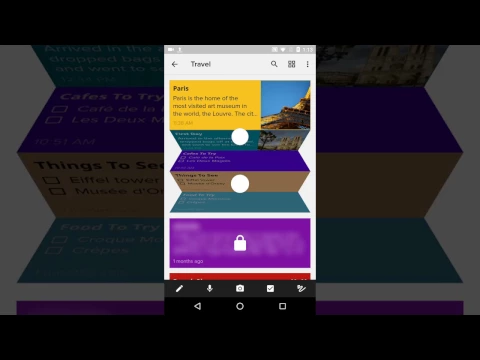
Notebook is een mobiel notitieblok voor het snel maken en opslaan van notities met elke inhoud. Naar analogie met veelkleurige papieren stickers, zullen virtuele media onmiddellijk, op verzoek van de gebruiker, een platform worden voor het uiten van gedachten en ideeën, het creëren van een boodschappen- en takenlijst en het invoeren van andere belangrijke informatie.

Bovendien is de functionaliteit van het programma niet beperkt tot alleen tekst, maar biedt het aan om notities aan te vullen met foto’s en korte video’s, spraakopnamen en audiobestanden, documenten, tabellen, links, citaten. Om een ​​nieuw item aan te maken, klikt u gewoon op het “+”-teken en begint u een nieuw blanco vel met informatie te vullen – voeg een titel toe, basisinformatie, gebruik de hulpmiddelen van het werkpaneel waarmee u de grootte en kleur van het lettertype kunt aanpassen , de kleur van het canvas, enzovoort.

Kenmerken:

  • maak kleurrijke kaarten met tekst, foto’s, video’s, afbeeldingen, bestanden en meer;
  • tekst schrijven in handmatige modus of spraakgestuurd typen;
  • snel zoeken naar inhoud met behulp van aangepaste filters;
  • willekeurige verandering in de volgorde van het weergeven van notities;
  • laatste actie ongedaan maken met pijl;
  • automatisch besparen van materialen.

Stel indien nodig een herinnering in voor de opname door de datum en tijd op te geven waarop het geluidssignaal zal klinken, om te informeren over plannen en kalendergebeurtenissen. Als u Notebook Kladblok-pagina’s naar vrienden wilt sturen, gebruik dan het Zoho-platformaccount – dit garandeert volledige vertrouwelijkheid en veiligheid van overgedragen bestanden.
Also known as: Notebook - Notities maken, Notebook–Notes, Lists, Planner
Video of Notebook
Screenshot Notebook 1
Screenshot Notebook 2
Screenshot Notebook 3
Screenshot Notebook 4
Screenshot Notebook 5

Notebook downloaden

What's New in Version 6.5.3

No official changelog provided for Notebook version 6.5.3. This update likely includes general stability improvements and bug fixes.

Available Files

System Requirements

OS Version
Android 6.0 (Marshmallow) or higher
Architecture
Varies by file (Which one do I need?)
Disk Space
~100 MB free space required
RAM
1 GB
Internet
Not required
Google Services
Required   GMS dependent
machtigingen (46)
  • Requires Google Play Services to launch:
    Note: This is an original file. Unlike modded versions with no verification, it validates via your store account. Details
  • Internet
  • Record Audio
  • Camera
  • Access Network State
  • Read External Storage

APK File Details

Package ID com.zoho.notebook
Available on Google Play
Ontwikkelaar Zoho Corporation
License Gratis ( No Ads)
Monetization In-App Purchases
Content Rating Everyone
Interface Language
17 languages

Japans, Portugees, Chinees, Thais, Duits, Engels, Hindi, Koreaans, Frans, Turks, Italiaans, Russisch, Vietnamees, Arabisch, Spaans, + 2 localizations

APK Verification & Virus Scan Results

Scan In Queue Signature Verified Safe & Original

Antivirus scan in queue, will be scanned soon. This APK is free of malware and its signature matches the official developer release.

Show File Details (SHA-256, SHA-1, MD5)

SHA-1 Signature:

5d870c0503ba30d843db481631ac654b45eab205

SHA-256 Hash:

871aa9b6610bfc138722e2bd250bdb25b03002e67b9e1c143608eb8ca8c54ebb

MD5 Checksum:

439e5f4d8c503411bf6a5bc0a461d2b4

Frequently Asked Questions

Is Notebook safe to download?

Notebook has passed a basic integrity check. A full antivirus scan is pending. You can check the current scan status in the Security section above.

How to install XAPK file?

XAPK is a split APK package. Standard Android installer cannot open it directly. Use 'SAI' or 'XAPK Installer' — they handle XAPK files automatically. Download the installer, open the XAPK file with it, and follow the on-screen steps. Read more

What Android version does Notebook require?

Notebook requires Android 6.0 (API 23) or higher. Optimized for Android 14 (API 34).

Is Notebook free?

Yes, the app is free to download, but it contains in-app purchases for additional content.

Does Notebook require a license check?

Yes, this app performs a license check. You may need to have the Google Play Store installed and be logged in to verify the license.

How to update Notebook to the latest version?

Download the latest APK from this page and install it over your existing version — no need to uninstall first. Your data and settings will be preserved. We update the file as soon as a new version is released.

What processor architecture does Notebook support?

Notebook supports arm64-v8a. This build does not support x86/x86_64 processors, so it will not run on most PC emulators. If you are unsure about your device architecture, check the Device Info section on this page.

If you have found any issue or are having difficulty with this page, please .

User Reviews & Ratings

Wereldwijde beoordeling(Play Store): 4.41(46.1K)
Beoordeel deze app

0,00

12345

not yet rated

Share your experience with other users.