Volume Booster & Sound Enhancer Music Player Icon

Volume Booster & Sound Enhancer Music Player APK for Android

Volumebooster en online muziekspeler

Download Volume Booster & Sound Enhancer Music Player APK 2.3.1 12MB

What is Volume Booster & Sound Enhancer Music Player?

Volume Booster & Sound Enhancer Music Player is een applicatie waarmee je het standaardgeluid van je telefoon en randapparatuur die erop is aangesloten, zoals koptelefoons en luidsprekers, kunt verhogen. Deze laatste kan via Bluetooth draadloos met de telefoon worden verbonden.
De applicatie vereist geen toegang tot de hoofdmappen van de telefoon – rootrechten.
Met deze applicatie kunt u dus het geluidsvolume verhogen van alle applicaties die op uw telefoon zijn geïnstalleerd: spelers, sociale netwerken, instant messengers, game-applicaties en andere.

Deze applicatie integreert ook een muziekspeler waarmee je online naar muziek kunt luisteren. De speler bevat een bibliotheek met muzieknummers in totaal verschillende genres. Met deze speler kun je ook offline naar muziek luisteren door muziekbestanden uit het telefoongeheugen in de speler te importeren.

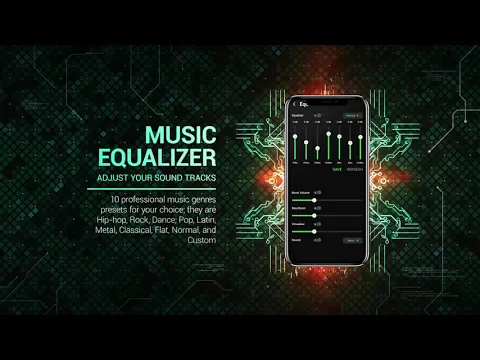
Een professionele equalizer helpt je het volume en het geluid van geluidseffecten aan te passen (versterk zang en lage of hoge frequenties), die met behulp van animatie de manipulatie van de overeenkomstige parameters visualiseert.
Alle instellingen en configuraties die u maakt, slaat de applicatie automatisch op.

Door Volume Booster & Sound Enhancer Music Player naar uw telefoon te downloaden, kunt u naar muziek luisteren op een comfortabel volumebereik en door de soundtrack te versterken, bijvoorbeeld pop-upmeldingen van sociale netwerken, mist u nooit meer een belangrijk bericht.
Also known as: FishingPlanet, PES2012
Video of Volume Booster & Sound Enhancer Music Player
Screenshot Volume Booster & Sound Enhancer Music Player 1
Screenshot Volume Booster & Sound Enhancer Music Player 2
Screenshot Volume Booster & Sound Enhancer Music Player 3
Screenshot Volume Booster & Sound Enhancer Music Player 4
Screenshot Volume Booster & Sound Enhancer Music Player 5
Screenshot Volume Booster & Sound Enhancer Music Player 6
Screenshot Volume Booster & Sound Enhancer Music Player 7

Volume Booster & Sound Enhancer Music Player downloaden

What's New in Version 2.3.1

No official changelog provided for Volume Booster & Sound Enhancer Music Player version 2.3.1. This update likely includes general stability improvements and bug fixes.

Available Files

System Requirements

OS Version
Android 4.4 (Kit Kat) or higher
Architecture
Varies by file (Which one do I need?)
Disk Space
~20 MB free space required
RAM
1 GB
Internet
Not required
machtigingen (21)
  • Internet
  • Access Network State
  • Read External Storage
  • Write External Storage
  • Access Coarse Location

APK File Details

Package ID com.ivolumes.equalizer.bassbooster
Ontwikkelaar Ivolumes
License Gratis ( No Ads)
Interface Language
Nederlands +74

Nederlands, Japans, Duits, Thais, Hindi, Vietnamees, Oekraïens, Pools, Koreaans, Frans, Turks, Spaans, Italiaans, Portugees, Russisch, Bulgaars, Chinees, Roemeens, Arabisch, Tsjechisch, Hongaars, Engels, + 53 localizations

APK Verification & Virus Scan Results

Scan In Queue Signature Verified Removed from Play Store

Antivirus scan in queue, will be scanned soon. The APK file is digitally signed.

Show File Details (SHA-256, SHA-1, MD5)

SHA-1 Signature:

18D991DD284BAED8AD59F98A11109DB2772D0FB2

SHA-256 Hash:

799da57cc64557af8ca860d6064554932dbb8d66234c8b9fc58ba92404344392

MD5 Checksum:

93f4010fe8a01673b9c800c8b2fe3047

Frequently Asked Questions

Is Volume Booster & Sound Enhancer Music Player safe to download?

Volume Booster & Sound Enhancer Music Player has passed a basic integrity check. A full antivirus scan is pending. You can check the current scan status in the Security section above.

How to install Volume Booster & Sound Enhancer Music Player APK on Android?

Download the APK using the button above. Then open the file and tap Install. If prompted, enable "Install from unknown sources" in Settings → Security. The process takes under a minute. Read more

Why does installation fail on newer Android versions (14 - 16)?

Newer Android versions strictly block the installation of apps built for older Android versions (API < 23) for security reasons. Standard installation is not possible. Read our step-by-step guide on how to bypass this restriction using ADB or Shizuku.

What Android version does Volume Booster & Sound Enhancer Music Player require?

Volume Booster & Sound Enhancer Music Player requires Android 4.4 (API 19) or higher. Optimized for Android 10 (API 29).

What processor architecture does Volume Booster & Sound Enhancer Music Player support?

Volume Booster & Sound Enhancer Music Player supports arm64-v8a. This build does not support x86/x86_64 processors, so it will not run on most PC emulators. If you are unsure about your device architecture, check the Device Info section on this page.

How to enable installation from unknown sources on Android?

Go to Settings → Security (or Settings → Apps → Special access on Android 8+) and enable "Install unknown apps" for your browser or file manager. On Android 8 and above this setting is per-app, not global. Read more

If you have found any issue or are having difficulty with this page, please .

User Reviews & Ratings

Beoordeel deze app

0,00

12345

not yet rated

Share your experience with other users.