MediBang Paint app cover art for Android
MediBang Paint Icon

MediBang Paint APK for Android

- Make Art !
37M+
Gratis
2 feb 2024

Professionele tekentool

Download MediBang Paint APK 27.4 47MB

What is MediBang Paint?

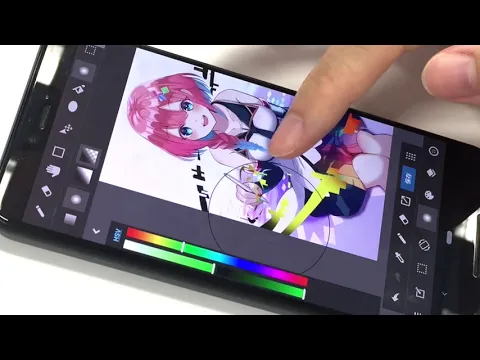
MediBang Paint – Maak digitale tekeningen en strips met professionele tools en krachtige functies. Begin met maken en schetsen op uw mobiele apparaat en ga verder op uw computer of tablet – de functie van het opslaan van een project in de cloud vervaagt de grenzen tussen apparaten en platforms.

Maak meesterwerken op het scherm van een mobiel apparaat met uw vinger of gebruik een ondersteunde pen, pas de intensiteit van lijnen en streken aan met druk. Gebruik tientallen hulpmiddelen, waaronder een standaard potlood, pen, penseel, vulling, pipet, gum, texturen en patronen, een rijk kleurenpalet en andere hulpmiddelen om illustraties te maken. Gebruik een bibliotheek met gratis achtergronden, lagen, pas de transparantie aan, splits het canvas in delen, voeg tekst in, transformeer en schaal de afbeelding, pas de grootte van het canvas vrij aan of kies uit vooraf gedefinieerde sjablonen.

Kenmerken:

  • comfortabele menunavigatie en snelle selectie van functies;
  • synchronisatie en automatisch opslaan van projecten;
  • bibliotheek met materialen en krachtige tools;
  • ondersteuning voor het werken met lagen;
  • vriendelijke gemeenschap.

Maak voor jezelf of deel je werk met vrienden. Verklaar jezelf aan de hele wereld en de professionele gemeenschap, doe mee aan de wedstrijd van illustratoren en communiceer op het forum met gelijkgestemde mensen. De applicatie MediBang Paint staat open voor creatieve en artistieke experimenten en biedt een intuïtief en gebruiksvriendelijk tekenplatform.
Also known as: MediBang Paint - Make Art !
Video of MediBang Paint
Screenshot MediBang Paint 1
Screenshot MediBang Paint 2
Screenshot MediBang Paint 3
Screenshot MediBang Paint 4
Screenshot MediBang Paint 5
Screenshot MediBang Paint 6

MediBang Paint downloaden

What's New in Version 27.4

Added a Simple Mode icon to the home screen.

Available Files

System Requirements

OS Version
Android 7.0 (Nougat) or higher
Architecture
Varies by file (Which one do I need?)
Disk Space
~80 MB free space required
RAM
1 GB
Internet
Not required
machtigingen (16)
  • Internet
  • Record Audio
  • Access Network State
  • Read External Storage
  • Write External Storage

APK File Details

Package ID com.medibang.android.paint.tablet
Available on Google Play
Ontwikkelaar MediBang Inc.
License Gratis
Monetization Contains Ads   In-App Purchases
Content Rating Teen
Interface Language
Nederlands +76

Nederlands, Japans, Spaans, Chinees, Koreaans, Russisch, Indonesisch, Duits, Bulgaars, Thais, Hindi, Vietnamees, Oekraïens, Pools, Engels, Roemeens, Arabisch, Frans, Turks, Tsjechisch, Italiaans, Portugees, Hongaars, + 54 localizations

APK Verification & Virus Scan Results

No Virus Signature Verified Safe & Original

Virus scan: Clean (0/67) View report. This APK is free of malware and its signature matches the official developer release.

Show File Details (SHA-256, SHA-1, MD5)

SHA-1 Signature:

52be7df3cc45ba96cabdf76968e5cbe830495d4f

SHA-256 Hash:

24de03910ddcb64076fcb9f75be54732de276529b93e1e8ea5a2ea3178bfdd00

MD5 Checksum:

41024993bc12bbec053f226db6b8b027

Frequently Asked Questions

Is MediBang Paint safe to download?

Yes, MediBang Paint is safe to download. The APK is scanned on every update — no malware or viruses detected. You can verify the full scan report in the Security section above.

How to install MediBang Paint APK on Android?

Download the APK using the button above. Then open the file and tap Install. If prompted, enable "Install from unknown sources" in Settings → Security. The process takes under a minute. Read more

What Android version does MediBang Paint require?

MediBang Paint requires Android 7.0 (API 24) or higher. Optimized for Android 13 (API 33).

Is MediBang Paint free?

Yes, it is free to download and use, but it contains ads and offers in-app purchases.

How to update MediBang Paint to the latest version?

Download the latest APK from this page and install it over your existing version — no need to uninstall first. Your data and settings will be preserved. We update the file as soon as a new version is released.

What processor architecture does MediBang Paint support?

MediBang Paint supports arm64-v8a, armeabi-v7a. This build does not support x86/x86_64 processors, so it will not run on most PC emulators. If you are unsure about your device architecture, check the Device Info section on this page.

How to enable installation from unknown sources on Android?

Go to Settings → Security (or Settings → Apps → Special access on Android 8+) and enable "Install unknown apps" for your browser or file manager. On Android 8 and above this setting is per-app, not global. Read more

If you have found any issue or are having difficulty with this page, please .

User Reviews & Ratings

Wereldwijde beoordeling(Play Store): 3.83(275.9K)
Site Rating: 5(1)
Beoordeel deze app

5,00

12345

1

Share your experience with other users.