Twilight Icon

Twilight APK for Android

13M+
Gratis
29 mrt 2016

Filtert blauw licht, vermindert vermoeidheid van de ogen en helpt je slapen

Download Twilight APK 6.3 5MB

What is Twilight?

Twilight – Deze applicatie is het resultaat van wetenschappelijk onderzoek naar de invloed van de kleuren op de schermen van tv’s, computers, smartphones en tablets op de eigenaren van deze slimme apparaten.

Kunt u lange tijd niet slapen? Zijn uw kinderen superactief voor het slapengaan? Op basis van een grote hoeveelheid statistisch materiaal hebben de resultaten van onderzoeken overtuigend aangetoond dat langdurige stimulatie van het netvlies met blauw licht voor het naar bed gaan de natuurlijke cyclus van slapen en waken verstoort.

Mechanisme van het spel Twilight: Op het netvlies van het oog bevinden zich melanopsine-fotoreceptoren, die zeer gevoelig zijn voor diepe kleuren in het bereik van 460-480 nm. Melanopsines zorgen ervoor dat het menselijk lichaam melatonine produceert, een hormoon dat de natuurlijke cycli van slaap en waakzaamheid regelt. Langdurige, vooral ’s nachts, irritatie van het netvlies met blauwe kleur verstoort de natuurlijke cycli van slaap en waakzaamheid.

Twilight:

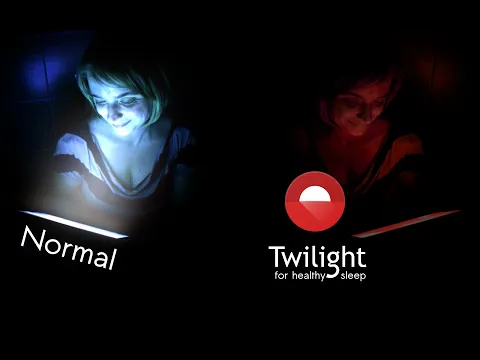
  1. Past de intensiteit van de schermgloed aan de dagelijkse cyclus van dag en nacht aan;
  2. Filtert de blauwe kleur van het scherm na zonsondergang;
  3. In de avond en ’s nachts verlicht het het scherm met aangename roodtinten – zonsondergang.
Video of Twilight
Screenshot Twilight 1
Screenshot Twilight 2
Screenshot Twilight 3
Screenshot Twilight 4
Screenshot Twilight 5

Twilight downloaden

What's New in Version 6.3

Fixed in widgets
Support for Philips HUE PRO bridge
Expressive redesign
Many new translations
Paper-like matte texture option
Bigger pause button
Latest API level target
New libraries

Available Files

System Requirements

OS Version
Android 2.3 (Gingerbread) or higher
Architecture
Varies by file (Which one do I need?)
Disk Space
~10 MB free space required
RAM
1 GB
Internet
Not required
machtigingen (8)
  • Internet
  • Access Network State
  • Access Coarse Location
  • System Alert Window
  • Receive Boot Completed

APK File Details

Package ID com.urbandroid.lux
Available on Google Play
Ontwikkelaar Petr Nálevka (Urbandroid)
License Gratis ( No Ads)
Content Rating Everyone
Interface Language
Nederlands +42

Nederlands, Japans, Indonesisch, Duits, Bulgaars, Thais, Chinees, Hindi, Vietnamees, Oekraïens, Pools, Koreaans, Roemeens, Arabisch, Frans, Turks, Tsjechisch, Spaans, Italiaans, Portugees, Hongaars, Russisch, + 21 localizations

APK Verification & Virus Scan Results

No Virus Signature Verified Safe & Original

Virus scan: Clean (0/63) View report. This APK is free of malware and its signature matches the official developer release.

Show File Details (SHA-256, SHA-1, MD5)

SHA-1 Signature:

00A0E53C9A3F5D14DA5E698FF420E4A7776EA4B1

SHA-256 Hash:

8812b1c2fc057e4841174f1c72e71e42a88177d92bda2073cbc8814024352392

MD5 Checksum:

5036d55f3181ea888381ef9bf8a71306

Frequently Asked Questions

Is Twilight safe to download?

Yes, Twilight is safe to download. The APK is scanned on every update — no malware or viruses detected. You can verify the full scan report in the Security section above.

How to install Twilight APK on Android?

Download the APK using the button above. Then open the file and tap Install. If prompted, enable "Install from unknown sources" in Settings → Security. The process takes under a minute. Read more

Why does installation fail on newer Android versions (14 - 16)?

Newer Android versions strictly block the installation of apps built for older Android versions (API < 23) for security reasons. Standard installation is not possible. Read our step-by-step guide on how to bypass this restriction using ADB or Shizuku.

What Android version does Twilight require?

Twilight requires Android 2.3 (API 9) or higher. Optimized for Android 5.0 (API 21).

Is Twilight free?

Yes, this app is completely free to download and use.

How to update Twilight to the latest version?

Download the latest APK from this page and install it over your existing version — no need to uninstall first. Your data and settings will be preserved. We update the file as soon as a new version is released.

Does Twilight require Root access?

No root is required for basic use. Twilight works on standard Android for CPU info, RAM, battery, sensors, and network stats. Root unlocks a small set of advanced system parameters that Android restricts by default.

If you have found any issue or are having difficulty with this page, please .

User Reviews & Ratings

Wereldwijde beoordeling(Play Store): 4.64(412.1K)
Site Rating: 1(1)
Beoordeel deze app

1,00

12345

1

Share your experience with other users.