Het Weer - Weather app cover art for Android
Het Weer - Weather Icon

Het Weer - Weather APK for Android

MacroPinch Original
51M+
Gratis
23 mrt 2024

Stijlvolle weer-app in je statusbalk. Weet altijd hoe het weer is, waar dan ook.

Download Het Weer - Weather APK 6.0.9 11MB Old versions

What is Het Weer?

Weer (Weather) – deze applicatie in een minimalistische stijl wordt op slimme apparaten op het Android-besturingssysteem geïnstalleerd als achtergrond voor het hoofdscherm, dat de belangrijkste parameters van de weersomstandigheden weergeeft op het punt waar de gebruiker is gelegen. Weergegevens worden gevormd volgens het principe van “hier en nu”.

Het beheer van de Weather-applicatie is ongelooflijk eenvoudig – intuïtief: er is slechts één klik nodig om informatie over de weersomstandigheden in de statusbalk weer te geven:

  • Temperatuur;
  • Vochtigheid;
  • Atmosferische druk;
  • UV-index;
  • Weergeschiedenis en weersvoorspelling als interactieve grafiek.

De weerparameters worden ook weergegeven in de vorm van geanimeerde illustraties die de gebruiker visueel informeren over wat voor weer hem te wachten staat buiten het vliegtuig, de auto of het gezellige appartement.

Functies:

  1. Weergegevens worden periodiek en afhankelijk van elke wijziging in de locatie van de gebruiker bijgewerkt;
  2. Geanimeerde illustraties laten de gebruiker het weer achter op straat voelen, terwijl hij zich nog steeds in een warm appartement bevindt;
  3. U kunt kiezen uit meerdere kleuropties en een abstract patroon voor de achtergrond van het startscherm;
  4. De applicatie is aangepast voor smartphones, tablets, phablets en smart-tv’s.
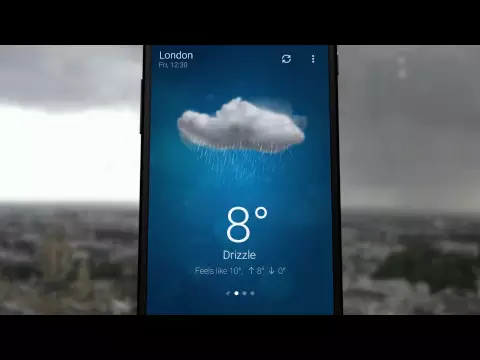
Video of Het Weer - Weather
Screenshot Het Weer - Weather 1
Screenshot Het Weer - Weather 2
Screenshot Het Weer - Weather 3
Screenshot Het Weer - Weather 4
Screenshot Het Weer - Weather 5
Screenshot Het Weer - Weather 6
Screenshot Het Weer - Weather 7
Screenshot Het Weer - Weather 8

Het Weer downloaden

What's New in Version 6.0.9

* Re-added big degrees notification text on devices with newer OS version
* Support for Android 16
* Several small fixes and tweaks

Other versions

System Requirements

OS Version
Android 5.1 (Lollipop MR1) or higher
Architecture
Varies by file (Which one do I need?)
Disk Space
~20 MB free space required
RAM
1 GB
Internet
Not required
machtigingen (16)
  • Internet
  • Access Network State
  • Access Fine Location
  • Access Coarse Location
  • Wake Lock

APK File Details

Package ID com.macropinch.swan
Available on Google Play
Ontwikkelaar MacroPinch
License Gratis
Monetization Contains Ads   In-App Purchases
Content Rating Everyone
Interface Language
Nederlands +74

Nederlands, Japans, Duits, Bulgaars, Hindi, Koreaans, Frans, Turks, Spaans, Italiaans, Portugees, Russisch, Chinees, Thais, Vietnamees, Oekraïens, Pools, Roemeens, Arabisch, Tsjechisch, Hongaars, Engels, + 53 localizations

APK Verification & Virus Scan Results

No Virus Signature Verified Safe & Original

Virus scan: Clean (0/64) View report. This APK is free of malware and its signature matches the official developer release.

Show File Details (SHA-256, SHA-1, MD5)

SHA-1 Signature:

869680d2df56da3a6616c455180caaabfc3833ef

SHA-256 Hash:

2a7bb9d490a2eca840c8d0ef6ceb774ebfd5e24877736a3089ce630e42eb7c89

MD5 Checksum:

896b2dc3b44b3237d7eb75b6084b97b6

Frequently Asked Questions

Is Het Weer safe to download?

Yes, Het Weer is safe to download. The APK is scanned on every update — no malware or viruses detected. You can verify the full scan report in the Security section above.

How to install Het Weer APK on Android?

Download the APK using the button above. Then open the file and tap Install. If prompted, enable "Install from unknown sources" in Settings → Security. The process takes under a minute. Read more

What Android version does Het Weer require?

Het Weer requires Android 5.1 (API 22) or higher. Optimized for Android 14 (API 34).

Is Het Weer free?

Yes, it is free to download and use, but it contains ads and offers in-app purchases.

How to update Het Weer to the latest version?

Download the latest APK from this page and install it over your existing version — no need to uninstall first. Your data and settings will be preserved. We update the file as soon as a new version is released.

What processor architecture does Het Weer support?

Het Weer supports universeel. This build does not support x86/x86_64 processors, so it will not run on most PC emulators. If you are unsure about your device architecture, check the Device Info section on this page.

How to enable installation from unknown sources on Android?

Go to Settings → Security (or Settings → Apps → Special access on Android 8+) and enable "Install unknown apps" for your browser or file manager. On Android 8 and above this setting is per-app, not global. Read more

If you have found any issue or are having difficulty with this page, please .

User Reviews & Ratings

Wereldwijde beoordeling(Play Store): 4.47(1.3M)
Site Rating: 4.38(8)
Beoordeel deze app

4,38

12345

8

Share your experience with other users.