Rise of Steel Icon

Rise of Steel APK for Android

12M+
Gratis
8 jan 2024

Word wakker! Het tijdperk van transformatoren (volgens ons spel zijn dit robots die op afstand worden bestuurd door mensen) begint nu.

Download Rise of Steel APK 2.7.3 105MB Old versions

What is Rise of Steel?

Rise of Steel is een dynamische 3D first-person shooter. De gameplay gaat ervan uit dat de speler in de rol van een transformator verschillende missies uitvoert en veel gamemissies uitvoert om vijanden te vernietigen en bondgenoten te redden.

Verhaal: Je personage, een transformator, bracht verschillende eeuwen door in een lethargische slaap, begraven onder een berg ijzererts. Mensen, mijnbouw erts, kwamen op de bodem van de transformator en activeerden hem. Enkele duizenden meer van dergelijke transformatoren over de hele wereld werden geactiveerd.Met de hulp van de spelers werden de transformatoren zich bewust van zichzelf. Eenmaal in de steden zullen de robots moeten beslissen aan welke kant ze gaan vechten: 1) aan de kant van mensen of 2) aan de kant van de opstandige robots.

Kort gezegd: als je klaar bent met het lezen van deze tekst, moet je ook beslissen wat je gaat doen met je transformerende avatar: vecht aan de kant van mensen of word hun ergste vijand aan de kant van robots. Rise of Steel dit is niet zomaar een spel, het is een voorbereiding op de komende oorlog tussen robots en mensen. Word wakker!
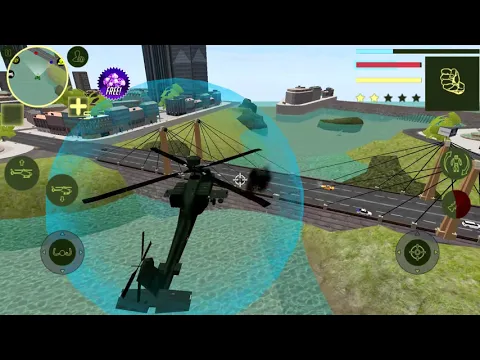
Video of Rise of Steel
Screenshot Rise of Steel 1
Screenshot Rise of Steel 2
Screenshot Rise of Steel 3
Screenshot Rise of Steel 4
Screenshot Rise of Steel 5
Screenshot Rise of Steel 6
Screenshot Rise of Steel 7

Rise of Steel downloaden

What's New in Version 2.7.3

Bug fixes

Other versions

System Requirements

OS Version
Android 5.0 (Lollipop) or higher
Architecture
Varies by file (Which one do I need?)
Disk Space
~200 MB free space required
RAM
2 GB
Internet
Not required (Offline playable)
machtigingen (9)
  • Internet
  • Access Network State
  • Wake Lock
  • Ad Id
  • Billing

APK File Details

Package ID com.nc.rise.of.steel
Available on Google Play
Ontwikkelaar Naxeex Action & RPG Games
License Gratis
Monetization Contains Ads   In-App Purchases
Age Rating Teen (Violence, Blood)
Interface Language
Nederlands +74

Nederlands, Japans, Duits, Bulgaars, Thais, Hindi, Vietnamees, Oekraïens, Pools, Koreaans, Roemeens, Arabisch, Frans, Turks, Tsjechisch, Spaans, Italiaans, Portugees, Hongaars, Russisch, Engels, Chinees, + 53 localizations

APK Verification & Virus Scan Results

No Virus Signature Verified Safe & Original

Virus scan: Clean (0/64) View report. This APK is free of malware and its signature matches the official developer release.

Show File Details (SHA-256, SHA-1, MD5)

SHA-1 Signature:

9d0af5694aa13f0f4cb78da4afb242e537d912b9

SHA-256 Hash:

de731ca1f68f16743699db019a2d7def8dfb22d34b10f42ed3a15734f6ab4d9b

MD5 Checksum:

6760763c6aba9e42b9f22bd89da7d95b

Frequently Asked Questions

Is Rise of Steel safe to download?

Yes, Rise of Steel is safe to download. The APK is scanned on every update — no malware or viruses detected. You can verify the full scan report in the Security section above.

How to install Rise of Steel APK on Android?

Download the APK using the button above. Then open the file and tap Install. If prompted, enable "Install from unknown sources" in Settings → Security. The process takes under a minute. Read more

What Android version does Rise of Steel require?

Rise of Steel requires Android 5.0 (API 21) or higher. Optimized for Android 13 (API 33).

Is Rise of Steel free?

Yes, it is free to download and use, but it contains ads and offers in-app purchases.

How to update Rise of Steel to the latest version?

Download the latest APK from this page and install it over your existing version — no need to uninstall first. Your data and settings will be preserved. We update the file as soon as a new version is released.

What processor architecture does Rise of Steel support?

Rise of Steel supports arm64-v8a, armeabi-v7a. This build does not support x86/x86_64 processors, so it will not run on most PC emulators. If you are unsure about your device architecture, check the Device Info section on this page.

How to enable installation from unknown sources on Android?

Go to Settings → Security (or Settings → Apps → Special access on Android 8+) and enable "Install unknown apps" for your browser or file manager. On Android 8 and above this setting is per-app, not global. Read more

If you have found any issue or are having difficulty with this page, please .

User Reviews & Ratings

Wereldwijde beoordeling(Play Store): 4.09(42K)
Site Rating: 4.5(2)
Beoordeel deze app

4,50

12345

2

Share your experience with other users.