Samurai Slash spel cover art for Android
Samurai Slash Icon

Samurai Slash APK for Android

- Run & Slice
Ketchapp Original
4M+
Gratis
20 okt 2023

Verpletter alle obstakels op het pad van de samoerai met schuine, snijdende slagen

Download Samurai Slash APK 1.5.5 117MB

What is Samurai Slash?

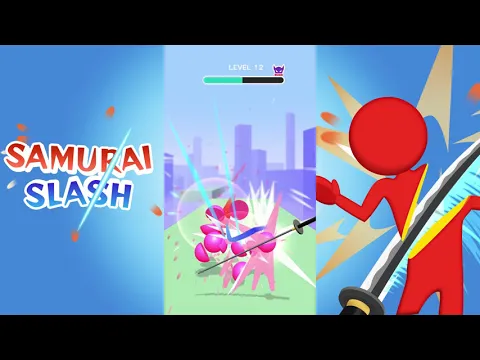
Samurai Slash - Run & Slice – het pad van een echte samurai is netelig en gevaarlijk, maar met de hulp van een katana en met de steun van de gebruiker zal hij alle tegenslagen en obstakels overwinnen. Dit informele arcadespel komt qua mechanica zo dicht mogelijk bij de grondlegger van het genre Fruit Ninja , maar is begiftigd met een grote verscheidenheid aan objecten waarmee de gamer kan communiceren door te vegen.

Op elk niveau moet de hoofdpersoon tientallen voorwerpen doorsnijden met een scherp mes. Reflecteer een kogel die door een vijand wordt afgevuurd wanneer deze binnen zeer korte afstand komt. Bovendien moet dit in veel gevallen gebeuren met inachtneming van de voorwaarden: er wordt een pijl op het object getekend, die aangeeft in welke richting de klap met de katana moet worden gemaakt. Hak kleurrijke blokken, bamboebarrières en boomstambarrières. Er zijn ook traditioneel fruit en andere obstakels, waarvan sommige een numerieke aanduiding hebben: het aantal keren dat het koude mes het object moet snijden.

Kenmerken:

  • reis van een Japanse krijger door vijf kleurrijke 3D-werelden;
  • vloeiende animaties, betoverende speciale effecten en geluiden;
  • Verbeter de parameters van het personage dat je bestuurt;
  • niet-standaard wapens en kisten met bonussen.

Aan het einde van elke ronde van de tijdmoordenaar Samurai Slash vecht je tegen de vijand, sla je het wapen uit hun handen en snijd je het in tientallen stukken. Hoe meer objecten op een niveau kunnen worden vernietigd, hoe hoger de beloning. Gebruik geld om je gezondheidsniveau, aanvalssnelheid en offline inkomsten te verbeteren, nieuwe locaties, skins en soorten wapens te ontgrendelen.
Also known as: Samurai Slash 3D, Samurai Slash - Run & Slice
Video of Samurai Slash
Screenshot Samurai Slash 1
Screenshot Samurai Slash 2
Screenshot Samurai Slash 3
Screenshot Samurai Slash 4
Screenshot Samurai Slash 5
Screenshot Samurai Slash 6
Screenshot Samurai Slash 7
Screenshot Samurai Slash 8

Samurai Slash downloaden

What's New in Version 1.5.5

Minor bug fixes and improvements

Available Files

System Requirements

OS Version
Android 5.1 (Lollipop MR1) or higher
Architecture
Varies by file (Which one do I need?)
Disk Space
~200 MB free space required
RAM
2 GB
Internet
Not required (Offline playable)
machtigingen (15)
  • Internet
  • Access Network State
  • Read External Storage
  • Write External Storage
  • Read Phone State

APK File Details

Package ID com.ketchapp.samuraislash
Available on Google Play
Ontwikkelaar Ketchapp
License Gratis
Monetization Contains Ads   In-App Purchases
Age Rating Everyone 10+ (Fantasy Violence, Alcohol Reference)
Interface Language
Nederlands +76

Nederlands, Japans, Indonesisch, Duits, Bulgaars, Thais, Chinees, Hindi, Vietnamees, Oekraïens, Pools, Engels, Koreaans, Roemeens, Arabisch, Frans, Turks, Tsjechisch, Spaans, Italiaans, Portugees, Hongaars, Russisch, + 54 localizations

APK Verification & Virus Scan Results

No Virus Signature Verified Safe & Original

Virus scan: Clean (0/63) View report. This APK is free of malware and its signature matches the official developer release.

Show File Details (SHA-256, SHA-1, MD5)

SHA-1 Signature:

e2dd9b5b2400bc47c4a77a970ee075093be009c3

SHA-256 Hash:

055a7874d28b9f8d9e5bad09889033c9a6c5ec69da1cae64f69e1bec93f7a03b

MD5 Checksum:

9d6fe159c133f0ce07973e6c2b86892d

Frequently Asked Questions

Is Samurai Slash safe to download?

Yes, Samurai Slash is safe to download. The APK is scanned on every update — no malware or viruses detected. You can verify the full scan report in the Security section above.

How to install Samurai Slash APK on Android?

Download the APK using the button above. Then open the file and tap Install. If prompted, enable "Install from unknown sources" in Settings → Security. The process takes under a minute. Read more

What Android version does Samurai Slash require?

Samurai Slash requires Android 5.1 (API 22) or higher. Optimized for Android 13 (API 33).

Is Samurai Slash free?

Yes, it is free to download and use, but it contains ads and offers in-app purchases.

How to update Samurai Slash to the latest version?

Download the latest APK from this page and install it over your existing version — no need to uninstall first. Your data and settings will be preserved. We update the file as soon as a new version is released.

What processor architecture does Samurai Slash support?

Samurai Slash supports arm64-v8a, armeabi-v7a. This build does not support x86/x86_64 processors, so it will not run on most PC emulators. If you are unsure about your device architecture, check the Device Info section on this page.

How to enable installation from unknown sources on Android?

Go to Settings → Security (or Settings → Apps → Special access on Android 8+) and enable "Install unknown apps" for your browser or file manager. On Android 8 and above this setting is per-app, not global. Read more

If you have found any issue or are having difficulty with this page, please .

User Reviews & Ratings

Wereldwijde beoordeling(Play Store): 4.12(9.9K)
Beoordeel deze app

0,00

12345

not yet rated

Share your experience with other users.