Idle Galaxy Icon

Idle Galaxy APK for Android

22 apr 2020

Dynamisch model van de creatie van de Galaxy in clickerformaat

Download Idle Galaxy APK 1.2.1 98MB

What is Idle Galaxy?

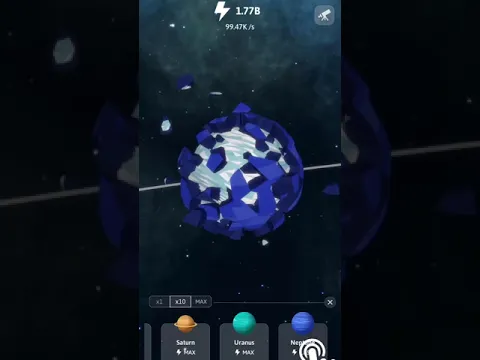
Idle Galaxy – Deze creatieve clickersimulatie vindt bijna vijf miljard jaar geleden plaats. Van onduidelijke etiologie, de explosie die de verschijning van de zon veroorzaakte, gaf aanleiding tot een nieuw leven, waaraan de gebruiker wordt uitgenodigd om zijn eigen hand te leggen. En dit zijn niet alleen verheven woorden, dit is de hoofdtaak van de gamer – tik op het kosmische lichaam en verzamel de energie die nodig is voor de implementatie van evolutionaire processen.

Nadat je de volledige vorming van de hoofdster van onze Melkweg hebt bereikt, let dan op de planeten en satellieten. Creëer vanuit het niets de aarde, Mercurius, Venus, Mars, Neptunus, enzovoort – breng het zonnestelsel in de staat waarin het zich op dit moment bevindt. Automatiseer en versnel beschikbare processen, koop energievermenigvuldigers, de belangrijkste bouwbron.

Kenmerken:

  • creëer geduldig en volhardend het zonnestelsel met klikken;
  • enorme ruimte in een gedetailleerd driedimensionaal ontwerp;
  • ontgrendelen om de planeet en tientallen satellieten te verkennen;
  • activeer boosters om het spel te versnellen;
  • win kristallen op het “rad van fortuin”;
  • automatiseer creatieve processen.

Verdien kristallen voor het voltooien van geplande taken Idle Galaxy , ruil ze tegen een gunstige prijs in voor energie of koop nuttige bonussen, zoals een “tijdmachine”, waarmee je een tijdsprong naar de toekomst kunt maken.
Video of Idle Galaxy
Screenshot Idle Galaxy 1
Screenshot Idle Galaxy 2
Screenshot Idle Galaxy 3

Idle Galaxy downloaden

What's New in Version 1.2.1

No official changelog provided for Idle Galaxy version 1.2.1. This update likely includes general stability improvements and bug fixes.

Available Files

System Requirements

OS Version
Android 4.1 (Jelly Bean) or higher
Architecture
Varies by file (Which one do I need?)
Disk Space
~150 MB free space required
RAM
2 GB
Internet
Not required (Offline playable)
machtigingen (14)
  • Internet
  • Access Network State
  • Read External Storage
  • Write External Storage
  • Read Phone State

APK File Details

Package ID com.pkxgame.idlegalaxy
Ontwikkelaar pkxgame
License Gratis ( No Ads)
Interface Language
Nederlands +74

Nederlands, Japans, Duits, Bulgaars, Thais, Hindi, Vietnamees, Oekraïens, Pools, Engels, Koreaans, Roemeens, Arabisch, Frans, Turks, Tsjechisch, Spaans, Italiaans, Portugees, Hongaars, Russisch, Chinees, + 53 localizations

APK Verification & Virus Scan Results

No Virus Signature Verified Safe & Original

Virus scan: Clean (0/60) View report. The APK file is digitally signed.

Show File Details (SHA-256, SHA-1, MD5)

SHA-1 Signature:

829d803755cf68a5fceca9dab6051f419bfa5c7a

SHA-256 Hash:

c56baf0c123ffe9833af77a0494b28ca2a059060a3926aa6a0019c09f075cdbe

MD5 Checksum:

49423369a3f982e1a7b7220b4249edfa

Frequently Asked Questions

Is Idle Galaxy safe to download?

Yes, Idle Galaxy is safe to download. The APK is scanned on every update — no malware or viruses detected. You can verify the full scan report in the Security section above.

How to install Idle Galaxy APK on Android?

Download the APK using the button above. Then open the file and tap Install. If prompted, enable "Install from unknown sources" in Settings → Security. The process takes under a minute. Read more

Why does installation fail on newer Android versions (14 - 16)?

Newer Android versions strictly block the installation of apps built for older Android versions (API < 23) for security reasons. Standard installation is not possible. Read our step-by-step guide on how to bypass this restriction using ADB or Shizuku.

What Android version does Idle Galaxy require?

Idle Galaxy requires Android 4.1 (API 16) or higher. Optimized for Android 9.0 (API 28).

What processor architecture does Idle Galaxy support?

Idle Galaxy supports arm64-v8a, armeabi-v7a. This build does not support x86/x86_64 processors, so it will not run on most PC emulators. If you are unsure about your device architecture, check the Device Info section on this page.

How to enable installation from unknown sources on Android?

Go to Settings → Security (or Settings → Apps → Special access on Android 8+) and enable "Install unknown apps" for your browser or file manager. On Android 8 and above this setting is per-app, not global. Read more

If you have found any issue or are having difficulty with this page, please .

User Reviews & Ratings

Beoordeel deze app

0,00

12345

not yet rated

Share your experience with other users.