AI Video Editor - VivaCut Icon

AI Video Editor - VivaCut APK for Android

282M+
Gratis
16 jun 2026

Een set tools voor het maken van professionele video's

Download AI Video Editor - VivaCut APK 4.5.0 202MB Old versions

What is AI Video Editor?

VivaCut is een mobiel platform voor creatieve experimenten, met tientallen tools die nodig zijn voor het bewerken en maken van spectaculaire video’s. Voorbij zijn de dagen dat een computer en een professionele editor nodig waren om een ​​clip te maken, nu kan elke gebruiker creëren en experimenteren op het scherm van een smartphone of tablet.

Voeg materialen uit het geheugen van een mobiel apparaat toe aan een nieuw project – frame-by-frame afbraak vindt automatisch plaats en de gebruiker hoeft alleen mislukte frames te verwijderen, de vloeiendheid van overgangen, afspeelsnelheid, verzadiging en contrast aan te passen, visueel te selecteren VFX-effecten en overlay-audiobegeleiding.

Maak de video compleet met emotionele stickers en thematische inscripties door de stijl, grootte en kleur van de tekst vooraf te configureren. Gebruik filters, verander de achtergrond, dupliceer, experimenteer met verhoudingen, sla het resultaat op en stuur de clips naar je vrienden en ontvang lovende recensies.

Kenmerken:

  • tijdlijn voor de meest nauwkeurige video-uitsnede;
  • luxueuze filmische overgangen;
  • overlay muziek en geluiden op de video;
  • stickers en tekst gebruiken;
  • selecteer opslagkwaliteit;
  • is gratis en zonder advertenties.

Om het werk in de editor VivaCut onder de knie te krijgen, is geen speciale kennis vereist – een intuïtieve interface en een voorbeeld van eventuele aangebrachte wijzigingen zullen u behoeden voor mogelijke fouten. Voor nog meer waardevolle informatie en antwoorden op veelgestelde vragen is er een help-tabblad, dat we u sterk aanbevelen te bestuderen.

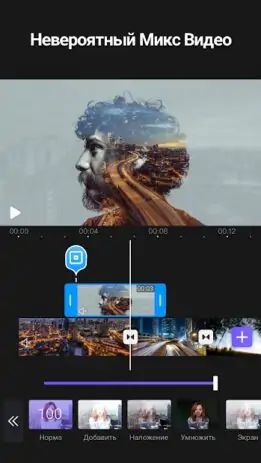
Screenshot AI Video Editor - VivaCut 1
Screenshot AI Video Editor - VivaCut 2
Screenshot AI Video Editor - VivaCut 3
Screenshot AI Video Editor - VivaCut 4
Screenshot AI Video Editor - VivaCut 5
Screenshot AI Video Editor - VivaCut 6
Screenshot AI Video Editor - VivaCut 7
Screenshot AI Video Editor - VivaCut 8

AI Video Editor downloaden

What's New in Version 4.5.0

1.All brand new editing UI
2.Now,you can change language in settings

Other versions

System Requirements

OS Version
Android 7.0 (Nougat) or higher
Architecture
Varies by file (Which one do I need?)
Disk Space
~350 MB free space required
RAM
2 GB
Internet
Not required
machtigingen (38)
  • Requires Google Play Services to launch:
    Note: This is an original file. Unlike modded versions with no verification, it validates via your store account. Details
  • Internet
  • Record Audio
  • Camera
  • Access Network State
  • Read External Storage

APK File Details

Package ID com.videoeditorpro.android
Available on Google Play
Ontwikkelaar VivaCut professional video editor
License Gratis
Monetization Contains Ads   In-App Purchases
Content Rating Everyone
Interface Language
18 languages

Japans, Duits, Thais, Chinees, Hindi, Vietnamees, Koreaans, Arabisch, Frans, Turks, Spaans, Italiaans, Portugees, Russisch, + 4 localizations

APK Verification & Virus Scan Results

No Virus Signature Verified Safe & Original

Virus scan: Clean (0/64) View report. This APK is free of malware and its signature matches the official developer release.

Show File Details (SHA-256, SHA-1, MD5)

SHA-1 Signature:

0f048c9b6906431764256acb3f9300e4b093b737

SHA-256 Hash:

421c3545786cca5b527c67ce56f6aff14ca037de94739791ab713d84bf2cd08c

MD5 Checksum:

bca823016417355c53c81d799137deb5

Frequently Asked Questions

Is AI Video Editor safe to download?

Yes, AI Video Editor is safe to download. The APK is scanned on every update — no malware or viruses detected. You can verify the full scan report in the Security section above.

How to install AI Video Editor APK on Android?

Download the APK using the button above. Then open the file and tap Install. If prompted, enable "Install from unknown sources" in Settings → Security. The process takes under a minute. Read more

What Android version does AI Video Editor require?

AI Video Editor requires Android 7.0 (API 24) or higher. Optimized for Android 15 (API 35).

Is AI Video Editor free?

Yes, it is free to download and use, but it contains ads and offers in-app purchases.

Does AI Video Editor require a license check?

Yes, this app performs a license check. You may need to have the Google Play Store installed and be logged in to verify the license.

How to update AI Video Editor to the latest version?

Download the latest APK from this page and install it over your existing version — no need to uninstall first. Your data and settings will be preserved. We update the file as soon as a new version is released.

What processor architecture does AI Video Editor support?

AI Video Editor supports arm64-v8a, armeabi-v7a. This build does not support x86/x86_64 processors, so it will not run on most PC emulators. If you are unsure about your device architecture, check the Device Info section on this page.

If you have found any issue or are having difficulty with this page, please .

User Reviews & Ratings

Wereldwijde beoordeling(Play Store): 4.88(1.3M)
Site Rating: 4(1)
Beoordeel deze app

4,00

12345

1

Share your experience with other users.