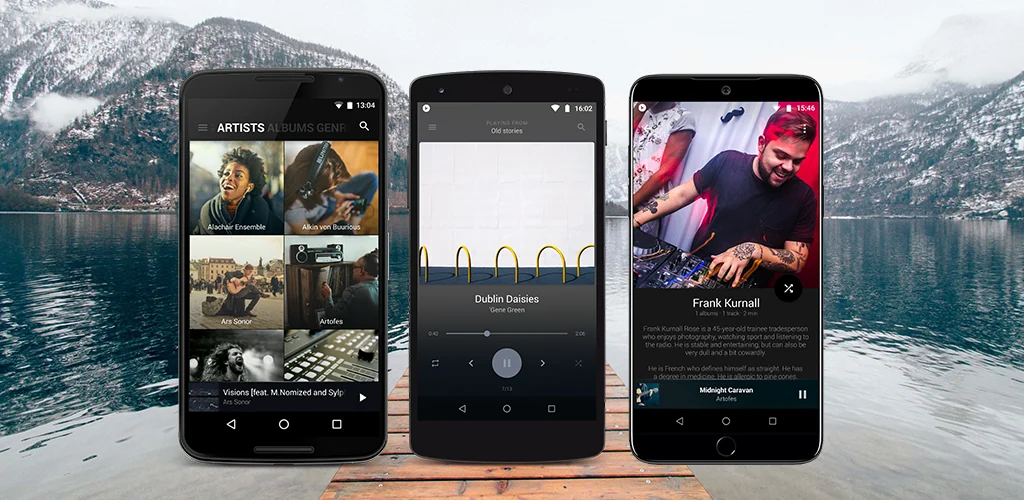

BlackPlayer Music Player app cover art for Android
BlackPlayer Music Player Icon

BlackPlayer Music Player APK for Android

FifthSource Original
3M+
Free
Jul 3, 2026

Personalize your local music playback with advanced controls and deep customization.

Download BlackPlayer Music Player APK 3.13 13MB

What is BlackPlayer Music Player?

BlackPlayer Music Player is a robust MP3 music player designed for local content playback on Android devices. This application offers extensive customization options and a modern, minimalistic Material Design interface, making it a strong choice for users seeking a personalized audio experience. Its focus on smooth performance and detailed control over your music library sets it apart in the local music player APK category.

What is BlackPlayer Music Player?

BlackPlayer Music Player functions as a dedicated player for music files stored directly on your device. It supports common audio formats including MP3, WAV, OGG, FLAC, and M4A. The interface emphasizes user control, allowing navigation between pages with simple swipes and offering additional options by tapping top titles. The app intelligently tracks your most played artists and albums, presenting personalized suggestions on its 'Play Now' start page to help you rediscover your music.

Key Features:

  • Extensive Audio Support: Plays standard local music files such as MP3, WAV, OGG, FLAC, and M4A, ensuring compatibility with most personal music libraries.
  • Advanced Audio Controls: Includes a 5-band equalizer, BassBoost, 3D Surround Virtualizer, and an amplifier for fine-tuning sound output. It also permits the use of external equalizers.
  • Gapless Playback: Delivers a continuous listening experience by eliminating pauses between tracks, ideal for albums or mixes.
  • Lyrics and Tag Editor: Supports viewing and editing embedded lyrics, including synchronized .lrc files, and features a full ID3 Tag editor for managing track, album, artist, and genre information.
  • Deep Customization: Offers customizable themes, fonts, colors, and interface animations, allowing users to tailor the app's appearance to their preference.
  • Device Integration: Provides support for Android Auto and Wear OS, extending music control and playback to car infotainment systems and smartwatches.

Customizing Your Audio Experience

Beyond basic playback, BlackPlayer Music Player provides tools to shape your listening experience. The built-in 5-band equalizer allows for precise frequency adjustments, while BassBoost and 3D Surround Virtualizer enhance low-end presence and spatial audio effects. For those with specific audio hardware or preferences, the option to integrate external equalizers ensures maximum sound fidelity. The app's visual customization extends to every element, from font styles to animation speeds, ensuring the player looks exactly as you want it to.

BlackPlayer Music Player vs similar apps

Compared to alternatives like Poweramp or AIMP, BlackPlayer Music Player stands out with its particularly strong emphasis on visual customization alongside a robust feature set. While Poweramp is often lauded for its powerful audio engine and AIMP for its broad format support and lightweight design, BlackPlayer Music Player offers a more modern Material Design aesthetic with deeper UI personalization options. Users who prioritize a sleek, highly adaptable interface combined with essential audio enhancements and local file management will find BlackPlayer Music Player a compelling choice.

BlackPlayer Music Player is best suited for users who maintain a local music library and value a highly customizable, feature-rich player without relying on streaming services. One minor limitation is its exclusive focus on local files, meaning it does not offer integrated streaming capabilities found in some other music apps.
Video of BlackPlayer Music Player
Screenshot BlackPlayer Music Player 1
Screenshot BlackPlayer Music Player 2
Screenshot BlackPlayer Music Player 3
Screenshot BlackPlayer Music Player 4
Screenshot BlackPlayer Music Player 5
Screenshot BlackPlayer Music Player 6
Screenshot BlackPlayer Music Player 7
Screenshot BlackPlayer Music Player 8

BlackPlayer Music Player APK Download

What's New in Version 3.13

Version 3.13 - November 17
- ExoPlayer is now the default decoder due to issues with the 'Media Player' decoder.
- Improved support for Sound effects when using ExoPlayer.
- Small crash fixes.
* Read all changes in changelog *

System Requirements

OS Version
Android 5.0 (Lollipop) or higher
Architecture
Varies by file (Which one do I need?)
Disk Space
~20 MB free space required
RAM
1 GB
Internet
Not required

APK File Details

Package ID com.musicplayer.blackplayerfree
Available on Google Play
Developer FifthSource
License Free
Monetization Contains Ads  
Content Rating PEGI 3
Interface Language
English +77

English, Japanese, Indonesian, German, Bulgarian, Vietnamese, Ukrainian, Polish, Korean, Romanian, French, Turkish, Czech, Spanish, Italian, Hungarian, Russian, Chinese, Hindi, Portuguese, Thai, Arabic, + 56 localizations

Required Permissions (21)
  • Internet
  • Access Network State
  • Read External Storage
  • Write External Storage
  • Vibrate

APK Verification & Virus Scan Results

No Virus Signature Verified Safe & Original

Virus scan: Clean (0/53) View report. This APK is free of malware and its signature matches the official developer release.

Show File Details (SHA-256, SHA-1, MD5)

SHA-1 Signature:

f7edeca54c44f8450cdca82a3671bdd3b7efd565

SHA-256 Hash:

95f3c1e5b75a0f8c6867e1dd67ae116d7852da0ccda9e504dbcbeadb0a55d202

MD5 Checksum:

c6a624f0b901b0d0955bc9d1cd9970e8

Frequently Asked Questions

Is BlackPlayer Music Player safe to download?

Yes, BlackPlayer Music Player is safe to download. The APK is scanned on every update — no malware or viruses detected. You can verify the full scan report in the Security section above.

How to install BlackPlayer Music Player APK on Android?

Download the APK using the button above. Then open the file and tap Install. If prompted, enable "Install from unknown sources" in Settings → Security. The process takes under a minute. Read more

What Android version does BlackPlayer Music Player require?

BlackPlayer Music Player requires Android 5.0 (API 21) or higher. Optimized for Android 15 (API 35).

Is BlackPlayer Music Player free?

Yes, it is free to use, but it is ad-supported.

How to update BlackPlayer Music Player to the latest version?

Download the latest APK from this page and install it over your existing version — no need to uninstall first. Your data and settings will be preserved. We update the file as soon as a new version is released.

What processor architecture does BlackPlayer Music Player support?

BlackPlayer Music Player supports universal. If you are unsure about your device architecture, check the Device Info section on this page.

How to enable installation from unknown sources on Android?

Go to Settings → Security (or Settings → Apps → Special access on Android 8+) and enable "Install unknown apps" for your browser or file manager. On Android 8 and above this setting is per-app, not global. Read more

If you have found any issue or are having difficulty with this page, please .

User Reviews & Ratings

Global rating(Play Store): 3.03(27.9K)
Site Rating: 5(1)
Rate this app

5.00

12345

1

Share your experience with other users.

Download BlackPlayer Music Player APK - Latest version

Get the official APK file for your Android device. Fast, safe, and free. Download APK