Video Conference - TeamLink Icon

Video Conference - TeamLink APK for Android

TeamLink Original
7M+
Free
Oct 6, 2024

A tool for organizing voice and video calls in a group format

Download Video Conference - TeamLink APK 2.3.3.1119 35MB

What is Video Conference?

TeamLink – always stay in touch with colleagues, friends and family using the group video conferencing service. To join a collective meeting, just enter an ID and set the desired communication mode. At the same time, the program supports participation in a group chat of up to two hundred people, which not every product from the field of communication technologies can boast of.

Uninterrupted communication with minimal latency and phenomenal resistance to packet loss. High quality image and audio stream for comfortable and constructive communication. The ability to start recording with one touch, so that in the future, in a calm atmosphere, once again review the meeting or meeting on repeat. No time limits and other limits that limit and fetter.

Features:

  • intuitive process of organizing and connecting to the conference;
  • a meeting of hundreds of people in one meeting room;
  • option to show your screen to interlocutors;
  • stable connection without quality loss;
  • calendar for scheduling appointments.

Those users who have problems with the speed of the Internet connection or use paid traffic packages, the TeamLink application provides an option to turn off the image, which allows you to still stay in touch and participate in discussions, but save.
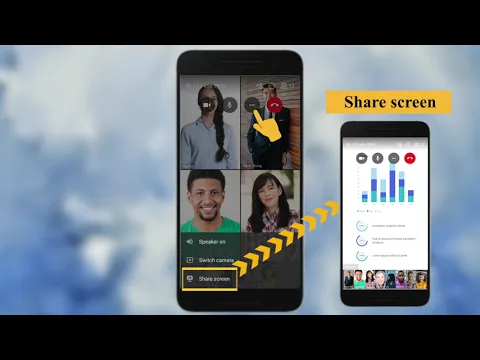
Video of Video Conference - TeamLink
Screenshot Video Conference - TeamLink 1
Screenshot Video Conference - TeamLink 2
Screenshot Video Conference - TeamLink 3
Screenshot Video Conference - TeamLink 4

Download Video Conference - TeamLink APK for Android

What's New in Version 2.3.3.1119

No official changelog provided for Video Conference - TeamLink version 2.3.3.1119. This update likely includes general stability improvements and bug fixes.

Available Files

System Requirements

OS Version
Android 5.0 (Lollipop) or higher
Architecture
Varies by file (Which one do I need?)
Disk Space
~60 MB free space required
RAM
1 GB
Internet
Required
Permissions (27)
  • Internet
  • Record Audio
  • Camera
  • Access Network State
  • Write External Storage

APK File Details

Package ID app.cybrook.teamlink
Available on Google Play
Developer TeamLink
License Free
Monetization Contains Ads   In-App Purchases
Content Rating Everyone
Interface Language
English +74

English, Japanese, German, Bulgarian, Thai, Hindi, Vietnamese, Ukrainian, Polish, Korean, Romanian, Arabic, French, Turkish, Czech, Spanish, Italian, Hungarian, Russian, Chinese, Portuguese, + 54 localizations

APK Verification & Virus Scan Results

No Virus Signature Verified Safe & Original

Virus scan: Clean (0/58) View report. This APK is free of malware and its signature matches the official developer release.

Show File Details (SHA-256, SHA-1, MD5)

SHA-1 Signature:

CB97E71AFA4665D6D28697B9197046C81E5E5D6C

SHA-256 Hash:

6143650b41785786ca8ed9f52362ed5721d165567febc0a7452fd4dabff8145f

MD5 Checksum:

f18af7256257dbf836c7b18135b4fa42

Frequently Asked Questions

Is Video Conference safe to download?

Yes, Video Conference is safe to download. The APK is scanned on every update — no malware or viruses detected. You can verify the full scan report in the Security section above.

How to install Video Conference APK on Android?

Download the APK using the button above. Then open the file and tap Install. If prompted, enable "Install from unknown sources" in Settings → Security. The process takes under a minute. Read more

What Android version does Video Conference require?

Video Conference requires Android 5.0 (API 21) or higher. Optimized for Android 14 (API 34).

Is Video Conference free?

Yes, it is free to download and use, but it contains ads and offers in-app purchases.

How to update Video Conference to the latest version?

Download the latest APK from this page and install it over your existing version — no need to uninstall first. Your data and settings will be preserved. We update the file as soon as a new version is released.

What processor architecture does Video Conference support?

Video Conference supports arm64-v8a, armeabi-v7a. This build does not support x86/x86_64 processors, so it will not run on most PC emulators. If you are unsure about your device architecture, check the Device Info section on this page.

How to enable installation from unknown sources on Android?

Go to Settings → Security (or Settings → Apps → Special access on Android 8+) and enable "Install unknown apps" for your browser or file manager. On Android 8 and above this setting is per-app, not global. Read more

If you have found any issue or are having difficulty with this page, please .

User Reviews & Ratings

Global rating(Play Store): 4.17(27.4K)
Rate this app

0.00

12345

not yet rated

Share your experience with other users.