BeadStudio Icon

BeadStudio APK for Android

- Fuse bead designer
datscharf Original
349K+
Free
Jun 15, 2024

Creating art canvases with multi-colored beads

Download BeadStudio APK 11.12 9MB

What is BeadStudio?

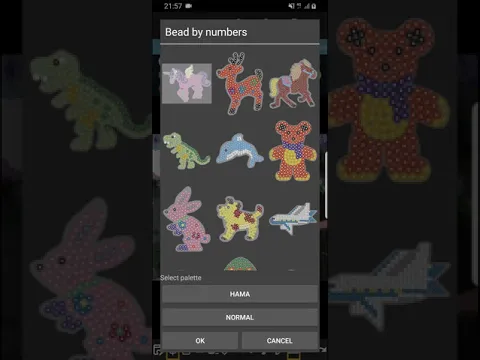
BeadStudio is a project for the implementation of creative ideas, which is a casual thermal mosaic simulator. Create custom bead sketches using pre-installed templates or images from your mobile device gallery as the basis for your future canvas.

Choose a photo or drawing and instantly convert it into a workpiece, which will soon be filled with bright colors and unusual color combinations. A family photo, a photo of a pet, a summer landscape, sights, cartoon characters – any image can be turned into a template for a future thermal mosaic. On the bottom panel, the user will find all the necessary tools for mobile creativity. Use two sizes of erasers and brushes, fills, a rich color palette, mirror images horizontally and vertically, and other tools that will make the process of creating a picture comfortable and enjoyable.

Features:

  • convert photos from mobile device memory;
  • color by number mode with anti-stress effect;
  • save your work in the Gallery or share with friends;
  • quick access toolbar.

The BeadStudio app can also be used as an anti-stress coloring book that uses the principles of Pixel Art and other similar applications – transfer paint from a palette to an object, taking into account the numbering of elements.
Also known as: Bead Studio Free, BeadStudio: Fuse bead designer
Video of BeadStudio
Screenshot BeadStudio 1
Screenshot BeadStudio 2
Screenshot BeadStudio 3
Screenshot BeadStudio 4
Screenshot BeadStudio 5
Screenshot BeadStudio 6
Screenshot BeadStudio 7
Screenshot BeadStudio 8

Download BeadStudio: Fuse bead designer APK for Android

What's New in Version 11.12

* Added new colors from danish bead manufacturer.
* Fixed tab control when converting image.
* Sort export list by id
* Show center marking
* White background on png export
* Adjusted some bead colors

Available Files

System Requirements

OS Version
Android 5.0 (Lollipop) or higher
Architecture
Varies by file (Which one do I need?)
Disk Space
~20 MB free space required
RAM
1 GB
Internet
Not required
Permissions (11)
  • Internet
  • Access Network State
  • Read External Storage
  • Write External Storage
  • Wake Lock

APK File Details

Package ID com.datscharf.beadstudiofree
Available on Google Play
Developer datscharf
License Free
Monetization Contains Ads   In-App Purchases
Content Rating Everyone
Interface Language
English +76

English, Japanese, Indonesian, German, Bulgarian, Thai, Chinese, Hindi, Vietnamese, Ukrainian, Polish, Korean, Romanian, Arabic, French, Turkish, Czech, Spanish, Italian, Portuguese, Hungarian, Russian, + 55 localizations

APK Verification & Virus Scan Results

No Virus Signature Verified Safe & Original

Virus scan: Clean (0/67) View report. This APK is free of malware and its signature matches the official developer release.

Show File Details (SHA-256, SHA-1, MD5)

SHA-1 Signature:

9D62120C2F085EEEF4B11916326E6CA83DE27817

SHA-256 Hash:

49cab32df509dd64bbc943ee2dc7a00e7343cc320ff63bc93599cd01c9d65748

MD5 Checksum:

8288b65f287015e67f84bf7288d6492c

Frequently Asked Questions

Is BeadStudio safe to download?

Yes, BeadStudio is safe to download. The APK is scanned on every update — no malware or viruses detected. You can verify the full scan report in the Security section above.

How to install BeadStudio APK on Android?

Download the APK using the button above. Then open the file and tap Install. If prompted, enable "Install from unknown sources" in Settings → Security. The process takes under a minute. Read more

What Android version does BeadStudio require?

BeadStudio requires Android 5.0 (API 21) or higher. Optimized for Android 13 (API 33).

Is BeadStudio free?

Yes, it is free to download and use, but it contains ads and offers in-app purchases.

How to update BeadStudio to the latest version?

Download the latest APK from this page and install it over your existing version — no need to uninstall first. Your data and settings will be preserved. We update the file as soon as a new version is released.

What processor architecture does BeadStudio support?

BeadStudio supports universal. If you are unsure about your device architecture, check the Device Info section on this page.

How to enable installation from unknown sources on Android?

Go to Settings → Security (or Settings → Apps → Special access on Android 8+) and enable "Install unknown apps" for your browser or file manager. On Android 8 and above this setting is per-app, not global. Read more

If you have found any issue or are having difficulty with this page, please .

User Reviews & Ratings

Global rating(Play Store): 4.35(2K)
Rate this app

0.00

12345

not yet rated

Share your experience with other users.