Cut Paste Photos Icon

Cut Paste Photos APK for Android

Dexati Original
65M+
Free
Feb 8, 2020

Cut, Copy Photo and Paste Image, Photo Collage Editor, Face Swap, Color Splash

Download Cut Paste Photos APK 9.1.1 7MB

What is Cut Paste Photos?

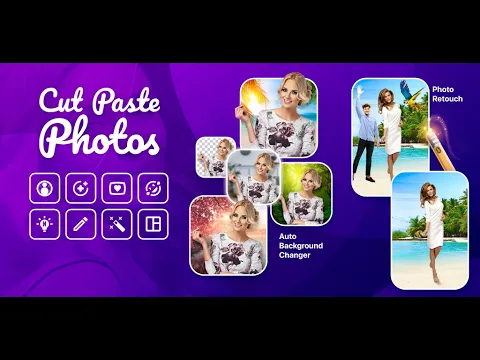
Cut Paste Photos is a photo editor that lets you crop objects in your photos to fit them into new situations. Want to see yourself in a winter hat against the backdrop of the Pacific Ocean? Surrounded by friends and girlfriends with perfect bodies of super models? Add captions and stickers so that even aliens know who is who in the photo, and send your art to your friends – it will be fun.

How it works. With a gesture on the touch screen, circle around the object of editing in the photo – the program itself will select the object strictly according to the office, and without gradients. Thus:

  • Crop the faces in the photo, and in place of some faces, paste others;
  • Change background images;
  • Is someone missing from the photo? Just add those missing.

Tools:

  1. Cropping – this tool is suitable for working with small objects, such as faces.
  2. Progressive photo editor – allows you to mount large objects in photos, for example, a whole person; it can be removed from the photo, or vice versa – inserted into a new environment.
  3. A collection of wallpapers – they can be used to give old photos new meanings. The user of the application can replenish the Collection of wallpapers with his own samples.
  4. Collages is a collection of templates for collages. With the help of a collage, you can tell a photo story, which must have an interesting beginning and an epic end. The main tool is imagination.
  5. Photo effects: sepia, black-and-more, retro and others.
  6. Lettering and Stickers: emoji, animals, masks, celebrities – with their help, you can emphasize or smooth out any flaws in the heroes of the photo.

Hardware requirement: OS Android 7.1.
Video of Cut Paste Photos
Screenshot Cut Paste Photos 1
Screenshot Cut Paste Photos 2
Screenshot Cut Paste Photos 3
Screenshot Cut Paste Photos 4
Screenshot Cut Paste Photos 5
Screenshot Cut Paste Photos 6

Download Cut Paste Photos APK for Android

What's New in Version 9.1.1

Updated background changer.
SDK updates.

Available Files

  • 9.1.1 (latest) 7MB Android 4.1+ arm64-v8a Download
  • 5.2 4MB Android 2.3.3, 2.3.4+ arm64-v8aarmeabiarmeabi-v7amipsmips64x86x86_64 Download

System Requirements

OS Version
Android 4.1 (Jelly Bean) or higher
Architecture
Varies by file (Which one do I need?)
Disk Space
~20 MB free space required
RAM
1 GB
Internet
Not required
Permissions (7)
  • Internet
  • Access Network State
  • Write External Storage
  • Wake Lock
  • Billing

APK File Details

Package ID com.km.cutpaste.util
Available on Google Play
Developer Dexati
License Free
Monetization Contains Ads   In-App Purchases
Content Rating Everyone
Interface Language
English +74

English, Japanese, German, Bulgarian, Thai, Hindi, Vietnamese, Ukrainian, Polish, Korean, Romanian, Arabic, French, Turkish, Czech, Spanish, Italian, Portuguese, Hungarian, Russian, Chinese, + 54 localizations

APK Verification & Virus Scan Results

No Virus Signature Verified Safe & Original

Virus scan: Clean (0/68) View report. This APK is free of malware and its signature matches the official developer release.

Show File Details (SHA-256, SHA-1, MD5)

SHA-1 Signature:

1CFB9B072E3A732664EC9F674390FEA34FB8CA61

SHA-256 Hash:

c7a01a1126841dc42f3a15a103067e444b9218560e40fdac35a4cfde24ff9f03

MD5 Checksum:

d4b99b4ef1beff7f9e6fd5a8eadced8a

Frequently Asked Questions

Is Cut Paste Photos safe to download?

Yes, Cut Paste Photos is safe to download. The APK is scanned on every update — no malware or viruses detected. You can verify the full scan report in the Security section above.

How to install Cut Paste Photos APK on Android?

Download the APK using the button above. Then open the file and tap Install. If prompted, enable "Install from unknown sources" in Settings → Security. The process takes under a minute. Read more

Why does installation fail on newer Android versions (14 - 16)?

Newer Android versions strictly block the installation of apps built for older Android versions (API < 23) for security reasons. Standard installation is not possible. Read our step-by-step guide on how to bypass this restriction using ADB or Shizuku.

What Android version does Cut Paste Photos require?

Cut Paste Photos requires Android 4.1 (API 16) or higher. Optimized for Android 9.0 (API 28).

Is Cut Paste Photos free?

Yes, it is free to download and use, but it contains ads and offers in-app purchases.

How to update Cut Paste Photos to the latest version?

Download the latest APK from this page and install it over your existing version — no need to uninstall first. Your data and settings will be preserved. We update the file as soon as a new version is released.

What processor architecture does Cut Paste Photos support?

Cut Paste Photos supports arm64-v8a. This build does not support x86/x86_64 processors, so it will not run on most PC emulators. If you are unsure about your device architecture, check the Device Info section on this page.

If you have found any issue or are having difficulty with this page, please .

User Reviews & Ratings

Global rating(Play Store): 4.32(259.6K)
Site Rating: 4.32(6)
Rate this app

4.00

12345

6

Share your experience with other users.