dotpict Icon

dotpict APK for Android

- Easy to draw Pixelart
dotpict LLC Original
3M+
Free
Dec 19, 2023

A set of tools for creating drawings in pixel art style

Download dotpict APK 18.14.4 17MB

What is dotpict?

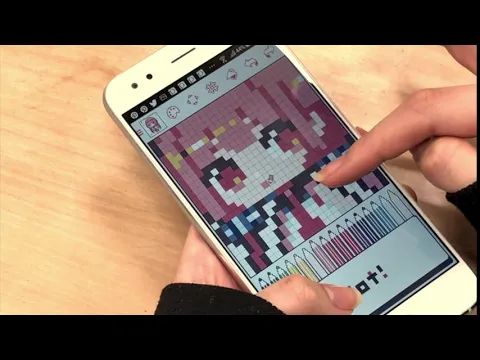
dotpict Easy to draw Pixelart – an editor for creating pixel images, which is aimed at beginner artists. If you are just taking your first steps in creating pixel art drawings, then it is better to avoid such specialized and serious programs as Pixel Studio . We recommend that you start creating with this simple and intuitive editor, and after gaining experience, pay attention to the “adult” tools.

Before you start drawing, you need to decide on the dimensions of the working canvas. Preset sizes are available from 16×16 to 192×192, but the user can adjust the scale of the workspace arbitrarily. Use eyedropper, pencil, fill, eraser. Draw with your finger or use a special electronic pen. In addition to creating static images, the editor allows you to work with layers. Combine separate canvases to create colorful animations.

Peculiarities:

  • flexible canvas size settings and color palettes to choose from;
  • intuitive tools on the quick access panel;
  • saving progress in automatic mode;
  • support for layers for creating GIF animation;
  • for the development of creative potential.

Post your pixel art projects in an album so that other users can rate them. Take the work of other artists as a basis and add your own touches. Subscribe to your favorite authors to follow their work. Improve your drawing skills with dotpict, chat on the forum and share your work with friends.
Also known as: dotpict Easy to draw Pixelart
Video of dotpict
Screenshot dotpict 1
Screenshot dotpict 2
Screenshot dotpict 3
Screenshot dotpict 4

Download dotpict Easy to draw Pixelart APK for Android

What's New in Version 18.14.4

- You can now translate the descriptions of works and user projects into your language.
- Various improvements and bug fixes.

Available Files

System Requirements

OS Version
Android 7.0 (Nougat) or higher
Architecture
Varies by file (Which one do I need?)
Disk Space
~30 MB free space required
RAM
1 GB
Internet
Not required
Permissions (17)
  • Internet
  • Access Network State
  • Write External Storage
  • Wake Lock
  • Access Adservices Attribution

APK File Details

Package ID net.dotpicko.dotpict
Available on Google Play
Developer dotpict LLC
License Free
Monetization Contains Ads   In-App Purchases
Content Rating Teen
Interface Language
English +76

English, Japanese, Chinese, Korean, German, Bulgarian, Thai, Hindi, Vietnamese, Ukrainian, Polish, Romanian, Arabic, French, Turkish, Czech, Spanish, Italian, Hungarian, Russian, Portuguese, Indonesian, + 55 localizations

APK Verification & Virus Scan Results

No Virus Signature Verified Safe & Original

Virus scan: Clean (0/66) View report. This APK is free of malware and its signature matches the official developer release.

Show File Details (SHA-256, SHA-1, MD5)

SHA-1 Signature:

ef37daa008573c045378637f1d38559dec594f56

SHA-256 Hash:

9374966733c660d005b26d6962f8d7296a46a9d7a2633c3b078159374d5e49eb

MD5 Checksum:

b0cc34e60555db2af120aa2048fa4426

Frequently Asked Questions

Is dotpict safe to download?

Yes, dotpict is safe to download. The APK is scanned on every update — no malware or viruses detected. You can verify the full scan report in the Security section above.

How to install dotpict APK on Android?

Download the APK using the button above. Then open the file and tap Install. If prompted, enable "Install from unknown sources" in Settings → Security. The process takes under a minute. Read more

What Android version does dotpict require?

dotpict requires Android 7.0 (API 24) or higher. Optimized for Android 13 (API 33).

Is dotpict free?

Yes, it is free to download and use, but it contains ads and offers in-app purchases.

How to update dotpict to the latest version?

Download the latest APK from this page and install it over your existing version — no need to uninstall first. Your data and settings will be preserved. We update the file as soon as a new version is released.

What processor architecture does dotpict support?

dotpict supports arm64-v8a, armeabi, armeabi-v7a, x86, x86_64. If you are unsure about your device architecture, check the Device Info section on this page.

How to enable installation from unknown sources on Android?

Go to Settings → Security (or Settings → Apps → Special access on Android 8+) and enable "Install unknown apps" for your browser or file manager. On Android 8 and above this setting is per-app, not global. Read more

If you have found any issue or are having difficulty with this page, please .

User Reviews & Ratings

Global rating(Play Store): 4.37(42.2K)
Rate this app

0.00

12345

not yet rated

Share your experience with other users.