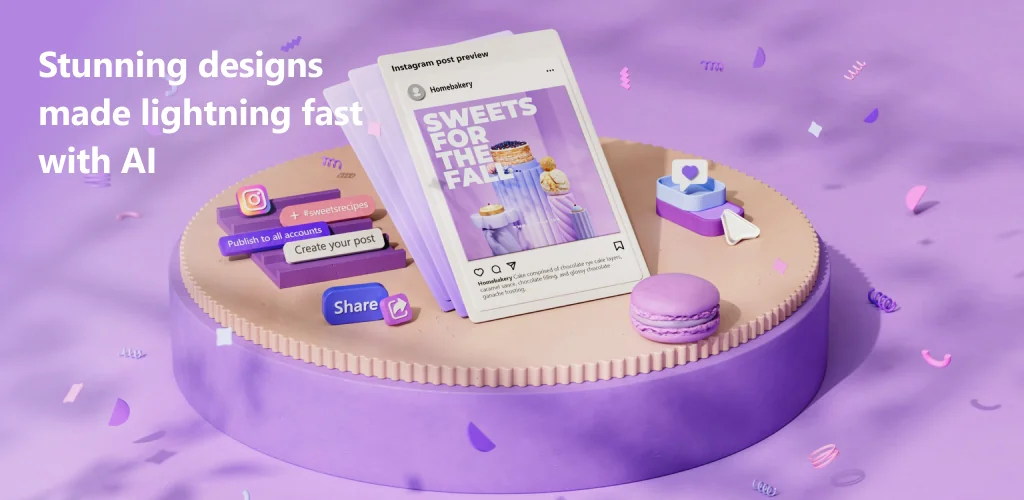
Microsoft Designer app cover art for Android
Microsoft Designer Icon

Microsoft Designer APK for Android

5M+
Free
Apr 9, 2026

Transform ideas into stunning visuals, from images to personalized cards.

Download Microsoft Designer APK 1.2604303.8001.beta 81MB

What is Microsoft Designer?

Ever wished you could whip up stunning visuals without being a design pro? Tired of struggling with complex software just to make a cool social post or a personalized card? Say hello to Microsoft Designer, the incredible AI design tool that puts professional-grade creativity right in your pocket. We’re honestly impressed by how easily you can create designs and edit photos in seconds, all powered by smart AI.

Imagine turning your wildest ideas into eye-catching images just by typing a few words – that’s the magic of generative AI at your fingertips! Whether you need a unique sci-fi scene, funny images, or custom stickers to liven up your chats, Microsoft Designer makes it happen. It’s like having a personal graphic designer ready to bring your imagination to life, making you a true content creator.

But it’s not just about generating new art. This app is also a fantastic AI photo editor. Accidentally got a photobomber in your perfect shot? No problem! You can effortlessly erase objects you don’t want, remove background distractions, or even blur background elements to make your subject truly pop. Plus, creating personalized greeting cards, custom wallpapers, or standout social media posts has never been simpler. What will you design first?

Key Features:

  • AI Image Generation: Describe any image you can dream up, and watch generative AI create it instantly.
  • Generative Erase: Easily remove unwanted objects or distractions from your photos with intelligent AI.
  • Background Removal & Blur: Instantly strip away backgrounds or blur them to highlight your main subject.
  • Custom Stickers & Monograms: Design unique stickers for messaging or personalized monograms for any occasion.
  • Personalized Cards & Wallpapers: Craft beautiful greeting cards, invitations, or custom wallpapers for your phone.

Ready to unleash your inner artist? Download Microsoft Designer today and start creating something amazing. It’s free to use with a Microsoft account, giving you 5 GB of cloud storage to save all your brilliant designs across devices.
Video of Microsoft Designer
Screenshot Microsoft Designer 1
Screenshot Microsoft Designer 2
Screenshot Microsoft Designer 3
Screenshot Microsoft Designer 4
Screenshot Microsoft Designer 5
Screenshot Microsoft Designer 6
Screenshot Microsoft Designer 7
Screenshot Microsoft Designer 8

Download Microsoft Designer APK for Android

What's New in Version 1.2604303.8001.beta

No official changelog provided for Microsoft Designer version 1.2604303.8001.beta. This update likely includes general stability improvements and bug fixes.

Available Files

System Requirements

OS Version
Android 9.0 (Pie) or higher
Architecture
Varies by file (Which one do I need?)
Disk Space
~100 MB free space required
RAM
1 GB
Internet
Not required
Google Services
Required
Permissions (24)
  • Internet
  • Record Audio
  • Camera
  • Access Network State
  • Read External Storage

APK File Details

Package ID com.microsoft.designer
Available on Google Play
Developer Microsoft Corporation | Website
License Free ( No Ads)
Monetization In-App Purchases
Content Rating Everyone
Interface Language
English +24

English, Thai, German, French, Japanese, Vietnamese, Spanish, Korean, Portuguese, Turkish, Chinese, Italian, Russian, Arabic, Hindi, Ukrainian, Hungarian, Polish, + 7 localizations

APK Verification & Virus Scan Results

No Virus Signature Verified Safe & Original

Virus scan: Clean (0/63) View report. This APK is free of malware and its signature matches the official developer release.

Show File Details (SHA-256, SHA-1, MD5)

SHA-1 Signature:

713b3c8b26cc0d02a516c4e0bbb8fea4c0e06c5e

SHA-256 Hash:

0c272e8f88434ed3631c4f87bc6bf0f5ad0cd172cd76e02855530547fb533bda

MD5 Checksum:

36a6df2089aa29f4a636ddf8cf9b197f

Frequently Asked Questions

Is Microsoft Designer safe to download?

Yes, Microsoft Designer is safe to download. The APK is scanned on every update — no malware or viruses detected. You can verify the full scan report in the Security section above.

How to install XAPK file?

XAPK is a split APK package. Standard Android installer cannot open it directly. Use 'SAI' or 'XAPK Installer' — they handle XAPK files automatically. Download the installer, open the XAPK file with it, and follow the on-screen steps. Read more

What Android version does Microsoft Designer require?

Microsoft Designer requires Android 9.0 (API 28) or higher. Optimized for Android 15 (API 35).

Is Microsoft Designer free?

Yes, the app is free to download, but it contains in-app purchases for additional content.

How to update Microsoft Designer to the latest version?

Download the latest APK from this page and install it over your existing version — no need to uninstall first. Your data and settings will be preserved. We update the file as soon as a new version is released.

What processor architecture does Microsoft Designer support?

Microsoft Designer supports armeabi-v7a, arm64-v8a, x86, x86_64. If you are unsure about your device architecture, check the Device Info section on this page.

How to enable installation from unknown sources on Android?

Go to Settings → Security (or Settings → Apps → Special access on Android 8+) and enable "Install unknown apps" for your browser or file manager. On Android 8 and above this setting is per-app, not global. Read more

If you have found any issue or are having difficulty with this page, please .

User Reviews & Ratings

Global rating(Play Store): 3.78(8.2K)
Site Rating: 5(1)
Rate this app

5.00

12345

1

Share your experience with other users.