Tayasui Sketches Icon

Tayasui Sketches APK for Android

10M+
Free
Nov 29, 2023

Drawing application with a set of realistic tools

Download Tayasui Sketches APK 1.4.13 54MB

What is Tayasui Sketches?

Tayasui Sketches is an intuitive tool for artists, with which it is equally comfortable to create simple pencil sketches and luxurious watercolor paintings. The application, thanks to its intuitive interface, can become an excellent launching pad that will prepare the user to work with more complex professional tools.

Choose from digital paper colors and textures, and use a range of customizable brushes, pencils, markers, watercolors, fountain pens and spray guns. With one touch, adjust the size and transparency. Choose a color from preset sets, select the right shade manually, or choose a tone directly on the canvas with an eyedropper. For beginner illustrators, the function of importing templates and ready-made images will be useful – edit the source, add ornaments, text, change the background and change individual elements.

Features:

  • dozens of brushes to create artistic masterpieces;
  • fine-tuning each element and support for layers;
  • custom size canvases and choice of textures;
  • import templates and export finished projects.

Use supported styluses or sketch with your finger. Naturally, the first option is preferable, as it allows you to achieve accurate drawing of lines, strokes and strokes. Tayasui Sketches provides a realistic drawing experience that is easy to learn and aimed at a wide user base.
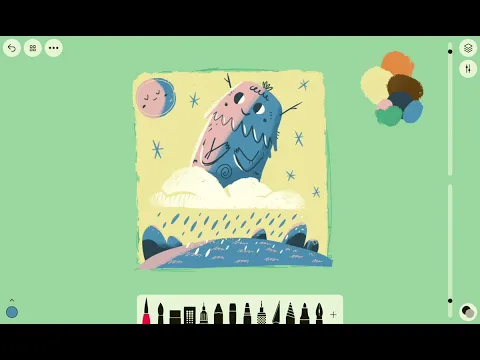
Video of Tayasui Sketches
Screenshot Tayasui Sketches 1
Screenshot Tayasui Sketches 2
Screenshot Tayasui Sketches 3
Screenshot Tayasui Sketches 4
Screenshot Tayasui Sketches 5

Download Tayasui Sketches APK for Android

What's New in Version 1.4.13

Bug fix and improvements 🎉

Available Files

System Requirements

OS Version
() or higher
Architecture
Varies by file (Which one do I need?)
Disk Space
~90 MB free space required
RAM
1 GB
Internet
Not required
Permissions (14)
  • Internet
  • Access Network State
  • Read External Storage
  • Write External Storage
  • Vibrate

APK File Details

Package ID com.tayasui.sketches
Available on Google Play
Developer Tayasui Sketches
License Free ( No Ads)
Monetization In-App Purchases
Content Rating Everyone
Interface Language
English +74

English, Japanese, German, Bulgarian, Thai, Hindi, Vietnamese, Ukrainian, Polish, Korean, Romanian, Arabic, French, Turkish, Czech, Spanish, Italian, Hungarian, Russian, Chinese, Portuguese, + 54 localizations

APK Verification & Virus Scan Results

No Virus Signature Verified Safe & Original

Virus scan: Clean (0/63) View report. This APK is free of malware and its signature matches the official developer release.

Show File Details (SHA-256, SHA-1, MD5)

SHA-1 Signature:

e736d95060e365afdf60a16c1bc50ab4001a86e0

SHA-256 Hash:

12b4c55c27a03ecbb13302debb3fc434c0d2bac99fb357d227de70fa4a18cb8d

MD5 Checksum:

c8687680a7d9c9c47a7e2e04d3afc88e

Frequently Asked Questions

Is Tayasui Sketches safe to download?

Yes, Tayasui Sketches is safe to download. The APK is scanned on every update — no malware or viruses detected. You can verify the full scan report in the Security section above.

How to install Tayasui Sketches APK on Android?

Download the APK using the button above. Then open the file and tap Install. If prompted, enable "Install from unknown sources" in Settings → Security. The process takes under a minute. Read more

What Android version does Tayasui Sketches require?

Tayasui Sketches requires Android 20 (API 20) or higher. Optimized for Android 13 (API 33).

Is Tayasui Sketches free?

Yes, the app is free to download, but it contains in-app purchases for additional content.

How to update Tayasui Sketches to the latest version?

Download the latest APK from this page and install it over your existing version — no need to uninstall first. Your data and settings will be preserved. We update the file as soon as a new version is released.

What processor architecture does Tayasui Sketches support?

Tayasui Sketches supports arm64-v8a. This build does not support x86/x86_64 processors, so it will not run on most PC emulators. If you are unsure about your device architecture, check the Device Info section on this page.

How to enable installation from unknown sources on Android?

Go to Settings → Security (or Settings → Apps → Special access on Android 8+) and enable "Install unknown apps" for your browser or file manager. On Android 8 and above this setting is per-app, not global. Read more

If you have found any issue or are having difficulty with this page, please .

User Reviews & Ratings

Global rating(Play Store): 4.27(32.7K)
Rate this app

0.00

12345

not yet rated

Share your experience with other users.