N0va Desktop Icon

N0va Desktop APK for Android

- Live Wallpapers
1M+
Free
Feb 21, 2022

Static and "live" wallpapers with heroes of popular anime universes

Download N0va Desktop APK 2.1.1.43 80MB

What is N0va Desktop?

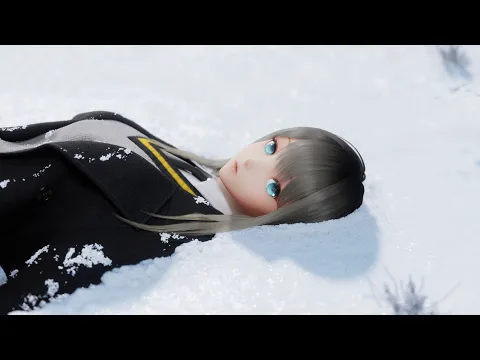
N0va Desktop – “live” wallpaper with the effect of presence, which will put a pretty anime girl named Lumin in your mobile device. The heroine, depending on the current mood of the user and his choice, is able to appear in different images – from a playful beauty in bold outfits to a chaste young lady with a restrained smile on her lips.

The user independently decides how the heroine will look and what to do. Choose outfits for Lumin, customize the background, set the smooth animation of the movements of the new girlfriend in the settings. The application does not limit the user to only one character, in the collection he will find hundreds of static and dynamic screensavers, thematically dedicated to such popular game projects as Genshin Impact, Tears of Themis and Honkai Impact. Amber, Keia, Lisa, Noelle, Qiana, Mei, Sakura Yae, Bronya Bunny and other favorite heroes will always be there from now on.

Features:

  • a collection of luxurious screensavers in the theme of popular games;
  • choose the style and animation for the main characters;
  • assorted static and “live” wallpapers;
  • for desktop and lock screen;
  • regular replenishment of the collection.

The collection, presented as part of the N0va Desktop product, will help you personalize the screen of your mobile gadget, add anime notes to it, surround yourself with your favorite characters and game scenes.
Also known as: N0va Desktop - Live Wallpapers
Video of N0va Desktop
Screenshot N0va Desktop 1
Screenshot N0va Desktop 2
Screenshot N0va Desktop 3
Screenshot N0va Desktop 4

Download N0va Desktop - Live Wallpapers APK for Android

What's New in Version 2.1.1.43

Improved application stability and resolved some compatibility issues with certain devices

Available Files

System Requirements

OS Version
Android 5.0 (Lollipop) or higher
Architecture
Varies by file (Which one do I need?)
Disk Space
~150 MB free space required
RAM
1 GB
Internet
Not required
Permissions (13)
  • Internet
  • Record Audio
  • Access Network State
  • Vibrate
  • Wake Lock

APK File Details

Package ID com.mihoyo.desktopportal
Developer COGNOSPHERE PTE. LTD.
License Free ( No Ads)
Interface Language
English +75

English, Thai, Japanese, German, Bulgarian, Hindi, Vietnamese, Ukrainian, Polish, Korean, Romanian, Arabic, French, Turkish, Czech, Spanish, Italian, Hungarian, Russian, Chinese, Portuguese, Indonesian, + 54 localizations

APK Verification & Virus Scan Results

No Virus Signature Verified Safe & Original

Virus scan: Clean (0/56) View report. The APK file is digitally signed.

Show File Details (SHA-256, SHA-1, MD5)

SHA-1 Signature:

a134c3c4f23aa5d3558513cdd85c7b936757a07b

SHA-256 Hash:

13fdebd4ef214c991e34e13de3e6695333448274b098c1af054fe436ed7637e8

MD5 Checksum:

36f543aa3b522c45c1bf118c80cff7c7

Frequently Asked Questions

Is N0va Desktop safe to download?

Yes, N0va Desktop is safe to download. The APK is scanned on every update — no malware or viruses detected. You can verify the full scan report in the Security section above.

How to install N0va Desktop APK on Android?

Download the APK using the button above. Then open the file and tap Install. If prompted, enable "Install from unknown sources" in Settings → Security. The process takes under a minute. Read more

Why does installation fail on newer Android versions (14 - 16)?

Newer Android versions strictly block the installation of apps built for older Android versions (API < 23) for security reasons. Standard installation is not possible. Read our step-by-step guide on how to bypass this restriction using ADB or Shizuku.

What Android version does N0va Desktop require?

N0va Desktop requires Android 5.0 (API 21) or higher. Optimized for Android 11 (API 30).

Is N0va Desktop free?

Yes, this app is completely free to download and use.

What processor architecture does N0va Desktop support?

N0va Desktop supports arm64-v8a, armeabi-v7a. This build does not support x86/x86_64 processors, so it will not run on most PC emulators. If you are unsure about your device architecture, check the Device Info section on this page.

How to enable installation from unknown sources on Android?

Go to Settings → Security (or Settings → Apps → Special access on Android 8+) and enable "Install unknown apps" for your browser or file manager. On Android 8 and above this setting is per-app, not global. Read more

If you have found any issue or are having difficulty with this page, please .

User Reviews & Ratings

Global rating(Play Store): 3.96(21.4K)
Rate this app

0.00

12345

not yet rated

Share your experience with other users.

Лера:
Привет