Microsoft Kaizala – Chat, Call & Work Icon

Microsoft Kaizala – Chat, Call & Work APK for Android

8M+
Free
Dec 6, 2020

Messenger for predominant use in corporate mode

Download Microsoft Kaizala – Chat, Call & Work APK 1.1.2420.5211 56MB

What is Microsoft Kaizala?

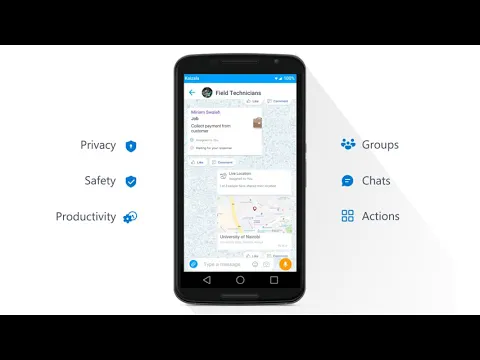
Kaizala is the official client for instant messaging in private or group mode from Microsoft Corporation. Connect with friends, family and colleagues using a secure environment that takes the security and privacy of user data seriously. Write, call, hold meetings, send images, videos, documents and other materials.

Although the application provides a one-on-one operation, the emphasis is on the corporate use of the product’s functions in a professional environment (it is called WhatsApp for Business for a reason). For this, the integration of special services and products has been implemented – Office 365, an organizer, a schedule of business meetings, conducting surveys, a task management tool, and so on.

Features:

  • means for communication in the format of large working groups;
  • attachment of files, images, audio and video;
  • registration in the service by phone number;
  • integration of useful services and add-ons;
  • strong data encryption methods;
  • is an intuitive and elegant interface.

You don’t need a Microsoft account to register in the messenger, just enter your mobile phone number, which will instantly receive an SMS with a verification code. After that, the user is free to accept invitations to groups, create work or personal chats, set up a profile, share geolocation, and use other useful features.
Also known as: Kaizala, Microsoft Kaizala – Chat, Call & Work
Video of Microsoft Kaizala – Chat, Call & Work
Screenshot Microsoft Kaizala – Chat, Call & Work 1
Screenshot Microsoft Kaizala – Chat, Call & Work 2
Screenshot Microsoft Kaizala – Chat, Call & Work 3
Screenshot Microsoft Kaizala – Chat, Call & Work 4
Screenshot Microsoft Kaizala – Chat, Call & Work 5
Screenshot Microsoft Kaizala – Chat, Call & Work 6

Download Microsoft Kaizala – Chat, Call & Work APK for Android

What's New in Version 1.1.2420.5211

No official changelog provided for Microsoft Kaizala – Chat, Call & Work version 1.1.2420.5211. This update likely includes general stability improvements and bug fixes.

Available Files

System Requirements

OS Version
Android 5.0 (Lollipop) or higher
Architecture
Varies by file (Which one do I need?)
Disk Space
~90 MB free space required
RAM
1 GB
Internet
Not required
Permissions (45)
  • Internet
  • Record Audio
  • Camera
  • Access Network State
  • Read External Storage

APK File Details

Package ID com.microsoft.mobile.polymer
Developer Microsoft Corporation | Website
License Free ( No Ads)
Interface Language
English +46

English, Japanese, German, Bulgarian, Thai, Hindi, Vietnamese, Ukrainian, Polish, Korean, Romanian, Arabic, French, Turkish, Czech, Spanish, Italian, Hungarian, Russian, Chinese, Portuguese, Indonesian, + 25 localizations

APK Verification & Virus Scan Results

No Virus Signature Verified Safe & Original

Virus scan: Clean (0/63) View report. The APK file is digitally signed.

Show File Details (SHA-256, SHA-1, MD5)

SHA-1 Signature:

7dc83cd2abe833560c2896626e307041c0df3a7a

SHA-256 Hash:

8db0724c84768283b3cb7c8659dfa61bb02f432fcbbdea9835fa46f2f7f596de

MD5 Checksum:

340ab276618a37ff45850350d57a9161

Frequently Asked Questions

Is Microsoft Kaizala safe to download?

Yes, Microsoft Kaizala is safe to download. The APK is scanned on every update — no malware or viruses detected. You can verify the full scan report in the Security section above.

How to install Microsoft Kaizala APK on Android?

Download the APK using the button above. Then open the file and tap Install. If prompted, enable "Install from unknown sources" in Settings → Security. The process takes under a minute. Read more

Why does installation fail on newer Android versions (14 - 16)?

Newer Android versions strictly block the installation of apps built for older Android versions (API < 23) for security reasons. Standard installation is not possible. Read our step-by-step guide on how to bypass this restriction using ADB or Shizuku.

What Android version does Microsoft Kaizala require?

Microsoft Kaizala requires Android 5.0 (API 21) or higher. Optimized for Android 10 (API 29).

Is Microsoft Kaizala free?

Yes, this app is completely free to download and use.

What processor architecture does Microsoft Kaizala support?

Microsoft Kaizala supports arm64-v8a. This build does not support x86/x86_64 processors, so it will not run on most PC emulators. If you are unsure about your device architecture, check the Device Info section on this page.

How to enable installation from unknown sources on Android?

Go to Settings → Security (or Settings → Apps → Special access on Android 8+) and enable "Install unknown apps" for your browser or file manager. On Android 8 and above this setting is per-app, not global. Read more

If you have found any issue or are having difficulty with this page, please .

User Reviews & Ratings

Global rating(Play Store): 4.72(118.3K)
Rate this app

0.00

12345

not yet rated

Share your experience with other users.