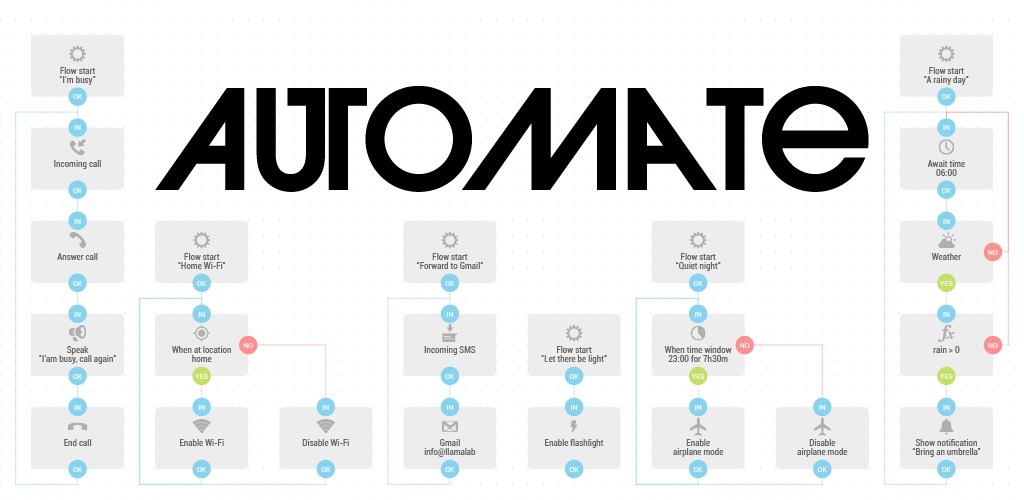
Automate app cover art for Android
Automate Icon

Automate APK for Android

LlamaLab Original
5M+
Free
Jun 5, 2026

Unlock effortless Android automation: Simplify your life, one flow at a time.

Download Automate APK 1.51.1 9MB Old versions

What is Automate?

Tired of doing the same things on your Android phone every day? What if you could teach your phone to handle those repetitive tasks for you? With Automate, you can! This powerful automation app lets you create custom "flows" using a simple, visual flowchart system. No coding required!

Automate is like giving your Android device a brain boost. You can automate tasks like backing up files, adjusting settings based on your location, sending messages, and even controlling other apps. Whether you're a tech newbie or a seasoned Android pro, Automate's intuitive interface makes Android automation accessible to everyone.

Key Features:

  • Visual Flowchart Editor: Create automations by dragging and connecting building blocks.
  • Extensive Block Library: Over 410 blocks to control almost every aspect of your device.
  • Community Flows: Download pre-made automations shared by other users.
  • Context-Aware Triggers: Start flows based on time, location, battery level, and more.
  • File Management: Automate file backups, transfers to cloud storage, and organization.

Imagine your phone automatically turning on Wi-Fi when you get home or silencing notifications during meetings. Automate makes it possible. Why waste time on repetitive actions when your phone can do it for you? Ready to unlock the full potential of your Android device and simplify your life? Download Automate today and start creating your own Android task scheduler!
Video of Automate
Screenshot Automate 1
Screenshot Automate 2
Screenshot Automate 3
Screenshot Automate 4
Screenshot Automate 5
Screenshot Automate 6
Screenshot Automate 7
Screenshot Automate 8

Download Automate APK for Android

What's New in Version 1.51.1

• Documentation search
• Fixed ADB protocol set block with Protocol set to USB
• Fixed Assist request often not showing on Android 7.1 and lower
• Fixed Flashlight enabled block using proceed When changed after Immediate

Other versions

System Requirements

OS Version
Android 4.0 (Ice Cream Sandwich) or higher
Architecture
Varies by file (Which one do I need?)
Disk Space
~20 MB free space required
RAM
1 GB
Internet
Not required
Permissions (109)
  • Internet
  • Record Audio
  • Camera
  • Access Network State
  • Read External Storage

APK File Details

Package ID com.llamalab.automate
Available on Google Play
Developer LlamaLab
License Free ( No Ads)
Monetization In-App Purchases
Content Rating Everyone
Interface Language
1 language

+ 1 localization

APK Verification & Virus Scan Results

No Virus Signature Verified Safe & Original

Virus scan: Clean (0/61) View report. This APK is free of malware and its signature matches the official developer release.

Show File Details (SHA-256, SHA-1, MD5)

SHA-1 Signature:

f2d60ac32e77c42784e8578601e7d6be7f13e09b

SHA-256 Hash:

5782cf0fa6db321a3f0de1bc6d1ce6eaea2ecf9c25e7d4b3f20a4d1eb39941fb

MD5 Checksum:

523f9a0fbcb54d5bc8afd547fd589e9b

Frequently Asked Questions

Is Automate safe to download?

Yes, Automate is safe to download. The APK is scanned on every update — no malware or viruses detected. You can verify the full scan report in the Security section above.

How to install Automate APK on Android?

Download the APK using the button above. Then open the file and tap Install. If prompted, enable "Install from unknown sources" in Settings → Security. The process takes under a minute. Read more

What Android version does Automate require?

Automate requires Android 4.0 (API 14) or higher. Optimized for Android 15 (API 35).

Is Automate free?

Yes, the app is free to download, but it contains in-app purchases for additional content.

How to update Automate to the latest version?

Download the latest APK from this page and install it over your existing version — no need to uninstall first. Your data and settings will be preserved. We update the file as soon as a new version is released.

Does Automate require Root access?

No root is required for basic use. Automate works on standard Android for CPU info, RAM, battery, sensors, and network stats. Root unlocks a small set of advanced system parameters that Android restricts by default.

What processor architecture does Automate support?

Automate supports arm64-v8a, armeabi-v7a, x86, x86_64. If you are unsure about your device architecture, check the Device Info section on this page.

If you have found any issue or are having difficulty with this page, please .

User Reviews & Ratings

Global rating(Play Store): 4.54(30.1K)
Site Rating: 5(1)
Rate this app

5.00

12345

1

Share your experience with other users.