Java Edition Mod for Minecraft app cover art for Android
Java Edition Mod for Minecraft Icon

Java Edition Mod for Minecraft APK for Android

6M+
Free
Dec 5, 2025

Transform your mobile Minecraft with a classic, familiar interface.

Download Java Edition Mod for Minecraft APK 1.15 30MB

What is Java Edition Mod for Minecraft?

Ever wished your Minecraft Pocket Edition felt more like the classic Java version you might play on PC? Say hello to `Java Edition Mod for Minecraft`, the ultimate Java Edition UI mod designed to completely transform your mobile Minecraft experience! This isn’t just a small tweak; it’s a full visual overhaul that brings the familiar feel of the Java Edition right to your fingertips.

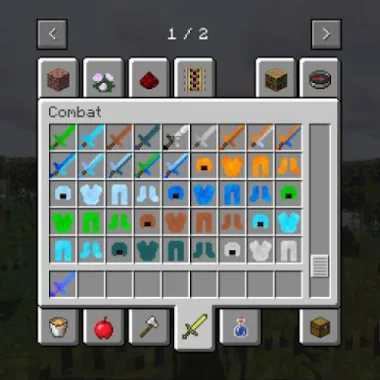
`Java Edition Mod for Minecraft` is a fantastic game mod that introduces a whole new level of MCPE customization. It cleverly replaces existing elements, from the main menu to smaller in-game listings, with fresh textures and improved color schemes. You’ll notice brand new buttons Minecraft players will love, making navigation smoother and more intuitive. Are you tired of struggling to find specific items? This mod makes it incredibly easy to play and search for new game objects, significantly improving your overall Minecraft Pocket Edition interface.

Ready to give your mobile Minecraft a fresh, familiar look? `Java Edition Mod for Minecraft` is one of the best MCPE mods if you’re wondering how to change Minecraft UI for a more polished and efficient experience.

Key Features:

  • Java Edition UI Transformation: Experience the iconic look and feel of Minecraft Java Edition directly on your mobile device.
  • Enhanced Navigation & New Buttons: Enjoy streamlined menus and intuitive new buttons for easier interaction and control.
  • Custom Textures & Visual Overhaul: Discover fresh textures and improved color palettes across your entire game interface, including the main menu and smaller listings.
  • Easier Game Object Search: Quickly locate items and resources, making your crafting and building adventures smoother than ever.

Download `Java Edition Mod for Minecraft` today and rediscover your favorite blocky world with a stunning, familiar new interface!

Also known as: Java Edition UI
Screenshot Java Edition Mod for Minecraft 1
Screenshot Java Edition Mod for Minecraft 2
Screenshot Java Edition Mod for Minecraft 3
Screenshot Java Edition Mod for Minecraft 4
Screenshot Java Edition Mod for Minecraft 5
Screenshot Java Edition Mod for Minecraft 6
Screenshot Java Edition Mod for Minecraft 7
Screenshot Java Edition Mod for Minecraft 8

Download Java Edition Mod for Minecraft APK for Android

What's New in Version 1.15

No official changelog provided for Java Edition Mod for Minecraft version 1.15. This update likely includes general stability improvements and bug fixes.

Available Files

  • 1.15 30MB Android 7.0+ arm64-v8a Download

System Requirements

OS Version
Android 7.0 (Nougat) or higher
Architecture
Varies by file (Which one do I need?)
Disk Space
~40 MB free space required
RAM
1 GB
Internet
Not required
Google Services
Required
Permissions (9)
  • Internet
  • Access Network State
  • Wake Lock
  • Android.gms.permission.ad Id
  • Access Adservices Attribution

APK File Details

Package ID com.lesite.mods.newjavamod
Developer Planet Mods Minecraft
License Free
Monetization Contains Ads  
Interface Language
English +0

English

APK Verification & Virus Scan Results

No Virus Signature Verified Safe & Original

Virus scan: Clean (0/64) View report. The APK file is digitally signed.

Show File Details (SHA-256, SHA-1, MD5)

SHA-1 Signature:

228da2a9706238e889677b181c482a7d75de7ac0

SHA-256 Hash:

88f0d10610d07536f148599df735eea1c4f68e52ee6a9556b582d103a8eac782

MD5 Checksum:

ff5d5fe04a9089b79f6f5296092311ec

Frequently Asked Questions

Is Java Edition Mod for Minecraft safe to download?

Yes, Java Edition Mod for Minecraft is safe to download. The APK is scanned on every update — no malware or viruses detected. You can verify the full scan report in the Security section above.

How to install XAPK file?

XAPK is a split APK package. Standard Android installer cannot open it directly. Use 'SAI' or 'XAPK Installer' — they handle XAPK files automatically. Download the installer, open the XAPK file with it, and follow the on-screen steps. Read more

What Android version does Java Edition Mod for Minecraft require?

Java Edition Mod for Minecraft requires Android 7.0 (API 24) or higher. Optimized for Android 15 (API 35).

Is Java Edition Mod for Minecraft free?

Yes, it is free to use, but it is ad-supported.

Does Java Edition Mod for Minecraft require Root access?

No root is required for basic use. Java Edition Mod for Minecraft works on standard Android for CPU info, RAM, battery, sensors, and network stats. Root unlocks a small set of advanced system parameters that Android restricts by default.

What processor architecture does Java Edition Mod for Minecraft support?

Java Edition Mod for Minecraft supports arm64-v8a. This build does not support x86/x86_64 processors, so it will not run on most PC emulators. If you are unsure about your device architecture, check the Device Info section on this page.

How to enable installation from unknown sources on Android?

Go to Settings → Security (or Settings → Apps → Special access on Android 8+) and enable "Install unknown apps" for your browser or file manager. On Android 8 and above this setting is per-app, not global. Read more

If you have found any issue or are having difficulty with this page, please .

User Reviews & Ratings

Global rating(Play Store): 4.31(10.6K)
Site Rating: 5(1)
Rate this app

5.00

12345

1

Share your experience with other users.