Master for Minecraft-Launcher Icon

Master for Minecraft-Launcher APK for Android

Content pack for the mobile version of Minecraft

Download Master for Minecraft-Launcher APK 2.2.5 24MB

What is Master for Minecraft-Launcher?

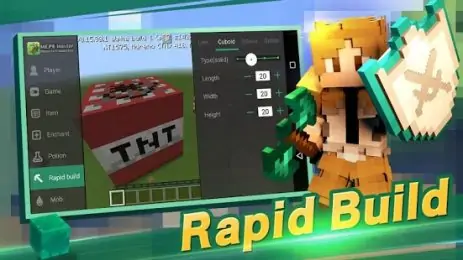
Master for Minecraft-Launcher is a functional product from the MCPE Master studio, which is highly demanded by a thematic audience, and is designed for comprehensive customization of the game server and the main character in the Minecraft project. The list of features of this utility is really amazing. Importing maps and equipment, scripts and textures into the original game, the ability to transfer valuable items and experience, making fundamental changes to weather conditions, the flora and fauna of the cubic universe, using enchantments, introducing new mobs into the gameplay on a single server, and many other interesting and unusual “chips” that fans of Minecraft will surely like.

The application interface is friendly and understandable – the authors have moved key features to icons on a panel that automatically appears at the right time: when you tap on the required item, a beautifully arranged menu appears with a whole range of fine settings. The advantages of the Master for Minecraft-Launcher program can be seen already in the process of setting up the game server – the choice of time of day, the use of various atmospheric phenomena such as rain and snow, ultimate light sources, the choice of starting level and auxiliary physical abilities for the character, such as invisibility or flight . The advantage of the program can also be called the prospect of sharing opportunities with any selected player on the server – his joy will not be the limit, and next time he will return your “debt”.

The additional tabs of the automatically appearing panel contain settings that are responsible for game items, biomes, and the behavior of non-player characters. You can also customize the activity style of opponents, adjust inventory capacity and assign zones on the map for further teleportations. No less useful is the ability to create screenshots at any stage of the game with further saving the image in the directory selected by the user. Is Master for Minecraft-Launcher worth downloading? Definitely yes! Minecraft fans simply will not find worthy analogues on Google Play! True, the maximum functionality is opened for real money, but free features for most gamers will be more than enough.

Also known as: MCPE Master
Screenshot Master for Minecraft-Launcher 1
Screenshot Master for Minecraft-Launcher 2
Screenshot Master for Minecraft-Launcher 3
Screenshot Master for Minecraft-Launcher 4
Screenshot Master for Minecraft-Launcher 5
Screenshot Master for Minecraft-Launcher 6
Screenshot Master for Minecraft-Launcher 7
Screenshot Master for Minecraft-Launcher 8

Download Master for Minecraft-Launcher APK for Android

What's New in Version 2.2.5

No official changelog provided for Master for Minecraft-Launcher version 2.2.5. This update likely includes general stability improvements and bug fixes.

Available Files

  • 2.2.5 24MB Android 4.0.3, 4.0.4+ armeabiarmeabi-v7a Download
  • 2.0.20 24MB Android 4.0.3, 4.0.4+ armeabiarmeabi-v7a Download

System Requirements

OS Version
Android 4.0.3, 4.0.4 (Ice Cream Sandwich) or higher
Architecture
Varies by file (Which one do I need?)
Disk Space
~40 MB free space required
RAM
1 GB
Internet
Not required
Permissions (25)
  • Internet
  • Record Audio
  • Camera
  • Access Network State
  • Read External Storage

APK File Details

Package ID com.groundhog.mcpemaster
Developer Groundhog
License Free ( No Ads)
Interface Language
English +73

English, Japanese, German, Thai, Chinese, Hindi, Vietnamese, Korean, Arabic, French, Turkish, Spanish, Italian, Portuguese, Russian, Indonesian, Bulgarian, Ukrainian, Polish, Romanian, Czech, Hungarian, + 52 localizations

APK Verification & Virus Scan Results

1 Detections (Low Risk) Signature Verified Not on Play Store

Virus scan: 1/56 Potential Detections View report. Flagged by some engines as a false positive. Signature matches the original developer build.

Show File Details (SHA-256, SHA-1, MD5)

SHA-1 Signature:

eab01d2e9e88669d3b15c66f1f6a2854326fe8cd

SHA-256 Hash:

63cdea2e4068c82feb987e1e47c0a540f7e793197b8d0d6a5c0d5a1b02ad581b

MD5 Checksum:

df36ee80399a406fa38d07b6f44b2819

Frequently Asked Questions

Is Master for Minecraft-Launcher safe to download?

A small number of antivirus engines flagged Master for Minecraft-Launcher. This may be a false positive, but we recommend reviewing the full scan report in the Security section above before downloading. Download at your own risk.

How to install Master for Minecraft-Launcher APK on Android?

Download the APK using the button above. Then open the file and tap Install. If prompted, enable "Install from unknown sources" in Settings → Security. The process takes under a minute. Read more

Why does installation fail on newer Android versions (14 - 16)?

Newer Android versions strictly block the installation of apps built for older Android versions (API < 23) for security reasons. Standard installation is not possible. Read our step-by-step guide on how to bypass this restriction using ADB or Shizuku.

What Android version does Master for Minecraft-Launcher require?

Master for Minecraft-Launcher requires Android 4.0.3, 4.0.4 (API 15) or higher. Optimized for Android 8.0 (API 26).

Does Master for Minecraft-Launcher require Root access?

No root is required for basic use. Master for Minecraft-Launcher works on standard Android for CPU info, RAM, battery, sensors, and network stats. Root unlocks a small set of advanced system parameters that Android restricts by default.

What processor architecture does Master for Minecraft-Launcher support?

Master for Minecraft-Launcher supports armeabi, armeabi-v7a. This build does not support x86/x86_64 processors, so it will not run on most PC emulators. If you are unsure about your device architecture, check the Device Info section on this page.

How to enable installation from unknown sources on Android?

Go to Settings → Security (or Settings → Apps → Special access on Android 8+) and enable "Install unknown apps" for your browser or file manager. On Android 8 and above this setting is per-app, not global. Read more

If you have found any issue or are having difficulty with this page, please .

User Reviews & Ratings

Site Rating: 4.29(62)
Rate this app

4.29

12345

62

Share your experience with other users.

Tuấn dương:
tôi vào áp và đăng nhập bằng facebook nhưng nó ghi là ứng dụng đang ở chế độ phát triển và cần chuyển sang chế độ thu nghiệm hoặc xin các quản trị viên cấp phép
Chanh:
Muốn chơi
Khanduy:
Quá hay
canh lee:
vui nghe