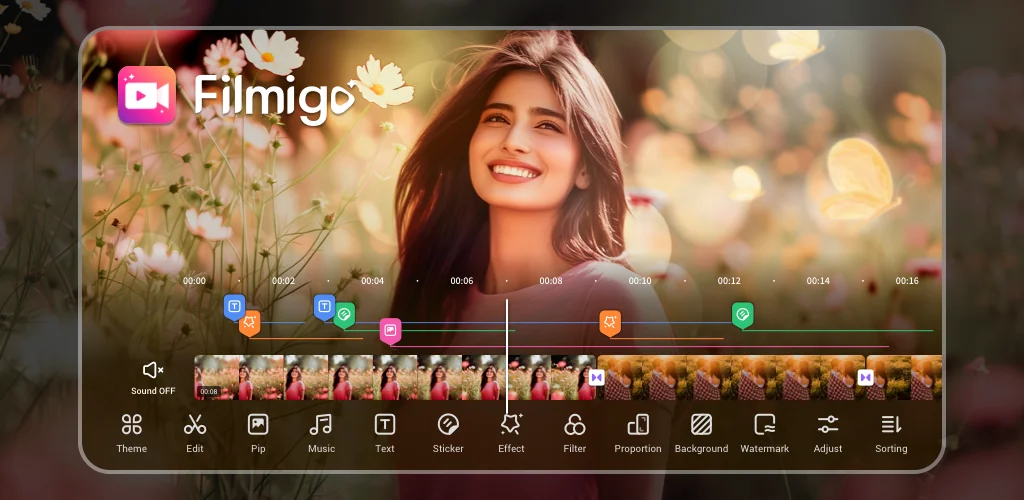
AI Video Maker AI Video Editor app cover art for Android
AI Video Maker AI Video Editor Icon

AI Video Maker AI Video Editor APK for Android

196M+
Free
Jan 29, 2026

Great editor with a lot of features

Download AI Video Maker AI Video Editor APK 6.5.2.0 257MB Old versions

What is AI Video Maker AI Video Editor?

AI Video Maker AI Video Editor is a video editor with powerful potential and at the same time a set of tools that is understandable to every ordinary user. After launching the program and issuing standard permissions, the user immediately gets to the main menu, from where he can quickly begin transforming the video file or photo selected in the gallery. Themes, effects, text style and font, music, stickers, sound effects and other tools involved in editing are not included with the program and are downloaded upon the user’s first request from the network, if the content is completely satisfactory after preview.

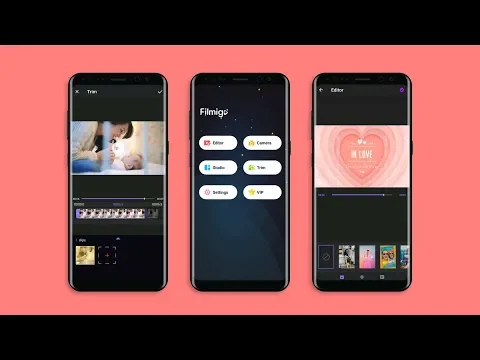
If you do not need a total transformation of the video, then you can simply trim it, for which the AI Video Maker AI Video Editor interface has a separate tab that breaks the video into frames, which ensures high accuracy of the trimming process. A watermark is applied to everything created through the editor in its free version, and the video itself is saved at a maximum of 720P quality. To expand the potential of the product and get the most out of it, you need to purchase a paid version or sign up for a monthly subscription.

This will automatically remove the watermark from the files and ads, the quality of the final video will skyrocket to 1080P HD, and add a few more interesting options. I would recommend AI Video Maker AI Video Editor software to people who are not satisfied with ordinary videos and photographs, and want to turn the former into memorable videos, and from the latter create an original collage – for this, the editor has everything you need, and even a child can learn to use the package of tools.
Also known as: VideoMaker, Filmigo, 多功能视频编辑
Video of AI Video Maker AI Video Editor
Screenshot AI Video Maker AI Video Editor 1
Screenshot AI Video Maker AI Video Editor 2
Screenshot AI Video Maker AI Video Editor 3
Screenshot AI Video Maker AI Video Editor 4
Screenshot AI Video Maker AI Video Editor 5
Screenshot AI Video Maker AI Video Editor 6
Screenshot AI Video Maker AI Video Editor 7
Screenshot AI Video Maker AI Video Editor 8

Download AI Video Maker AI Video Editor APK for Android

What's New in Version 6.5.2.0

- New AI video generation: Create movie-quality movies from a single photo.
- New AI text-to-sound feature: Create your own music with just one sentence.

Other versions

System Requirements

OS Version
Android 6.0 (Marshmallow) or higher
Architecture
Varies by file (Which one do I need?)
Disk Space
~400 MB free space required
RAM
2 GB
Internet
Not required
Permissions (28)
  • Internet
  • Record Audio
  • Camera
  • Access Network State
  • Read External Storage

APK File Details

Package ID com.funcamerastudio.videomaker
Available on Google Play
Developer VIDEOSHOW Video Editor & Maker & AI Chat Generator
License Free
Monetization Contains Ads   In-App Purchases
Content Rating Teen (Mild Violence, Suggestive Themes)
Interface Language
English +78

English, Japanese, German, Bulgarian, Thai, Hindi, Vietnamese, Ukrainian, Polish, Korean, Romanian, Arabic, French, Turkish, Czech, Spanish, Italian, Portuguese, Hungarian, Russian, Chinese, Indonesian, + 57 localizations

APK Verification & Virus Scan Results

No Virus Signature Verified Safe & Original

Virus scan: Clean (0/63) View report. This APK is free of malware and its signature matches the official developer release.

Show File Details (SHA-256, SHA-1, MD5)

SHA-1 Signature:

9f69aeca84eeec73d1ff17eb5859d2794734ce4b

SHA-256 Hash:

b5ba1faffc3049a177dffbe6cefc0397d4ce6fd184eb4bb836ac116f58a2ebb8

MD5 Checksum:

79462ca168eda3f57218a1650d0583cc

Frequently Asked Questions

Is AI Video Maker AI Video Editor safe to download?

Yes, AI Video Maker AI Video Editor is safe to download. The APK is scanned on every update — no malware or viruses detected. You can verify the full scan report in the Security section above.

How to install AI Video Maker AI Video Editor APK on Android?

Download the APK using the button above. Then open the file and tap Install. If prompted, enable "Install from unknown sources" in Settings → Security. The process takes under a minute. Read more

What Android version does AI Video Maker AI Video Editor require?

AI Video Maker AI Video Editor requires Android 6.0 (API 23) or higher. Optimized for Android 15 (API 35).

Is AI Video Maker AI Video Editor free?

Yes, it is free to download and use, but it contains ads and offers in-app purchases.

How to update AI Video Maker AI Video Editor to the latest version?

Download the latest APK from this page and install it over your existing version — no need to uninstall first. Your data and settings will be preserved. We update the file as soon as a new version is released.

What processor architecture does AI Video Maker AI Video Editor support?

AI Video Maker AI Video Editor supports arm64-v8a, armeabi-v7a. This build does not support x86/x86_64 processors, so it will not run on most PC emulators. If you are unsure about your device architecture, check the Device Info section on this page.

How to enable installation from unknown sources on Android?

Go to Settings → Security (or Settings → Apps → Special access on Android 8+) and enable "Install unknown apps" for your browser or file manager. On Android 8 and above this setting is per-app, not global. Read more

If you have found any issue or are having difficulty with this page, please .

User Reviews & Ratings

Global rating(Play Store): 4.39(1.2M)
Site Rating: 5(1)
Rate this app

5.00

12345

1

Share your experience with other users.