Rise of Steel Icon

Rise of Steel APK for Android

12M+
Free
Jan 8, 2024

Wake up! The era of transformers (according to our game, these are robots remotely controlled by people) begins right now.

Download Rise of Steel APK 2.7.3 105MB Old versions

What is Rise of Steel?

Rise of Steel is a dynamic 3D first-person shooter. The gameplay assumes that in the role of a transformer, the player performs various quests and performs many game missions to destroy enemies and save allies.

Plot. Your character, a transformer, spent several centuries in a lethargic sleep, buried under a mountain of iron ore. People, mining ore, got to the bottom of the transformer and activated it. Several thousand more such transformers around the world were activated. With the help of the players, the transformers became aware of themselves. Once in the cities, the robots will have to decide which side to fight on: 1) on the side of people or 2) on the side of the rebellious robots.

Bottom line. When you finish reading this text, you will also need to decide what to do with your transforming avatar: fight on the side of people or become their worst enemy on the side of robots. Rise of Steel this is not just a game, it is preparation for the upcoming war between robots and humans. Wake up!
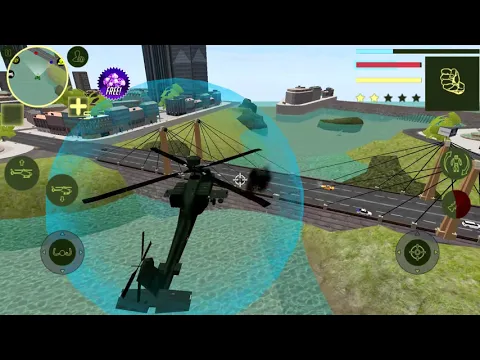
Video of Rise of Steel
Screenshot Rise of Steel 1
Screenshot Rise of Steel 2
Screenshot Rise of Steel 3
Screenshot Rise of Steel 4
Screenshot Rise of Steel 5
Screenshot Rise of Steel 6
Screenshot Rise of Steel 7

Download Rise of Steel APK for Android

What's New in Version 2.7.3

Bug fixes

Other versions

  • 2.7.3 (latest) 105MB Android 5.0+ arm64-v8aarmeabi-v7a Download
  • 2.2 93MB Android 4.1+ armeabi-v7ax86 Download
  • 2.0 93MB Android 4.1+ armeabi-v7ax86 Download

System Requirements

OS Version
Android 5.0 (Lollipop) or higher
Architecture
Varies by file (Which one do I need?)
Disk Space
~200 MB free space required
RAM
2 GB
Internet
Not required (Offline playable)
Permissions (9)
  • Internet
  • Access Network State
  • Wake Lock
  • Ad Id
  • Billing

APK File Details

Package ID com.nc.rise.of.steel
Available on Google Play
Developer Naxeex Action & RPG Games
License Free
Monetization Contains Ads   In-App Purchases
Age Rating Teen (Violence, Blood)
Interface Language
English +74

English, Japanese, German, Bulgarian, Thai, Hindi, Vietnamese, Ukrainian, Polish, Korean, Romanian, Arabic, French, Turkish, Czech, Spanish, Italian, Portuguese, Hungarian, Russian, Chinese, + 54 localizations

APK Verification & Virus Scan Results

No Virus Signature Verified Safe & Original

Virus scan: Clean (0/64) View report. This APK is free of malware and its signature matches the official developer release.

Show File Details (SHA-256, SHA-1, MD5)

SHA-1 Signature:

9d0af5694aa13f0f4cb78da4afb242e537d912b9

SHA-256 Hash:

de731ca1f68f16743699db019a2d7def8dfb22d34b10f42ed3a15734f6ab4d9b

MD5 Checksum:

6760763c6aba9e42b9f22bd89da7d95b

Frequently Asked Questions

Is Rise of Steel safe to download?

Yes, Rise of Steel is safe to download. The APK is scanned on every update — no malware or viruses detected. You can verify the full scan report in the Security section above.

How to install Rise of Steel APK on Android?

Download the APK using the button above. Then open the file and tap Install. If prompted, enable "Install from unknown sources" in Settings → Security. The process takes under a minute. Read more

What Android version does Rise of Steel require?

Rise of Steel requires Android 5.0 (API 21) or higher. Optimized for Android 13 (API 33).

Is Rise of Steel free?

Yes, it is free to download and use, but it contains ads and offers in-app purchases.

How to update Rise of Steel to the latest version?

Download the latest APK from this page and install it over your existing version — no need to uninstall first. Your data and settings will be preserved. We update the file as soon as a new version is released.

What processor architecture does Rise of Steel support?

Rise of Steel supports arm64-v8a, armeabi-v7a. This build does not support x86/x86_64 processors, so it will not run on most PC emulators. If you are unsure about your device architecture, check the Device Info section on this page.

How to enable installation from unknown sources on Android?

Go to Settings → Security (or Settings → Apps → Special access on Android 8+) and enable "Install unknown apps" for your browser or file manager. On Android 8 and above this setting is per-app, not global. Read more

If you have found any issue or are having difficulty with this page, please .

User Reviews & Ratings

Global rating(Play Store): 4.09(42K)
Site Rating: 4.5(2)
Rate this app

4.50

12345

2

Share your experience with other users.