Epic Raft Icon

Epic Raft APK for Android

1M+
Feb 19, 2024

Epic and realistic survival on a raft in extreme conditions

Download Epic Raft APK 1.0.16 134MB

What is Epic Raft?

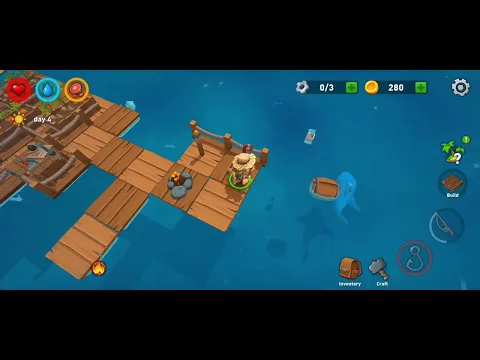
Epic Raft – a journey across the endless ocean on a small raft built by the hero from the wreckage of a shipwreck. From now on, the character can only rely on his ingenuity and dexterity, as well as on the user who will lend him his shoulder and knowledge in difficult times. How long can you survive in an unfriendly environment, and how happy will the end of the adventure be?

Use the hook to collect materials floating by, which will be useful for crafting new items, weapons and tools. Build a workbench that acts as an important element of survival and helps produce what a lonely wanderer needs at the moment. Since this is a simulator, the hero is faced with the acute question of nutrition and quenching thirst – keep an eye on these indicators, and at the same time pay attention to the hero’s health.

Features:

  • solving survival problems as they arise;
  • create items and build mechanisms;
  • monitor your vital parameters;
  • cartoon 3D graphics.

Gradually, the flimsy raft will grow to the size of a large floating base, on which the character will be able to place everything that is needed for exploration and travel, visiting new islands, where both pleasant surprises and mortal dangers may await. Once again, try not to leave the floating house Epic Raft, as sharks and mutant crabs are expectantly patrolling underwater, and hungry zombies are roaming the islands.
Video of Epic Raft
Screenshot Epic Raft 1
Screenshot Epic Raft 2
Screenshot Epic Raft 3
Screenshot Epic Raft 4
Screenshot Epic Raft 5

Download Epic Raft APK for Android

What's New in Version 1.0.16

No official changelog provided for Epic Raft version 1.0.16. This update likely includes general stability improvements and bug fixes.

Available Files

  • 1.0.16 134MB Android 5.0+ arm64-v8aarmeabi-v7a Download

System Requirements

OS Version
Android 5.0 (Lollipop) or higher
Architecture
Varies by file (Which one do I need?)
Disk Space
~250 MB free space required
RAM
2 GB
Internet
Not required (Offline playable)
Permissions (12)
  • Internet
  • Access Network State
  • Read External Storage
  • Write External Storage
  • Wake Lock

APK File Details

Package ID com.rmg.raft.ocean.survival.last.day
Developer Lightcore Ltd.
License Free ( No Ads)
Interface Language
English +75

English, Japanese, German, Bulgarian, Thai, Hindi, Vietnamese, Ukrainian, Polish, Korean, Romanian, Arabic, French, Turkish, Czech, Spanish, Italian, Portuguese, Hungarian, Russian, Chinese, Indonesian, + 54 localizations

APK Verification & Virus Scan Results

No Virus Signature Verified Safe & Original

Virus scan: Clean (0/63) View report. The APK file is digitally signed.

Show File Details (SHA-256, SHA-1, MD5)

SHA-1 Signature:

6801842684cd1fd9127a2c4e7b05bf79a80afaa5

SHA-256 Hash:

c7e48a190f2a336cb03a4c741bd3539edca98329f21142c4fbe5076b7e3c3620

MD5 Checksum:

e2f2c42975ddc05f865c2f848ba78981

Frequently Asked Questions

Is Epic Raft safe to download?

Yes, Epic Raft is safe to download. The APK is scanned on every update — no malware or viruses detected. You can verify the full scan report in the Security section above.

How to install Epic Raft APK on Android?

Download the APK using the button above. Then open the file and tap Install. If prompted, enable "Install from unknown sources" in Settings → Security. The process takes under a minute. Read more

Why does installation fail on newer Android versions (14 - 16)?

Newer Android versions strictly block the installation of apps built for older Android versions (API < 23) for security reasons. Standard installation is not possible. Read our step-by-step guide on how to bypass this restriction using ADB or Shizuku.

What Android version does Epic Raft require?

Epic Raft requires Android 5.0 (API 21) or higher. Optimized for Android 11 (API 30).

What processor architecture does Epic Raft support?

Epic Raft supports arm64-v8a, armeabi-v7a. This build does not support x86/x86_64 processors, so it will not run on most PC emulators. If you are unsure about your device architecture, check the Device Info section on this page.

How to enable installation from unknown sources on Android?

Go to Settings → Security (or Settings → Apps → Special access on Android 8+) and enable "Install unknown apps" for your browser or file manager. On Android 8 and above this setting is per-app, not global. Read more

If you have found any issue or are having difficulty with this page, please .

User Reviews & Ratings

Global rating(Play Store): 4.06(2.6K)
Site Rating: 5(1)
Rate this app

5.00

12345

1

Share your experience with other users.