Doll Designer Icon

Doll Designer APK for Android

76M+
Free
May 1, 2024

Gather a collection of puppet characters and build a house for them

Download Doll Designer APK 1.12.0 240MB

What is Doll Designer?

Doll Designer – collect a collection of dolls that will match the appearance of the wishes of a little girl. To implement the game task, a bit of dexterity and speed will be required, since the user will literally have to change the style and image of the puppet person on the go. This one-touch casual runner is aimed at children, and given the theme, it is more suitable for girls.

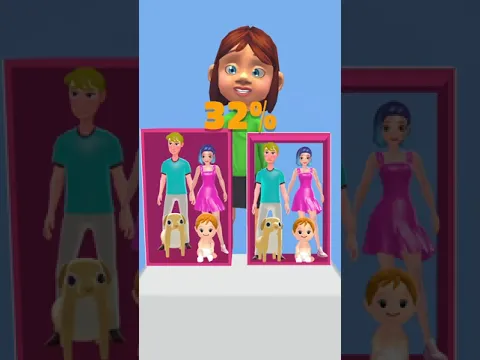
At the start of the original race, the model is faceless and boring – by the finish line, the player needs to transform the doll, using the sample as a guide. Although sometimes it will be allowed to show imagination, the main thing is that the result satisfies the little heroine waiting at the finish line. During the race, collect wardrobe items, wigs, shoes and other accessories for the doll. Do not ignore diamonds, which are the main currency and open access to new game content.

Features:

  • colorful 3D one-touch runner;
  • collect suitable accessories when passing the route;
  • try to achieve 100% match with the original sample;
  • fill the small house with decorative objects.

Use the collected gems Doll Designer to create beautiful dollhouses – populate miniature real estate with characters, use a creative approach to decorate the interior of living rooms and other premises.
Video of Doll Designer
Screenshot Doll Designer 1
Screenshot Doll Designer 2
Screenshot Doll Designer 3
Screenshot Doll Designer 4
Screenshot Doll Designer 5

Download Doll Designer APK for Android

What's New in Version 1.12.0

Bug Fixes

Available Files

System Requirements

OS Version
Android 7.0 (Nougat) or higher
Architecture
Varies by file (Which one do I need?)
Disk Space
~400 MB free space required
RAM
2 GB
Internet
Not required (Offline playable)
Permissions (13)
  • Internet
  • Access Network State
  • Access Coarse Location
  • Vibrate
  • Wake Lock

APK File Details

Package ID com.kfe.toymaker
Available on Google Play
Developer Lion Studios
License Free
Monetization Contains Ads   In-App Purchases
Age Rating Teen (Violence, Blood, Suggestive Themes)
Interface Language
English +76

English, Japanese, Indonesian, German, Bulgarian, Thai, Chinese, Hindi, Vietnamese, Ukrainian, Polish, Korean, Romanian, Arabic, French, Turkish, Czech, Spanish, Italian, Portuguese, Hungarian, Russian, + 55 localizations

APK Verification & Virus Scan Results

No Virus Signature Verified Safe & Original

Virus scan: Clean (0/62) View report. This APK is free of malware and its signature matches the official developer release.

Show File Details (SHA-256, SHA-1, MD5)

SHA-1 Signature:

13cad3acf057485f280412e0d8dc2ff8472291c7

SHA-256 Hash:

2d64227da79d2b42be1a3182d991d29b29f756eeb97e9065714d2d5eb251499c

MD5 Checksum:

588ab110d7522a1eede812219b9de399

Frequently Asked Questions

Is Doll Designer safe to download?

Yes, Doll Designer is safe to download. The APK is scanned on every update — no malware or viruses detected. You can verify the full scan report in the Security section above.

How to install Doll Designer APK on Android?

Download the APK using the button above. Then open the file and tap Install. If prompted, enable "Install from unknown sources" in Settings → Security. The process takes under a minute. Read more

What Android version does Doll Designer require?

Doll Designer requires Android 7.0 (API 24) or higher. Optimized for Android 13 (API 33).

Is Doll Designer free?

Yes, it is free to download and use, but it contains ads and offers in-app purchases.

How to update Doll Designer to the latest version?

Download the latest APK from this page and install it over your existing version — no need to uninstall first. Your data and settings will be preserved. We update the file as soon as a new version is released.

What processor architecture does Doll Designer support?

Doll Designer supports arm64-v8a, armeabi-v7a. This build does not support x86/x86_64 processors, so it will not run on most PC emulators. If you are unsure about your device architecture, check the Device Info section on this page.

How to enable installation from unknown sources on Android?

Go to Settings → Security (or Settings → Apps → Special access on Android 8+) and enable "Install unknown apps" for your browser or file manager. On Android 8 and above this setting is per-app, not global. Read more

If you have found any issue or are having difficulty with this page, please .

User Reviews & Ratings

Global rating(Play Store): 4.28(433.7K)
Rate this app

0.00

12345

not yet rated

Share your experience with other users.