Drive Kill game cover art for Android
Drive Kill Icon

Drive Kill APK for Android

Apr 12, 2013

Download Drive Kill APK 1.05 4MB

What is Drive Kill?

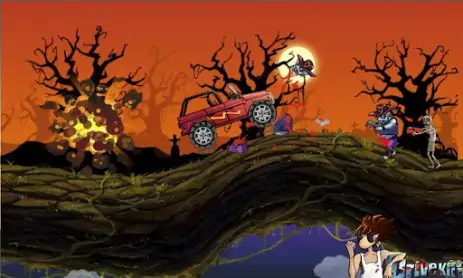
Drive Kill – an exciting arcade game in which you will destroy zombies in a car. Feel like a real hunter. At your disposal is a super pumped car, with a lot of upgrades for killing zombies. Improve the car during the game and destroy as many zombies as possible.

Screenshot Drive Kill 1
Screenshot Drive Kill 2
Screenshot Drive Kill 3
Screenshot Drive Kill 4
Screenshot Drive Kill 5
Screenshot Drive Kill 6

Download Drive Kill APK for Android

What's New in Version 1.05

No official changelog provided for Drive Kill version 1.05. This update likely includes general stability improvements and bug fixes.

Available Files

System Requirements

OS Version
Android 1.6 (Donut) or higher
Architecture
Varies by file (Which one do I need?)
Disk Space
~10 MB free space required
RAM
2 GB
Internet
Not required (Offline playable)
Permissions (3)
  • Internet
  • Access Network State
  • Wake Lock

APK File Details

Package ID com.f4games.drivekill
Developer f4games
License Free ( No Ads)
Interface Language
1 language

+ 1 localization

APK Verification & Virus Scan Results

No Virus Signature Verified Safe & Original

Virus scan: Clean (0/62) View report. The APK file is digitally signed.

Show File Details (SHA-256, SHA-1, MD5)

SHA-1 Signature:

a7ad0bccd2feef02aecec58a436136e92df10bc4

SHA-256 Hash:

0f95d9bd043011d09dbed695ac6fe3ce1803040ea6e98f224beaf8c7258e63fb

MD5 Checksum:

8b0cf2b1efb12809dfaa3ae2989c6759

Frequently Asked Questions

Is Drive Kill safe to download?

Yes, Drive Kill is safe to download. The APK is scanned on every update — no malware or viruses detected. You can verify the full scan report in the Security section above.

How to install Drive Kill APK on Android?

Download the APK using the button above. Then open the file and tap Install. If prompted, enable "Install from unknown sources" in Settings → Security. The process takes under a minute. Read more

Why does installation fail on newer Android versions (14 - 16)?

Newer Android versions strictly block the installation of apps built for older Android versions (API < 23) for security reasons. Standard installation is not possible. Read our step-by-step guide on how to bypass this restriction using ADB or Shizuku.

What Android version does Drive Kill require?

Drive Kill requires Android 1.6 (API 4) or higher. Optimized for Android 3.0.x (API 11).

What processor architecture does Drive Kill support?

Drive Kill supports universal. If you are unsure about your device architecture, check the Device Info section on this page.

How to enable installation from unknown sources on Android?

Go to Settings → Security (or Settings → Apps → Special access on Android 8+) and enable "Install unknown apps" for your browser or file manager. On Android 8 and above this setting is per-app, not global. Read more

If you have found any issue or are having difficulty with this page, please .

User Reviews & Ratings

Site Rating: 4.4(5)
Rate this app

4.40

12345

5

Share your experience with other users.