Mobile Soccer League Icon

Mobile Soccer League APK for Android

10M+
Free
Feb 14, 2023

Mobile soccer game

Download Mobile Soccer League APK 1.0.29 46MB Old versions

What is Mobile Soccer League?

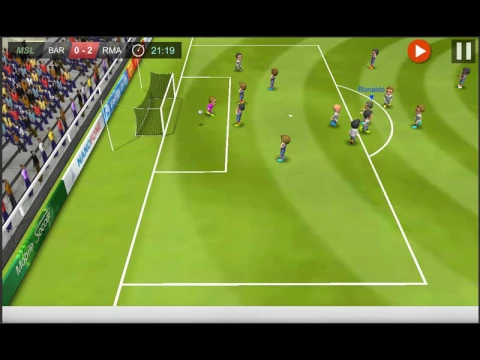
Mobile Soccer League (Mobile Football League) is a real-time soccer game simulator.

The concept of the simulator is that football fans from all over the world can play for future matches of the 2017 football season. The event map shows all football events for 2017.

Game process. The player should choose:

  • One of the national football leagues: France, Germany, Spain, Turkey and others, or the Champions League.
  • The football team.
  • Team players.
  • On the 2017 season map, the player chooses a match.
  • Develops game tactics and place the players on the field in the appropriate positions.
  • Plays football.

The goal of the player is to become the champion of the league. Team football players to enter the Champions League national team and win the Cup of Cups.

Management – using a virtual joystick and four buttons: 1) pass, 2) hit, 3) run, 4) bypass or tackle.

You can play in two modes:

  1. Regular football: two halves of 45 minutes.
  2. Rapid football is street football: three halves of 15 minutes in one goal.

Features:

  • Game characters are animated.
  • Graphics – 2D or 3D, depending on the quality of the Internet connection.
  • The mechanics of the game is based on the real laws of physics and football.

Have a good season!
Also known as: MSL
Video of Mobile Soccer League
Screenshot Mobile Soccer League 1
Screenshot Mobile Soccer League 2
Screenshot Mobile Soccer League 3
Screenshot Mobile Soccer League 4
Screenshot Mobile Soccer League 5
Screenshot Mobile Soccer League 6
Screenshot Mobile Soccer League 7
Screenshot Mobile Soccer League 8

Download Mobile Soccer League APK for Android

What's New in Version 1.0.29

No official changelog provided for Mobile Soccer League version 1.0.29. This update likely includes general stability improvements and bug fixes.

Other versions

System Requirements

OS Version
Android 4.4 (Kit Kat) or higher
Architecture
Varies by file (Which one do I need?)
Disk Space
~70 MB free space required
RAM
2 GB
Internet
Not required (Offline playable)
Permissions (3)
  • Internet
  • Access Network State
  • Billing

APK File Details

Package ID com.rasugames.msl
Developer Rasu Games
License Free ( No Ads)
Age Rating PEGI 3
Interface Language
1 language

+ 1 localization

APK Verification & Virus Scan Results

No Virus Signature Verified Safe & Original

Virus scan: Clean (0/62) View report. The APK file is digitally signed.

Show File Details (SHA-256, SHA-1, MD5)

SHA-1 Signature:

F6652BEAC3CF60D649A47920CB73B9FD06466294

SHA-256 Hash:

80e957effc905b72ef24fa545a4de246d518e72933e008be8ccd7cccccb1628b

MD5 Checksum:

d02a010e2271296807e281120034df18

Frequently Asked Questions

Is Mobile Soccer League safe to download?

Yes, Mobile Soccer League is safe to download. The APK is scanned on every update — no malware or viruses detected. You can verify the full scan report in the Security section above.

How to install Mobile Soccer League APK on Android?

Download the APK using the button above. Then open the file and tap Install. If prompted, enable "Install from unknown sources" in Settings → Security. The process takes under a minute. Read more

Why does installation fail on newer Android versions (14 - 16)?

Newer Android versions strictly block the installation of apps built for older Android versions (API < 23) for security reasons. Standard installation is not possible. Read our step-by-step guide on how to bypass this restriction using ADB or Shizuku.

What Android version does Mobile Soccer League require?

Mobile Soccer League requires Android 4.4 (API 19) or higher. Optimized for Android 11 (API 30).

Is Mobile Soccer League free?

Yes, this app is completely free to download and use.

What processor architecture does Mobile Soccer League support?

Mobile Soccer League supports arm64-v8a, armeabi-v7a. This build does not support x86/x86_64 processors, so it will not run on most PC emulators. If you are unsure about your device architecture, check the Device Info section on this page.

How to enable installation from unknown sources on Android?

Go to Settings → Security (or Settings → Apps → Special access on Android 8+) and enable "Install unknown apps" for your browser or file manager. On Android 8 and above this setting is per-app, not global. Read more

If you have found any issue or are having difficulty with this page, please .

User Reviews & Ratings

Global rating(Play Store): 4.09(298.7K)
Site Rating: 3.95(99)
Rate this app

3.95

12345

99

Share your experience with other users.

Alperen:
Uygulamyi yuklemedim ama simdi yukluyok
Muhamed demir:
Cok guzel