Pop the Lock Icon

Pop the Lock APK for Android

10M+
Free
Aug 25, 2023

This game is pure addiction--once you pop the fun can't stop!

Download Pop the Lock APK 2.0.11 37MB

What is Pop the Lock?

Pop The Lock is a code lock picking simulator. The task is to methodically crack as many locks as possible. With successive touches on the screen, you need to bring the notch on the circumference of the cylinder to a special recess at the top of the lock.

Combination lock:

  • Electronic. In order to open the electronic lock, you must enter the correct code – the electronic circuit closes – the electromagnet is activated, which removes the mechanical obstacle – the lock opens.
  • Mechanical – consists of a series of cylinders, along the circumference of which numbers are evenly spaced. All cylinders are mechanically notched at different numerical values. In order to mechanically open the combination lock, you need to place the notches on all cylinders in one line opposite the recess in the upper part of the lock. Thus, a straight line of notches eliminates the mechanical obstruction and allows the lock to be opened. You can arrange the notches in one line by knowing the correct code, by ear – in case of a match, you will hear a click, or by touch.

The game has several dozens of difficulty levels – become a leader on the rating table of the game! Pop The Lock – develops: attention, patience and confidence that you will not remain hungry or on the street in a foreign city.
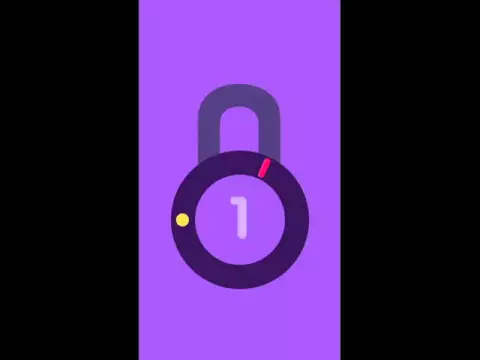
Video of Pop the Lock
Screenshot Pop the Lock 1
Screenshot Pop the Lock 2
Screenshot Pop the Lock 3

Download Pop the Lock APK for Android

What's New in Version 2.0.11

Small Changes

Available Files

System Requirements

OS Version
Android 7.0 (Nougat) or higher
Architecture
Varies by file (Which one do I need?)
Disk Space
~60 MB free space required
RAM
2 GB
Internet
Not required (Offline playable)
Permissions (7)
  • Internet
  • Camera
  • Access Network State
  • Read External Storage
  • Write External Storage

APK File Details

Package ID com.sm.popTheLock
Developer Simple Machine
License Free
Monetization Contains Ads   In-App Purchases
Interface Language
English +73

English, Japanese, Indonesian, German, Bulgarian, Thai, Hindi, Vietnamese, Ukrainian, Polish, Korean, Romanian, Arabic, French, Turkish, Czech, Spanish, Italian, Portuguese, Hungarian, Russian, Chinese, + 52 localizations

APK Verification & Virus Scan Results

1 Detections (Low Risk) Signature Verified Not on Play Store

Virus scan: 1/63 Potential Detections View report. Flagged by some engines as a false positive. Signature matches the original developer build.

Show File Details (SHA-256, SHA-1, MD5)

SHA-1 Signature:

89DC95A24F11DD08E9A018000C9110928605DB58

SHA-256 Hash:

db092c032bc0f59fe2c55dad1f9843bffc380a9f490a9b7a91f600cfe7004bad

MD5 Checksum:

6fa0c7e6fd204414c69e638d5005bb5c

Frequently Asked Questions

Is Pop the Lock safe to download?

A small number of antivirus engines flagged Pop the Lock. This may be a false positive, but we recommend reviewing the full scan report in the Security section above before downloading. Download at your own risk.

How to install Pop the Lock APK on Android?

Download the APK using the button above. Then open the file and tap Install. If prompted, enable "Install from unknown sources" in Settings → Security. The process takes under a minute. Read more

Why does installation fail on newer Android versions (14 - 16)?

Newer Android versions strictly block the installation of apps built for older Android versions (API < 23) for security reasons. Standard installation is not possible. Read our step-by-step guide on how to bypass this restriction using ADB or Shizuku.

What Android version does Pop the Lock require?

Pop the Lock requires Android 7.0 (API 24) or higher. Optimized for Android 8.0 (API 26).

Is Pop the Lock free?

Yes, it is free to download and use, but it contains ads and offers in-app purchases.

What processor architecture does Pop the Lock support?

Pop the Lock supports armeabi-v7a, x86. If you are unsure about your device architecture, check the Device Info section on this page.

How to enable installation from unknown sources on Android?

Go to Settings → Security (or Settings → Apps → Special access on Android 8+) and enable "Install unknown apps" for your browser or file manager. On Android 8 and above this setting is per-app, not global. Read more

If you have found any issue or are having difficulty with this page, please .

User Reviews & Ratings

Global rating(Play Store): 4.25(112K)
Site Rating: 3.67(6)
Rate this app

3.67

12345

6

Share your experience with other users.