The Flying Sun Icon

The Flying Sun APK for Android

- Adventure Game

Download The Flying Sun APK 1.2.7.1 21MB Old versions

What is The Flying Sun?

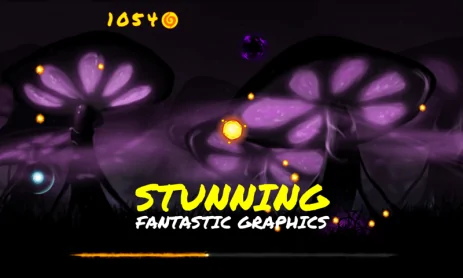
The Flying Sun – Adventure Game – An entertaining game for big little ones: the sun has disappeared from the sky, and your goal is to help him escape from the dark forest and return back. Collect as many bonuses as you can and save the planet!

Set the speed and power of the jump and launch the solar ball. Make your way through thorny trees, collect achievements and level up for a better chance of finishing the game!

Accumulate as many coins as possible, increase your level by using the power-ups you meet along the way.

Features:

  • FREE app
  • Easy to understand
  • Lots of achievements
  • Powerful boosters
  • Easy gameplay
  • Great graphics.
Also known as: The Flying Sun - Adventure Game, The Flying Sun Adventure Game
Screenshot The Flying Sun 1
Screenshot The Flying Sun 2
Screenshot The Flying Sun 3
Screenshot The Flying Sun 4
Screenshot The Flying Sun 5
Screenshot The Flying Sun 6
Screenshot The Flying Sun 7
Screenshot The Flying Sun 8
Screenshot The Flying Sun 9
Screenshot The Flying Sun 10
Screenshot The Flying Sun 11
Screenshot The Flying Sun 12

Download The Flying Sun Adventure Game APK for Android

What's New in Version 1.2.7.1

No official changelog provided for The Flying Sun version 1.2.7.1. This update likely includes general stability improvements and bug fixes.

Other versions

  • 1.2.7.1 21MB Android 2.3.3, 2.3.4+ armeabi-v7a Download
  • 1.2.1.0 16MB Android 4.0+ armeabi-v7a Download
  • 1.0.0.0 16MB Android 4.0+ armeabi-v7a Download

System Requirements

OS Version
Android 2.3.3, 2.3.4 (Gingerbread) or higher
Architecture
Varies by file (Which one do I need?)
Disk Space
~40 MB free space required
RAM
2 GB
Internet
Not required (Offline playable)
Permissions (7)
  • Internet
  • Access Network State
  • Write External Storage
  • Read Phone State
  • Vibrate

APK File Details

Package ID com.onlygames.theflyingsun
Developer OnlyGames
License Free ( No Ads)
Interface Language
41 languages

Japanese, German, Bulgarian, Thai, Hindi, Vietnamese, Ukrainian, Polish, Korean, Romanian, Arabic, French, Turkish, Czech, Spanish, Italian, Portuguese, Hungarian, Russian, + 22 localizations

APK Verification & Virus Scan Results

No Virus Signature Verified Safe & Original

Virus scan: Clean (0/64) View report. The APK file is digitally signed.

Show File Details (SHA-256, SHA-1, MD5)

SHA-1 Signature:

09b5e204454bc617f40915acd084ac252780652b

SHA-256 Hash:

9d328da0ee4210c23046050a288d9ec9a1ee00cdc3c9bc8febe0191c8f2a7423

MD5 Checksum:

270fa02b99859bf7486d80bac816958c

Frequently Asked Questions

Is The Flying Sun safe to download?

Yes, The Flying Sun is safe to download. The APK is scanned on every update — no malware or viruses detected. You can verify the full scan report in the Security section above.

How to install The Flying Sun APK on Android?

Download the APK using the button above. Then open the file and tap Install. If prompted, enable "Install from unknown sources" in Settings → Security. The process takes under a minute. Read more

Why does installation fail on newer Android versions (14 - 16)?

Newer Android versions strictly block the installation of apps built for older Android versions (API < 23) for security reasons. Standard installation is not possible. Read our step-by-step guide on how to bypass this restriction using ADB or Shizuku.

What Android version does The Flying Sun require?

The Flying Sun requires Android 2.3.3, 2.3.4 (API 10) or higher. Optimized for Android 5.1 (API 22).

What processor architecture does The Flying Sun support?

The Flying Sun supports armeabi-v7a. This build does not support x86/x86_64 processors, so it will not run on most PC emulators. If you are unsure about your device architecture, check the Device Info section on this page.

How to enable installation from unknown sources on Android?

Go to Settings → Security (or Settings → Apps → Special access on Android 8+) and enable "Install unknown apps" for your browser or file manager. On Android 8 and above this setting is per-app, not global. Read more

If you have found any issue or are having difficulty with this page, please .

User Reviews & Ratings

Site Rating: 4.5(2)
Rate this app

4.50

12345

2

Share your experience with other users.