Turretz Icon

Turretz APK for Android

1M+
Jul 24, 2019

Protect the planet from countless space threats

Download Turretz APK 3.0.9 22MB

What is Turretz?

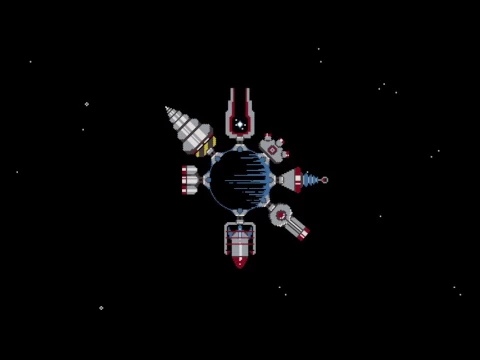
Turretz – endless space awaits a brave explorer who is ready to use all his strength and strategic talents to build a fortified orbital station that can become a reliable defense for the planet from all external threats of an alien or natural nature. In the design of the novelty from the studio 111%, a retro atmosphere is felt, which is facilitated by pixel graphics and electronic music as a background soundtrack. Arcade, action and strategy – this trio of genres will not let you relax for a second!

For each improvement of the station Turretz you will have to spend gold coins, initially one and a half thousand of them are available, which means you can buy a “gun” of the appropriate price or a little cheaper. After that, we tap the start button and try to withstand the attack of numerous alien ships, if this succeeds, then we get a certain amount of voiced coins into the account. Virtual currency can be obtained either for victories, or for watching commercials, or for investing real money in a project.

So step by step, your space base Turretz will acquire new lasers, guns and guns that will help it survive even against enemies that are significantly superior in number, as well as seasoned bosses. In addition to the station itself, automatic firing turrets and other auxiliary elements can be installed along the perimeter, which can be improved to achieve maximum efficiency from them. Compete with other gamers, trying to create a better base than theirs and earning a record number of points.
Video of Turretz
Screenshot Turretz 1
Screenshot Turretz 2
Screenshot Turretz 3
Screenshot Turretz 4

Download Turretz APK for Android

What's New in Version 3.0.9

No official changelog provided for Turretz version 3.0.9. This update likely includes general stability improvements and bug fixes.

Available Files

  • 3.0.9 22MB Android 4.1+ armeabi-v7a Download

System Requirements

OS Version
Android 4.1 (Jelly Bean) or higher
Architecture
Varies by file (Which one do I need?)
Disk Space
~40 MB free space required
RAM
2 GB
Internet
Not required (Offline playable)
Permissions (7)
  • Internet
  • Access Network State
  • Read External Storage
  • Write External Storage
  • Access Fine Location

APK File Details

Package ID com.percent.turretz
Developer 111%
License Free ( No Ads)
Age Rating PEGI 3

APK Verification & Virus Scan Results

No Virus Signature Verified Safe & Original

Virus scan: Clean (0/61) View report. The APK file is digitally signed.

Show File Details (SHA-256, SHA-1, MD5)

SHA-1 Signature:

3FD9D63917A3D1BA6D706F11FDB6F703FD81EBF2

SHA-256 Hash:

798f160db3e48633e1af2fcebac535a60136efe46b946147a55ac1319d9b7af6

MD5 Checksum:

eb0ed6df84281019d925c66a600b9bdd

Frequently Asked Questions

Is Turretz safe to download?

Yes, Turretz is safe to download. The APK is scanned on every update — no malware or viruses detected. You can verify the full scan report in the Security section above.

How to install Turretz APK on Android?

Download the APK using the button above. Then open the file and tap Install. If prompted, enable "Install from unknown sources" in Settings → Security. The process takes under a minute. Read more

Why does installation fail on newer Android versions (14 - 16)?

Newer Android versions strictly block the installation of apps built for older Android versions (API < 23) for security reasons. Standard installation is not possible. Read our step-by-step guide on how to bypass this restriction using ADB or Shizuku.

What Android version does Turretz require?

Turretz requires Android 4.1 (API 16) or higher. Optimized for Android 8.1 (API 27).

What processor architecture does Turretz support?

Turretz supports armeabi-v7a. This build does not support x86/x86_64 processors, so it will not run on most PC emulators. If you are unsure about your device architecture, check the Device Info section on this page.

How to enable installation from unknown sources on Android?

Go to Settings → Security (or Settings → Apps → Special access on Android 8+) and enable "Install unknown apps" for your browser or file manager. On Android 8 and above this setting is per-app, not global. Read more

If you have found any issue or are having difficulty with this page, please .

User Reviews & Ratings

Global rating(Play Store): 4.42(44.8K)
Rate this app

0.00

12345

not yet rated

Share your experience with other users.