Clash of Blocks Icon

Clash of Blocks APK for Android

14M+
Free
Sep 5, 2024

Use tactics and ingenuity to fill the playing field with your color

Download Clash of Blocks APK 98.1.1 111MB

What is Clash of Blocks?

Clash of Blocks is a battle for territory that will require logic and strategic skills to succeed. Fill the maximum area of ​​the limited playing field with cubes of your color, choosing the right place for landing an impromptu landing force. As soon as the element is on the field, it begins to fill the space, meeting resistance only at the points of contact with enemy tiles.

Try to block opponents of a different color, not allowing them to fill a sector larger than you – the intellectual war will be tough and uncompromising. Several rivals are involved in the confrontation, which, coupled with the ornate design of the playing fields, poses a difficult task for the gamer. The rewards for ingenuity and tactical skill will be gold, which opens up access to new game content – the shape and color of blocks, locations with new scenery (camping, confectionery, farm, north pole).

Features:

  • strategic capture of territories with blocks of its own color;
  • the reward depends on the percentage of the captured area;
  • colorful 3D graphics and funny sounds;
  • unlock new block types and locations;
  • build a virtual dream city.

In between complex intellectual tests Clash of Blocks the user is invited to build a city with developed infrastructure, upgradable buildings, transport hubs, a beautiful bay and green spaces.
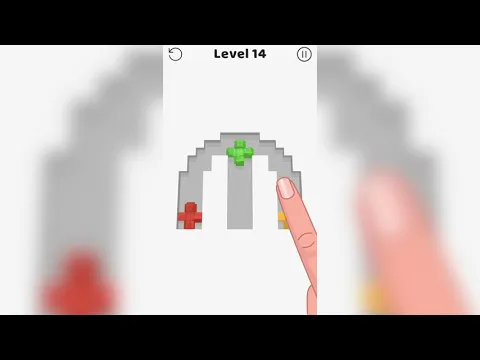
Video of Clash of Blocks
Screenshot Clash of Blocks 1
Screenshot Clash of Blocks 2
Screenshot Clash of Blocks 3
Screenshot Clash of Blocks 4
Screenshot Clash of Blocks 5

Download Clash of Blocks APK for Android

What's New in Version 98.1.1

Bug fixes + performance improvements. Thank you for playing!

Available Files

System Requirements

OS Version
Android 6.0 (Marshmallow) or higher
Architecture
Varies by file (Which one do I need?)
Disk Space
~150 MB free space required
RAM
2 GB
Internet
Not required (Offline playable)
Google Services
Required
Permissions (19)
  • Internet
  • Access Network State
  • Vibrate
  • Wake Lock
  • Clashofblocks.permission.c2d Message

APK File Details

Package ID com.eqrwiodfk.clashofblocks
Developer Popcore Games
License Free
Monetization Contains Ads   In-App Purchases
Interface Language
English +76

English, Arabic, Bulgarian, Czech, German, Spanish, French, Hindi, Hungarian, Indonesian, Italian, Japanese, Korean, Polish, Portuguese, Romanian, Russian, Thai, Turkish, Ukrainian, Vietnamese, Chinese, + 55 localizations

APK Verification & Virus Scan Results

No Virus Signature Verified Safe & Original

Virus scan: Clean (0/65) View report. The APK file is digitally signed.

Show File Details (SHA-256, SHA-1, MD5)

SHA-1 Signature:

78d2a7348824d70c77dac9349c256b2a9560f146

SHA-256 Hash:

1b34aea6d783630626ebc0723c99ae7f7ff0e8dfa97d3e152e96afb49dd2ae4a

MD5 Checksum:

f7cdea2b345dd72d25ffe259ed8bdbd7

Frequently Asked Questions

Is Clash of Blocks safe to download?

Yes, Clash of Blocks is safe to download. The APK is scanned on every update — no malware or viruses detected. You can verify the full scan report in the Security section above.

How to install XAPK file?

XAPK is a split APK package. Standard Android installer cannot open it directly. Use 'SAI' or 'XAPK Installer' — they handle XAPK files automatically. Download the installer, open the XAPK file with it, and follow the on-screen steps. Read more

What Android version does Clash of Blocks require?

Clash of Blocks requires Android 6.0 (API 23) or higher. Optimized for Android 14 (API 34).

Is Clash of Blocks free?

Yes, it is free to download and use, but it contains ads and offers in-app purchases.

What processor architecture does Clash of Blocks support?

Clash of Blocks supports arm64-v8a. This build does not support x86/x86_64 processors, so it will not run on most PC emulators. If you are unsure about your device architecture, check the Device Info section on this page.

How to enable installation from unknown sources on Android?

Go to Settings → Security (or Settings → Apps → Special access on Android 8+) and enable "Install unknown apps" for your browser or file manager. On Android 8 and above this setting is per-app, not global. Read more

If you have found any issue or are having difficulty with this page, please .

User Reviews & Ratings

Global rating(Play Store): 4.28(52.8K)
Rate this app

0.00

12345

not yet rated

Share your experience with other users.