Match Block 3D game cover art for Android
Match Block 3D Icon

Match Block 3D APK for Android

- 2048 Merge Game
797K+
Free
Feb 24, 2024

Use merge principles to get the desired result

Download Match Block 3D APK 2.1.8 61MB

What is Match Block 3D?

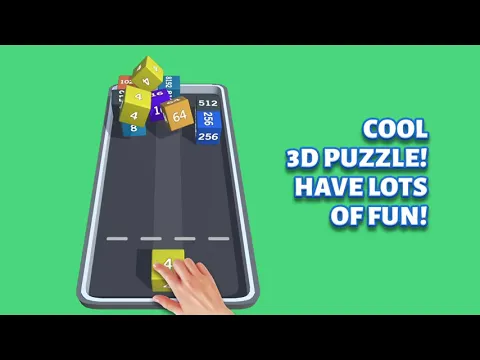
Match Block 3D is a popular 3D puzzle game. In addition to the skills of mathematical counting, the user will also need luck, because the cubes with numerical designations thrown onto the playing field merrily bounce and move around the space with incomprehensible logic. The player’s task is to get the final die with the designation 2048, for which they will have to combine objects with the same value.

Game actions take place on a field that looks like a hockey box – the sides do not allow jumping and randomly tumbling objects to fly out of the borders. The principle of merging is classic – by combining two cubes with the same value, the user receives a brick with a doubled number. So, by combining two cubes with the numbers “four”, as a result we get an element with the designation “eight”, a pair of cubes with the number “sixteen” at the output of dates, one object “thirty-two” and so on, until the result 2048 is reached.

Features:

  • math skills and element of randomness;
  • high-quality animation of moving elements;
  • minimalist level design;
  • use boosters and bonuses;
  • global leaderboard.

Push the cubes together, choose the optimal throw trajectory, use boosters. Make sure that there is always space on the playing field for new elements, otherwise the attempt will end in failure and the round will have to start over. Demonstrate record results Match Block 3D and follow your achievements in the global table of the best players.
Also known as: Match Block 3D - 2048 Merge Game
Video of Match Block 3D
Screenshot Match Block 3D 1
Screenshot Match Block 3D 2
Screenshot Match Block 3D 3
Screenshot Match Block 3D 4
Screenshot Match Block 3D 5

Download Match Block 3D - 2048 Merge Game APK for Android

What's New in Version 2.1.8

Fix IAP bug.

Available Files

System Requirements

OS Version
Android 5.0 (Lollipop) or higher
Architecture
Varies by file (Which one do I need?)
Disk Space
~100 MB free space required
RAM
2 GB
Internet
Not required (Offline playable)
Permissions (14)
  • Internet
  • Access Network State
  • Vibrate
  • Wake Lock
  • Access Wifi State

APK File Details

Package ID and.voxelcube.matchblock3d
Available on Google Play
Developer Voxel Cube Games
License Free
Monetization Contains Ads   In-App Purchases
Age Rating Everyone
Interface Language
English +75

English, Japanese, Indonesian, German, Bulgarian, Thai, Chinese, Hindi, Vietnamese, Ukrainian, Polish, Korean, Romanian, Arabic, French, Turkish, Czech, Spanish, Italian, Portuguese, Hungarian, Russian, + 54 localizations

APK Verification & Virus Scan Results

No Virus Signature Verified Safe & Original

Virus scan: Clean (0/65) View report. This APK is free of malware and its signature matches the official developer release.

Show File Details (SHA-256, SHA-1, MD5)

SHA-1 Signature:

f92be197b2b97444240b5ed1328e41ba9bb97310

SHA-256 Hash:

09302b9a5e3b1a91011bd5e563de5a9c021f18acba95e424d6ba725bc1ee2fb6

MD5 Checksum:

380679db41c840f49cdf7659415df35f

Frequently Asked Questions

Is Match Block 3D safe to download?

Yes, Match Block 3D is safe to download. The APK is scanned on every update — no malware or viruses detected. You can verify the full scan report in the Security section above.

How to install Match Block 3D APK on Android?

Download the APK using the button above. Then open the file and tap Install. If prompted, enable "Install from unknown sources" in Settings → Security. The process takes under a minute. Read more

What Android version does Match Block 3D require?

Match Block 3D requires Android 5.0 (API 21) or higher. Optimized for Android 13 (API 33).

Is Match Block 3D free?

Yes, it is free to download and use, but it contains ads and offers in-app purchases.

How to update Match Block 3D to the latest version?

Download the latest APK from this page and install it over your existing version — no need to uninstall first. Your data and settings will be preserved. We update the file as soon as a new version is released.

What processor architecture does Match Block 3D support?

Match Block 3D supports arm64-v8a, armeabi-v7a. This build does not support x86/x86_64 processors, so it will not run on most PC emulators. If you are unsure about your device architecture, check the Device Info section on this page.

How to enable installation from unknown sources on Android?

Go to Settings → Security (or Settings → Apps → Special access on Android 8+) and enable "Install unknown apps" for your browser or file manager. On Android 8 and above this setting is per-app, not global. Read more

If you have found any issue or are having difficulty with this page, please .

User Reviews & Ratings

Global rating(Play Store): 4.5(2.3K)
Rate this app

0.00

12345

not yet rated

Share your experience with other users.