Mekorama Icon

Mekorama APK for Android

Fancade Original
36M+
Free
Dec 20, 2020

Help a tiny robot stumble home through 50 puzzling mechanical dioramas.

Download Mekorama APK 1.3.1 10MB

What is Mekorama?

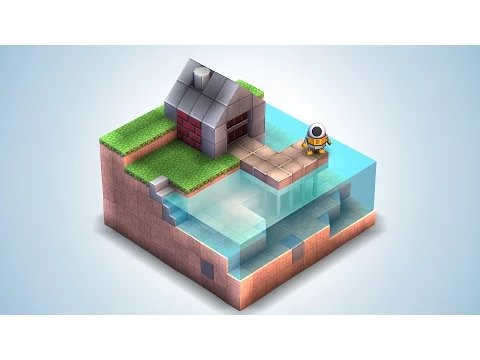
Mekorama is a sequel to Odd Bot Out, implemented in new 3D graphics. The game is an exciting platformer in the genre of optical puzzles.

The main character is a tiny robot, he fell from the sky to the inhospitable earth. The robot finds itself in some kind of puzzling structure – an optical illusion – from which it needs to find a way out or an entrance in order to get to the top of the structure, and then arrange a flat platform from where the robot can return to its native element – the sky.

Each building is one level of the game. To complete the level and get to the top of the structure as a small robot, you need to learn how to assemble the missing components of the structure from 50 emitters. Elements are lego segments of different shapes and sizes.

Each completed level of the puzzle will bring you winning points that can be converted into new building elements. Items can also be purchased with real money as in-app purchases.

Features:

  • Graphics – 3D;
  • The game process can be interrupted, and the game progress can be saved in order to continue solving optical puzzles later.

DownloadMekorama for android is never too late. It may be too late to become the first on the global rating table of the game! Hurry up don’t be late!
Video of Mekorama
Screenshot Mekorama 1
Screenshot Mekorama 2
Screenshot Mekorama 3
Screenshot Mekorama 4
Screenshot Mekorama 5

Download Mekorama APK for Android

What's New in Version 1.3.1

Bug fixes.

Available Files

  • 1.3.1 (latest) 10MB Android 4.4+ arm64-v8aarmeabi-v7a Download
  • 1.1 5MB Android 2.3.3, 2.3.4+ armeabi-v7a Download

System Requirements

OS Version
Android 4.4 (Kit Kat) or higher
Architecture
Varies by file (Which one do I need?)
Disk Space
~20 MB free space required
RAM
2 GB
Internet
Not required (Offline playable)
Permissions (8)
  • Internet
  • Access Network State
  • Read External Storage
  • Write External Storage
  • Wake Lock

APK File Details

Package ID com.martinmagni.mekorama
Available on Google Play
Developer Fancade
License Free
Monetization Contains Ads   In-App Purchases
Age Rating Everyone
Interface Language
English +74

English, Japanese, German, Bulgarian, Thai, Hindi, Vietnamese, Ukrainian, Polish, Korean, Romanian, Arabic, French, Turkish, Czech, Spanish, Italian, Portuguese, Hungarian, Russian, Chinese, + 54 localizations

APK Verification & Virus Scan Results

1 Detections (Low Risk) Signature Verified Check required

Virus scan: 1/65 Potential Detections View report. False positives may occur, but this APK matches the official developer signature and is safe to install.

Show File Details (SHA-256, SHA-1, MD5)

SHA-1 Signature:

D6AC380729293D2DCF107BB0F1D140E0B3A0EFA1

SHA-256 Hash:

a105a842914f607396c309f859b90cc737100346ca21dea7b9cac4226ac9d0f8

MD5 Checksum:

6276e9c5bd22899e35aaee7d89fe9447

Frequently Asked Questions

Is Mekorama safe to download?

A small number of antivirus engines flagged Mekorama. This may be a false positive, but we recommend reviewing the full scan report in the Security section above before downloading. Download at your own risk.

How to install Mekorama APK on Android?

Download the APK using the button above. Then open the file and tap Install. If prompted, enable "Install from unknown sources" in Settings → Security. The process takes under a minute. Read more

Why does installation fail on newer Android versions (14 - 16)?

Newer Android versions strictly block the installation of apps built for older Android versions (API < 23) for security reasons. Standard installation is not possible. Read our step-by-step guide on how to bypass this restriction using ADB or Shizuku.

What Android version does Mekorama require?

Mekorama requires Android 4.4 (API 19) or higher. Optimized for Android 10 (API 29).

Is Mekorama free?

Yes, it is free to download and use, but it contains ads and offers in-app purchases.

How to update Mekorama to the latest version?

Download the latest APK from this page and install it over your existing version — no need to uninstall first. Your data and settings will be preserved. We update the file as soon as a new version is released.

What processor architecture does Mekorama support?

Mekorama supports arm64-v8a, armeabi-v7a. This build does not support x86/x86_64 processors, so it will not run on most PC emulators. If you are unsure about your device architecture, check the Device Info section on this page.

If you have found any issue or are having difficulty with this page, please .

User Reviews & Ratings

Global rating(Play Store): 4.35(405.4K)
Site Rating: 5(3)
Rate this app

5.00

12345

3

Share your experience with other users.