Naija Ludo Icon

Naija Ludo APK for Android

14M+
Free
Feb 28, 2024

Naija Ludo is a classic dice and race game for all ages.

Download Naija Ludo APK OCT_2022 21MB Old versions

What is Naija Ludo?

Naija Ludo is an intellectual game, a variation of Indian parchisi, a game that combines elements of strategy and chance: on a cross-shaped field, four, three or two players lead their (16) pieces from the periphery (from home) to the center playing field. The player who first brings his chips to the central platform of the playing field wins. The step of the skin move of the players is determined by the bones.

Details.

  • At the choice of players, the game offers three color schemes for the playing field.
  • Multiplayer game. Invite your friends and find out who is smart and who is lucky. You can do this both online via the Internet and on the local network via Wi-Fi. In the latter version, the game mode is supported only for two players.
  • You can throw either one “dice” or two.
  • In single player mode, artificial intelligence plays against the player. Four difficulty levels: 1) easy, 2) normal, 3) hard, 4) advanced.
  • Barriers – players can activate and deactivate them. In the game settings, players can also choose whether to knock down opponents’ pieces or not.
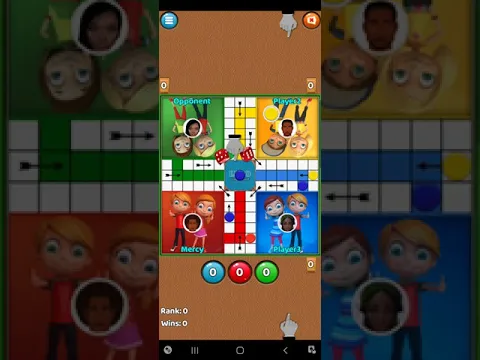
Video of Naija Ludo
Screenshot Naija Ludo 1
Screenshot Naija Ludo 2
Screenshot Naija Ludo 3
Screenshot Naija Ludo 4
Screenshot Naija Ludo 5
Screenshot Naija Ludo 6
Screenshot Naija Ludo 7

Download Naija Ludo APK for Android

What's New in Version OCT_2022

Online challenge error fixed.
Multiplayer improved.
Minor bug fixes.

Other versions

System Requirements

OS Version
Android 4.4 (Kit Kat) or higher
Architecture
Varies by file (Which one do I need?)
Disk Space
~40 MB free space required
RAM
2 GB
Internet
Required
Permissions (30)
  • Internet
  • Access Network State
  • Write External Storage
  • Access Fine Location
  • Access Coarse Location

APK File Details

Package ID com.tonielrosoft.classicludofree
Available on Google Play
Developer tonielrosoft
License Free
Monetization Contains Ads   In-App Purchases
Age Rating Everyone
Interface Language
English +76

English, Japanese, German, Bulgarian, Thai, Hindi, Vietnamese, Ukrainian, Polish, Korean, Romanian, Arabic, French, Turkish, Czech, Spanish, Italian, Hungarian, Russian, Chinese, Portuguese, Indonesian, + 55 localizations

APK Verification & Virus Scan Results

No Virus Signature Verified Safe & Original

Virus scan: Clean (0/65) View report. This APK is free of malware and its signature matches the official developer release.

Show File Details (SHA-256, SHA-1, MD5)

SHA-1 Signature:

2f05573b041a6853a55d0021d41468a2217c4b2d

SHA-256 Hash:

706f8039587ceda735d6027e6e821d302deb8cf8ee2cfb52608898eff5706cca

MD5 Checksum:

e5e57ff398c5c6950e8e3eca676e699b

Frequently Asked Questions

Is Naija Ludo safe to download?

Yes, Naija Ludo is safe to download. The APK is scanned on every update — no malware or viruses detected. You can verify the full scan report in the Security section above.

How to install Naija Ludo APK on Android?

Download the APK using the button above. Then open the file and tap Install. If prompted, enable "Install from unknown sources" in Settings → Security. The process takes under a minute. Read more

What Android version does Naija Ludo require?

Naija Ludo requires Android 4.4 (API 19) or higher. Optimized for Android 13 (API 33).

Is Naija Ludo free?

Yes, it is free to download and use, but it contains ads and offers in-app purchases.

How to update Naija Ludo to the latest version?

Download the latest APK from this page and install it over your existing version — no need to uninstall first. Your data and settings will be preserved. We update the file as soon as a new version is released.

What processor architecture does Naija Ludo support?

Naija Ludo supports armeabi-v7a. This build does not support x86/x86_64 processors, so it will not run on most PC emulators. If you are unsure about your device architecture, check the Device Info section on this page.

How to enable installation from unknown sources on Android?

Go to Settings → Security (or Settings → Apps → Special access on Android 8+) and enable "Install unknown apps" for your browser or file manager. On Android 8 and above this setting is per-app, not global. Read more

If you have found any issue or are having difficulty with this page, please .

User Reviews & Ratings

Global rating(Play Store): 4.43(27.5K)
Site Rating: 3.67(3)
Rate this app

3.67

12345

3

Share your experience with other users.