Neurobics Icon

Neurobics APK for Android

- 60 Brain Games
8M+
Free
Oct 8, 2025

Intellectual games for training the flexibility of the mind

Download Neurobics APK 106135 74MB

What is Neurobics?

Fascinating aerobics for brain neurons, as many as 60 minutes of exciting intellectual games to keep your brain in good shape – all this awaits you with Neurobics: 60 Brain Games !

This is not just a game, but a whole “gym” for the brain, which, like the whole body, needs constant training. It is enough to spend a few minutes a day for short sessions so that the brain is actively working and doing an excellent job with the tasks.

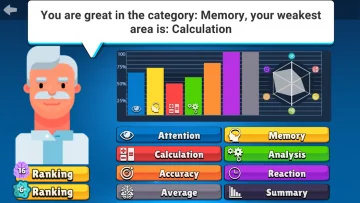
The application works in four ways, training:

  • memory;
  • logical analysis;
  • concentration of attention;
  • ability in mathematical calculations.

For everyone – useful and exciting exercises that are really fun to perform.

The games that will become available to those who decide to download Neurobics: 60 Brain Games have varying degrees of difficulty. Here it will be possible to pick up those that correspond to your current level, and increase the difficulty in order to develop yourself.

Remember! The brain always needs to be trained, it will develop ingenuity, improve memory, and help increase the sharpness of the mind. A great option is to do it without labor and stress, fun, playfully, without boredom, but with a whole sea of ​​​​pleasure. Neurobics: 60 Brain Games is a great assistant in this, and if your work is not related to mental work, then you need this application all the more!

Also known as: Neurobics: 60 Brain Games, Mental
Video of Neurobics
Screenshot Neurobics 1
Screenshot Neurobics 2
Screenshot Neurobics 3
Screenshot Neurobics 4
Screenshot Neurobics 5
Screenshot Neurobics 6

Download Neurobics: 60 Brain Games APK for Android

What's New in Version 106135

- Corrections and Improvements!
Leave a comment if you like the app, we appreciate your support!

Available Files

  • 106135 (latest) 74MB Android 9.0+ arm64-v8a Download
  • 106106 56MB Android 5.1+ arm64-v8aarmeabi-v7a Download

System Requirements

OS Version
Android 9.0 (Pie) or higher
Architecture
Varies by file (Which one do I need?)
Disk Space
~90 MB free space required
RAM
2 GB
Internet
Not required (Offline playable)
Google Services
Required
Permissions (10)
  • Internet
  • Access Network State
  • Wake Lock
  • Android.gms.permission.ad Id
  • Access Adservices Topics

APK File Details

Package ID com.peoresnada.mental
Available on Google Play
Developer Peoresnada.com
License Free
Monetization Contains Ads   In-App Purchases
Age Rating Everyone

APK Verification & Virus Scan Results

No Virus Signature Verified Safe & Original

Virus scan: Clean (0/65) View report. This APK is free of malware and its signature matches the official developer release.

Show File Details (SHA-256, SHA-1, MD5)

SHA-1 Signature:

57c1ffcd27ecbd8110d2e3df525421e9f91eea94

SHA-256 Hash:

f91ecc14f50967508fee2c83c603980110256eb6311b6f6d62638d88cdafcd59

MD5 Checksum:

6b75c0102b013e83d07874ffa0944ead

Frequently Asked Questions

Is Neurobics safe to download?

Yes, Neurobics is safe to download. The APK is scanned on every update — no malware or viruses detected. You can verify the full scan report in the Security section above.

How to install XAPK file?

XAPK is a split APK package. Standard Android installer cannot open it directly. Use 'SAI' or 'XAPK Installer' — they handle XAPK files automatically. Download the installer, open the XAPK file with it, and follow the on-screen steps. Read more

What Android version does Neurobics require?

Neurobics requires Android 9.0 (API 28) or higher. Optimized for Android 15 (API 35).

Is Neurobics free?

Yes, it is free to download and use, but it contains ads and offers in-app purchases.

How to update Neurobics to the latest version?

Download the latest APK from this page and install it over your existing version — no need to uninstall first. Your data and settings will be preserved. We update the file as soon as a new version is released.

What processor architecture does Neurobics support?

Neurobics supports arm64-v8a. This build does not support x86/x86_64 processors, so it will not run on most PC emulators. If you are unsure about your device architecture, check the Device Info section on this page.

How to enable installation from unknown sources on Android?

Go to Settings → Security (or Settings → Apps → Special access on Android 8+) and enable "Install unknown apps" for your browser or file manager. On Android 8 and above this setting is per-app, not global. Read more

If you have found any issue or are having difficulty with this page, please .

User Reviews & Ratings

Global rating(Play Store): 3.92(25.5K)
Rate this app

0.00

12345

not yet rated

Share your experience with other users.