Oceans Icon

Oceans APK for Android

- Board Game
78K+
Free
Feb 19, 2024

Card strategy in the setting of survival in a cruel underwater world

Download Oceans APK 2.5 150MB

What is Oceans?

Oceans Board Game is a popular digitized board game that takes the user on a dangerous underwater expedition. Although game events unfold on an impromptu table, and the gamer will have to interact with a deck of thematic cards, this does not reduce the intensity of passions.

Strategically outplay AI or other users by cleverly combining elements and adapting wards to a dynamically changing ecosystem. The user independently chooses a development scenario and adheres to it throughout the game session. There are many options, each with its own advantages and disadvantages. You can become a parasite that exists at the expense of other life forms. You can choose a more noble goal and stand at the head of the food chain by developing your character to the appropriate level.

Features:

  • board game with functional development of horizons;
  • constantly evolve and become stronger;
  • card battles for food, resources and territories;
  • Tutorial describing the rules.

You also have to choose the dimensions of the underwater inhabitant. The miniature size helps to become invisible and easily hide behind natural shelters. Giant volumes give significant advantages in fights with enemies, but make you clumsy and easily detected. Learn the features of the Oceans Board Game cards, learn how to combine them correctly in order to beat your opponents on points and come out of each round as a winner.
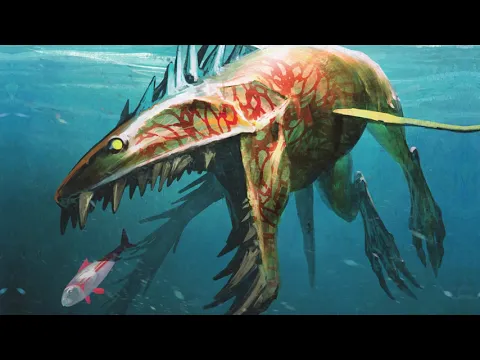
Also known as: Oceans Board Game, Oceans Lite
Video of Oceans
Screenshot Oceans 1
Screenshot Oceans 2
Screenshot Oceans 3
Screenshot Oceans 4
Screenshot Oceans 5
Screenshot Oceans 6

Download Oceans Board Game APK for Android

What's New in Version 2.5

**Medium AI free for all**
Online Multiplayer is here, real time or asynchronously.
Build your own decks for singleplayer and multiplayer with the Deckbuilder.
Bug Fixes

Available Files

  • 2.5 (latest) 150MB Android 6.0+ arm64-v8aarmeabi-v7a Download
  • 1.0.7 144MB Android 7.0+ arm64-v8aarmeabi-v7a Download

System Requirements

OS Version
Android 6.0 (Marshmallow) or higher
Architecture
Varies by file (Which one do I need?)
Disk Space
~250 MB free space required
RAM
2 GB
Internet
Required
Permissions (8)
  • Internet
  • Access Network State
  • Wake Lock
  • Receive Boot Completed
  • Billing

APK File Details

Package ID com.northstargames.oceans
Available on Google Play
Developer North Star Digital Games
License Free ( No Ads)
Monetization In-App Purchases
Age Rating Everyone (Mild Fantasy Violence)
Interface Language
English +74

English, Japanese, German, Bulgarian, Thai, Hindi, Vietnamese, Ukrainian, Polish, Korean, Romanian, Arabic, French, Turkish, Czech, Spanish, Italian, Portuguese, Hungarian, Russian, Chinese, + 54 localizations

APK Verification & Virus Scan Results

No Virus Signature Verified Safe & Original

Virus scan: Clean (0/65) View report. This APK is free of malware and its signature matches the official developer release.

Show File Details (SHA-256, SHA-1, MD5)

SHA-1 Signature:

f61d9009c8dd96b2a7752f15d27bdd89779a93d3

SHA-256 Hash:

a0c03f709c204e832164711f947fa15c5da8071c7da236aaee77e531c5c77f10

MD5 Checksum:

57f1a7fdefd8d8627580849645f04a1d

Frequently Asked Questions

Is Oceans safe to download?

Yes, Oceans is safe to download. The APK is scanned on every update — no malware or viruses detected. You can verify the full scan report in the Security section above.

How to install Oceans APK on Android?

Download the APK using the button above. Then open the file and tap Install. If prompted, enable "Install from unknown sources" in Settings → Security. The process takes under a minute. Read more

What Android version does Oceans require?

Oceans requires Android 6.0 (API 23) or higher. Optimized for Android 13 (API 33).

Is Oceans free?

Yes, the app is free to download, but it contains in-app purchases for additional content.

How to update Oceans to the latest version?

Download the latest APK from this page and install it over your existing version — no need to uninstall first. Your data and settings will be preserved. We update the file as soon as a new version is released.

What processor architecture does Oceans support?

Oceans supports arm64-v8a, armeabi-v7a. This build does not support x86/x86_64 processors, so it will not run on most PC emulators. If you are unsure about your device architecture, check the Device Info section on this page.

How to enable installation from unknown sources on Android?

Go to Settings → Security (or Settings → Apps → Special access on Android 8+) and enable "Install unknown apps" for your browser or file manager. On Android 8 and above this setting is per-app, not global. Read more

If you have found any issue or are having difficulty with this page, please .

User Reviews & Ratings

Global rating(Play Store): 3.75(931)
Rate this app

0.00

12345

not yet rated

Share your experience with other users.