Case Clicker 2 Icon

Case Clicker 2 APK for Android

- Custom cases!

We stuff virtual coins with clicks and open cases with weapons

Download Case Clicker 2 APK 2.2.8a 94MB

What is Case Clicker 2?

Case Clicker 2 – Custom Cases! – an excellent timekiller that allows you to increase the treasury with the help of clicks and open a huge number of cases with rare items. Immediately after the start of this casual project, the gamer needs to tap as quickly as possible on the display, which is divided into two windows: virtual money and the search for containers with valuable items (firearms or melee weapons). By clicking on the upper half of the screen, we get coins, on the bottom – we are trying to get the coveted case.

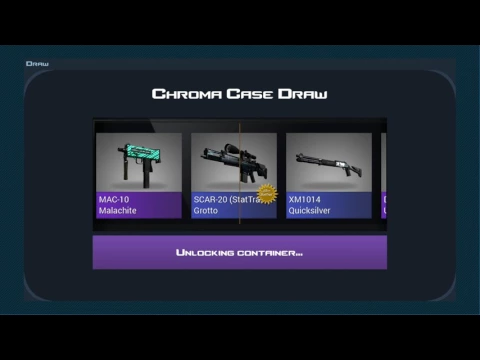
When the search indicator reaches one hundred percent, the user’s inventory in the Case Clicker 2 – Custom Cases! simulator is replenished with a new box, which can only be opened using a special key, and it, in turn, is purchased for money if a sufficient number of them have accumulated on the account of the gamer. The process of opening the container is a kind of roulette with a fair amount of randomness, so nothing can be planned in advance here.

Surplus funds in Case Clicker 2 – Custom Cases! It is worth investing in upgrading and modernizing your weapon collection right away. So, you can fully automate the process of finding new cases, or get a chance to open new types of boxes containing only exclusive items. But it should be borne in mind that the cost of keys for such content will be an order of magnitude higher. The graphic design of the casual novelty is dominated by minimalism and conciseness, the developers did not even bother to introduce some kind of animation. The clicker attracts primarily with its simplicity and at the same time fascination, for which it honestly receives the title of an excellent timekiller.
Also known as: Case Clicker 2 - Custom Cases!
Video of Case Clicker 2
Screenshot Case Clicker 2 1
Screenshot Case Clicker 2 2
Screenshot Case Clicker 2 3
Screenshot Case Clicker 2 4
Screenshot Case Clicker 2 5
Screenshot Case Clicker 2 6
Screenshot Case Clicker 2 7
Screenshot Case Clicker 2 8

Download Case Clicker 2 - Custom cases! APK for Android

What's New in Version 2.2.8a

No official changelog provided for Case Clicker 2 version 2.2.8a. This update likely includes general stability improvements and bug fixes.

Available Files

  • 2.2.8a 94MB Android 4.0.3, 4.0.4+ armeabi-v7a Download

System Requirements

OS Version
Android 4.0.3, 4.0.4 (Ice Cream Sandwich) or higher
Architecture
Varies by file (Which one do I need?)
Disk Space
~150 MB free space required
RAM
2 GB
Internet
Not required (Offline playable)
Permissions (5)
  • Internet
  • Access Network State
  • Write External Storage
  • Check License
  • Billing

APK File Details

Package ID com.hawkgames.caseclicker2
Developer Hawk Games!
License Free ( No Ads)
Age Rating PEGI 12

APK Verification & Virus Scan Results

No Virus Signature Verified Safe & Original

Virus scan: Clean (0/55) View report. The APK file is digitally signed.

Show File Details (SHA-256, SHA-1, MD5)

SHA-1 Signature:

4e54762c6328d3911d1f0005e07682c907c8b8b7

SHA-256 Hash:

da180db2ef360963b4db9b62653c062212f834999010eff43af957d93ed3d24b

MD5 Checksum:

9436276c39406e5a0b793b0ff492204d

Frequently Asked Questions

Is Case Clicker 2 safe to download?

Yes, Case Clicker 2 is safe to download. The APK is scanned on every update — no malware or viruses detected. You can verify the full scan report in the Security section above.

How to install Case Clicker 2 APK on Android?

Download the APK using the button above. Then open the file and tap Install. If prompted, enable "Install from unknown sources" in Settings → Security. The process takes under a minute. Read more

Why does installation fail on newer Android versions (14 - 16)?

Newer Android versions strictly block the installation of apps built for older Android versions (API < 23) for security reasons. Standard installation is not possible. Read our step-by-step guide on how to bypass this restriction using ADB or Shizuku.

What Android version does Case Clicker 2 require?

Case Clicker 2 requires Android 4.0.3, 4.0.4 (API 15) or higher. Optimized for Android 8.1 (API 27).

What processor architecture does Case Clicker 2 support?

Case Clicker 2 supports armeabi-v7a. This build does not support x86/x86_64 processors, so it will not run on most PC emulators. If you are unsure about your device architecture, check the Device Info section on this page.

How to enable installation from unknown sources on Android?

Go to Settings → Security (or Settings → Apps → Special access on Android 8+) and enable "Install unknown apps" for your browser or file manager. On Android 8 and above this setting is per-app, not global. Read more

If you have found any issue or are having difficulty with this page, please .

User Reviews & Ratings

Global rating(Play Store): 3.89(70.8K)
Rate this app

0.00

12345

not yet rated

Share your experience with other users.