Makeover Run Icon

Makeover Run APK for Android

- Makeup Game
57M+
Free
Jul 7, 2023

A story about hopes come true in the format of a colorful 3D runner

Download Makeover Run APK 0.29 129MB

What is Makeover Run?

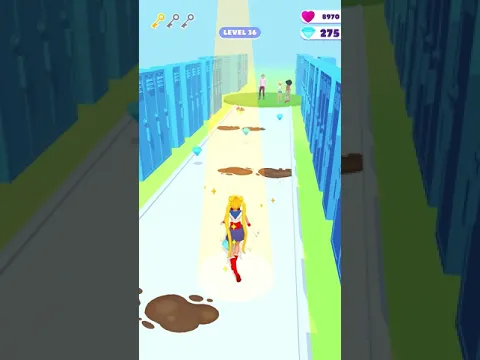
Makeover Run – Makeup Game – transforming an ugly duckling into a beautiful swan with the help of well-chosen outfits and professional makeup. Sagging shoulders, nervous sobs, envy of her impressively dressed peers – at the start of this runner the main character looks unpresentable. But as soon as a young lady goes the distance and collects objects that will radically transform her appearance, not a trace will remain of her former insecurity.

It must be said that the heroine has something to strive for – at the finish line a wonderful gentleman is waiting for her, who is ready to kiss the beauty and call her down the aisle. Help the girl go the distance, avoid foul-smelling objects surrounded by a swarm of flies, avoid puddles of mud. Collect fashionable clothes, original hairstyles, bright lipstick, expensive perfume and other accessories so that at the end of the race the young maiden will shine with happiness and smell fragrant.

Features:

  • simple arcade game with one-touch controls;
  • help an impossible dream become a reality;
  • hundreds of wardrobe items and accessories.

The diamonds collected by the heroine Makeover Run on the way to a new life can be spent in a local boutique – customize the appearance of your ward, buy new skins for the guy waiting for his beloved at the finish line, unlock new locations.
Also known as: Makeover Run – Makeup Game
Video of Makeover Run
Screenshot Makeover Run 1
Screenshot Makeover Run 2
Screenshot Makeover Run 3

Download Makeover Run – Makeup Game APK for Android

What's New in Version 0.29

- Bug fixes
- Overall improvements

Available Files

System Requirements

OS Version
Android 5.1 (Lollipop MR1) or higher
Architecture
Varies by file (Which one do I need?)
Disk Space
~200 MB free space required
RAM
2 GB
Internet
Not required (Offline playable)
Permissions (15)
  • Internet
  • Access Network State
  • Access Coarse Location
  • Read Phone State
  • Vibrate

APK File Details

Package ID com.firebytemonee.MakeoverRun
Developer MOONEE PUBLISHING LTD
License Free
Monetization Contains Ads   In-App Purchases
Age Rating Everyone
Interface Language
English +1

English, + 1 localization

APK Verification & Virus Scan Results

No Virus Signature Verified Safe & Original

Virus scan: Clean (0/63) View report. The APK file is digitally signed.

Show File Details (SHA-256, SHA-1, MD5)

SHA-1 Signature:

231e07ee419915689999ae5b33e29a1006fe24be

SHA-256 Hash:

4827eeb505d868f3823fa316bafbd524e12aba8257785c2bf097b991d90cba8b

MD5 Checksum:

a9461ec8653dfc8685cc31f27dca0894

Frequently Asked Questions

Is Makeover Run safe to download?

Yes, Makeover Run is safe to download. The APK is scanned on every update — no malware or viruses detected. You can verify the full scan report in the Security section above.

How to install Makeover Run APK on Android?

Download the APK using the button above. Then open the file and tap Install. If prompted, enable "Install from unknown sources" in Settings → Security. The process takes under a minute. Read more

Why does installation fail on newer Android versions (14 - 16)?

Newer Android versions strictly block the installation of apps built for older Android versions (API < 23) for security reasons. Standard installation is not possible. Read our step-by-step guide on how to bypass this restriction using ADB or Shizuku.

What Android version does Makeover Run require?

Makeover Run requires Android 5.1 (API 22) or higher. Optimized for Android 12 (API 31).

Is Makeover Run free?

Yes, it is free to download and use, but it contains ads and offers in-app purchases.

What processor architecture does Makeover Run support?

Makeover Run supports arm64-v8a, armeabi-v7a. This build does not support x86/x86_64 processors, so it will not run on most PC emulators. If you are unsure about your device architecture, check the Device Info section on this page.

How to enable installation from unknown sources on Android?

Go to Settings → Security (or Settings → Apps → Special access on Android 8+) and enable "Install unknown apps" for your browser or file manager. On Android 8 and above this setting is per-app, not global. Read more

If you have found any issue or are having difficulty with this page, please .

User Reviews & Ratings

Global rating(Play Store): 4.16(231.1K)
Rate this app

0.00

12345

not yet rated

Share your experience with other users.