Learn to Draw Icon

Learn to Draw APK for Android

- Paint by Art Coloring Book
1M+
Feb 18, 2020

Teaching kids how to draw simple pictures step by step

Download Learn to Draw APK 5.0 7MB

What is Learn to Draw?

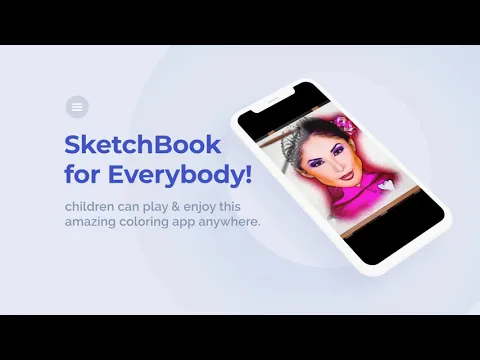
Learn to Draw is an educational application for young users, with which they can quickly learn the rules and basics of drawing according to prepared templates, as well as unleash their creative impulses by creating individual drawings. The program interface consists of a quartet of tabs, each of which provides access to activities of a certain category.

The first Draw mode – draw fruits, letters, vehicles, cartoon characters and so on. Three options are available here – coloring mode, expert (completely independent with a choice of pencil, brush and eraser color) or step-by-step repetition. The second Custom mode is a set of customized brushes and the ability to create multi-layered paintings.

The third mode is Pattern – use a set of patterns to create outlandish patterns. Fourth mode Flowers – when drawing, the brush leaves an original flower trail of the selected type. All declared formats provide for the cancellation of a move, the choice of a color palette, and the saving of works in the “My Sketches” tab.

Features:

  • an educational tool for children with a set of regulations;
  • pencils, brushes, eraser, backgrounds, layers, color palette;
  • cheerful musical accompaniment;
  • share your work with friends;
  • is completely free.

The Learn to Draw application does an excellent job of its assigned functionality, unobtrusively awakening young children’s interest in artistic activity and independent creativity.
Also known as: Draw Coloring Book, Learn to Draw - Paint by Art Coloring Book
Video of Learn to Draw
Screenshot Learn to Draw 1
Screenshot Learn to Draw 2
Screenshot Learn to Draw 3
Screenshot Learn to Draw 4
Screenshot Learn to Draw 5

Download Learn to Draw - Paint by Art Coloring Book APK for Android

What's New in Version 5.0

No official changelog provided for Learn to Draw version 5.0. This update likely includes general stability improvements and bug fixes.

Available Files

  • Learn to Draw 5.0 7MB Android 5.0+ arm64-v8aarmeabiarmeabi-v7amipsmips64x86x86_64 Download

System Requirements

OS Version
Android 5.0 (Lollipop) or higher
Architecture
Varies by file (Which one do I need?)
Disk Space
~20 MB free space required
RAM
2 GB
Internet
Not required (Offline playable)
Permissions (16)
  • Internet
  • Camera
  • Access Network State
  • Read External Storage
  • Write External Storage

APK File Details

Package ID com.freekidspainting.glowcoloringapp
Developer Filmize 3D Studio
License Free ( No Ads)
Age Rating PEGI 3
Interface Language
English +74

English, Japanese, German, Bulgarian, Thai, Chinese, Hindi, Vietnamese, Ukrainian, Polish, Korean, Romanian, Arabic, French, Turkish, Czech, Spanish, Italian, Portuguese, Hungarian, Russian, + 54 localizations

APK Verification & Virus Scan Results

No Virus Signature Verified Safe & Original

Virus scan: Clean (0/63) View report. The APK file is digitally signed.

Show File Details (SHA-256, SHA-1, MD5)

SHA-1 Signature:

643cf248452990dd7c0678e92d2cc7f08cb063dc

SHA-256 Hash:

62d1e385a3cc42fab682709588e0df66546e806c21dec583e858278541db1c9f

MD5 Checksum:

8388f99a1bd90ccec94cc916b702deb9

Frequently Asked Questions

Is Learn to Draw safe to download?

Yes, Learn to Draw is safe to download. The APK is scanned on every update — no malware or viruses detected. You can verify the full scan report in the Security section above.

How to install Learn to Draw APK on Android?

Download the APK using the button above. Then open the file and tap Install. If prompted, enable "Install from unknown sources" in Settings → Security. The process takes under a minute. Read more

Why does installation fail on newer Android versions (14 - 16)?

Newer Android versions strictly block the installation of apps built for older Android versions (API < 23) for security reasons. Standard installation is not possible. Read our step-by-step guide on how to bypass this restriction using ADB or Shizuku.

What Android version does Learn to Draw require?

Learn to Draw requires Android 5.0 (API 21) or higher. Optimized for Android 10 (API 29).

What processor architecture does Learn to Draw support?

Learn to Draw supports arm64-v8a, armeabi, armeabi-v7a, mips, mips64, x86, x86_64. If you are unsure about your device architecture, check the Device Info section on this page.

How to enable installation from unknown sources on Android?

Go to Settings → Security (or Settings → Apps → Special access on Android 8+) and enable "Install unknown apps" for your browser or file manager. On Android 8 and above this setting is per-app, not global. Read more

If you have found any issue or are having difficulty with this page, please .

User Reviews & Ratings

Global rating(Play Store): 4.63(959)
Rate this app

0.00

12345

not yet rated

Share your experience with other users.