Hit & Knock down Icon

Hit & Knock down APK for Android

mobirix Original
47M+
Free
Nov 13, 2023

Throw a ball to knock down the target.

Download Hit & Knock down APK 1.4.1 94MB

What is Hit & Knock down?

Hit & Knock down is an arcade game, the plot of which develops linearly – from simple to complex. Timekiller.

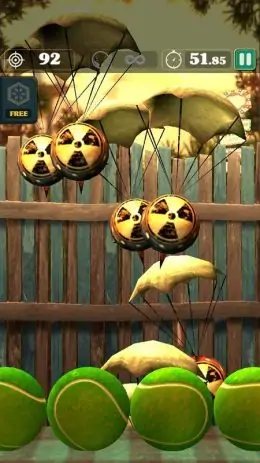
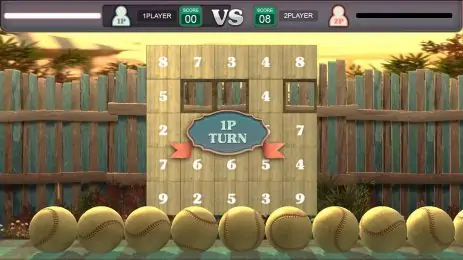
The process of the game. With improvised projectiles, players shoot at targets. The function of the shells is performed by baseball, football and basketball balls and billiard balls; the function of the targets is performed by plates, cans, parachutes and toys (roly-poly). targets.

To shoot at a target to kill their time, players can in two modes:

  1. Limited time. This is when the player needs to clear the stand from the targets in a finite amount of time.
  2. A limited number of projectiles.

The most targeted players become leaders on the global rating table of the game.

Details.

  • Multiplayer game. But you can also play offline.
  • The application supports 16 languages.
Also known as: Hit _ Knock down
Video of Hit & Knock down
Screenshot Hit & Knock down 1
Screenshot Hit & Knock down 2
Screenshot Hit & Knock down 3
Screenshot Hit & Knock down 4
Screenshot Hit & Knock down 5
Screenshot Hit & Knock down 6
Screenshot Hit & Knock down 7
Screenshot Hit & Knock down 8

Download Hit & Knock down APK for Android

What's New in Version 1.4.1

No official changelog provided for Hit & Knock down version 1.4.1. This update likely includes general stability improvements and bug fixes.

Available Files

System Requirements

OS Version
Android 7.0 (Nougat) or higher
Architecture
Varies by file (Which one do I need?)
Disk Space
~150 MB free space required
RAM
2 GB
Internet
Not required (Offline playable)
Permissions (7)
  • Internet
  • Access Network State
  • Wake Lock
  • Ad Id
  • Billing

APK File Details

Package ID com.mobirix.throwball
Available on Google Play
Developer mobirix
License Free
Monetization Contains Ads   In-App Purchases
Age Rating Everyone
Interface Language
English +74

English, Japanese, German, Bulgarian, Thai, Hindi, Vietnamese, Ukrainian, Polish, Korean, Romanian, Arabic, French, Turkish, Czech, Spanish, Italian, Portuguese, Hungarian, Russian, Chinese, + 54 localizations

APK Verification & Virus Scan Results

No Virus Signature Verified Safe & Original

Virus scan: Clean (0/63) View report. This APK is free of malware and its signature matches the official developer release.

Show File Details (SHA-256, SHA-1, MD5)

SHA-1 Signature:

295c0c6cc4e632b363e0dea9f426f7480551fe7e

SHA-256 Hash:

0a0cd2613540480ed2063e1a93fb508751a4bba1f28f3163f82e2b6de861f683

MD5 Checksum:

56d109a6476c9be8ea37acbf711c8c4b

Frequently Asked Questions

Is Hit & Knock down safe to download?

Yes, Hit & Knock down is safe to download. The APK is scanned on every update — no malware or viruses detected. You can verify the full scan report in the Security section above.

How to install Hit & Knock down APK on Android?

Download the APK using the button above. Then open the file and tap Install. If prompted, enable "Install from unknown sources" in Settings → Security. The process takes under a minute. Read more

What Android version does Hit & Knock down require?

Hit & Knock down requires Android 7.0 (API 24) or higher. Optimized for Android 13 (API 33).

Is Hit & Knock down free?

Yes, it is free to download and use, but it contains ads and offers in-app purchases.

How to update Hit & Knock down to the latest version?

Download the latest APK from this page and install it over your existing version — no need to uninstall first. Your data and settings will be preserved. We update the file as soon as a new version is released.

What processor architecture does Hit & Knock down support?

Hit & Knock down supports arm64-v8a, armeabi-v7a. This build does not support x86/x86_64 processors, so it will not run on most PC emulators. If you are unsure about your device architecture, check the Device Info section on this page.

How to enable installation from unknown sources on Android?

Go to Settings → Security (or Settings → Apps → Special access on Android 8+) and enable "Install unknown apps" for your browser or file manager. On Android 8 and above this setting is per-app, not global. Read more

If you have found any issue or are having difficulty with this page, please .

User Reviews & Ratings

Global rating(Play Store): 4.48(417.1K)
Site Rating: 1(1)
Rate this app

1.00

12345

1

Share your experience with other users.