Perfect Soccer Icon

Perfect Soccer APK for Android

4M+
Free
Jun 28, 2026

Build your dream soccer team and win online matches

Download Perfect Soccer APK 1.4.27 112MB

What is Perfect Soccer?

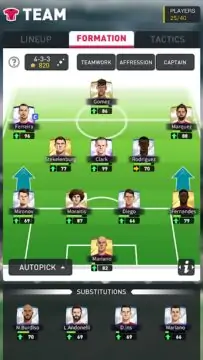
Perfect Soccer is a football-themed sports simulator with a focus on management. The task of the user, who acts as a new manager of a football club, is to turn the controlled team into the winner of regional tournaments and world championships. To make champions out of eleven inexperienced players will require organizational and tactical efforts.

Attract the attention of sponsors to the club, who at first will help financially. Buy new players, having previously familiarized yourself with their achievements and sports history. Form the composition of participants for each match, taking into account the characteristics of the opposing team. Manage everything from choosing a club name to intense workouts and equipment purchases.

Features:

  • control every management and training aspect;
  • lead the football team to the title of world champion;
  • conduct transactions for the purchase and sale of athletes;
  • unpredictable competitions with real players.

The matches in the simulator Perfect Soccer are short, the user cannot control the players, but during the match he is allowed to replace the players. Athletes independently run around the field, perform passes, assists, storm the opponents’ gates. Winning sessions bring rewards that are invested in leveling up the team and buying new favorites.

Video of Perfect Soccer
Screenshot Perfect Soccer 1
Screenshot Perfect Soccer 2
Screenshot Perfect Soccer 3
Screenshot Perfect Soccer 4
Screenshot Perfect Soccer 5
Screenshot Perfect Soccer 6

Download Perfect Soccer APK for Android

What's New in Version 1.4.27

bug fixes

Available Files

System Requirements

OS Version
Android 5.0 (Lollipop) or higher
Architecture
Varies by file (Which one do I need?)
Disk Space
~150 MB free space required
RAM
2 GB
Internet
Required
Google Services
Required
Permissions (19)
  • Internet
  • Access Network State
  • Read External Storage
  • Write External Storage
  • Read Phone State

APK File Details

Package ID com.perfect.eleven.football.manager.top
Available on Google Play
Developer Perfect Sports
License Free ( No Ads)
Monetization In-App Purchases
Age Rating Everyone
Interface Language
1 language

French

APK Verification & Virus Scan Results

No Virus Signature Verified Safe & Original

Virus scan: Clean (0/64) View report. This APK is free of malware and its signature matches the official developer release.

Show File Details (SHA-256, SHA-1, MD5)

SHA-1 Signature:

b04a7c0967d4a41231e261f4704435c49115634a

SHA-256 Hash:

d91856decef4ad7453b5ad2753a6a7ed0ac6d9220e3eb0ab15262bb021d523ef

MD5 Checksum:

fc6d4abf3d543cb30818a3572ea50e24

Frequently Asked Questions

Is Perfect Soccer safe to download?

Yes, Perfect Soccer is safe to download. The APK is scanned on every update — no malware or viruses detected. You can verify the full scan report in the Security section above.

How to install XAPK file?

XAPK is a split APK package. Standard Android installer cannot open it directly. Use 'SAI' or 'XAPK Installer' — they handle XAPK files automatically. Download the installer, open the XAPK file with it, and follow the on-screen steps. Read more

What Android version does Perfect Soccer require?

Perfect Soccer requires Android 5.0 (API 21) or higher.

Is Perfect Soccer free?

Yes, the app is free to download, but it contains in-app purchases for additional content.

How to update Perfect Soccer to the latest version?

Download the latest APK from this page and install it over your existing version — no need to uninstall first. Your data and settings will be preserved. We update the file as soon as a new version is released.

What processor architecture does Perfect Soccer support?

Perfect Soccer supports arm64-v8a. This build does not support x86/x86_64 processors, so it will not run on most PC emulators. If you are unsure about your device architecture, check the Device Info section on this page.

How to enable installation from unknown sources on Android?

Go to Settings → Security (or Settings → Apps → Special access on Android 8+) and enable "Install unknown apps" for your browser or file manager. On Android 8 and above this setting is per-app, not global. Read more

If you have found any issue or are having difficulty with this page, please .

User Reviews & Ratings

Global rating(Play Store): 4.11(18.7K)
Rate this app

0.00

12345

not yet rated

Share your experience with other users.