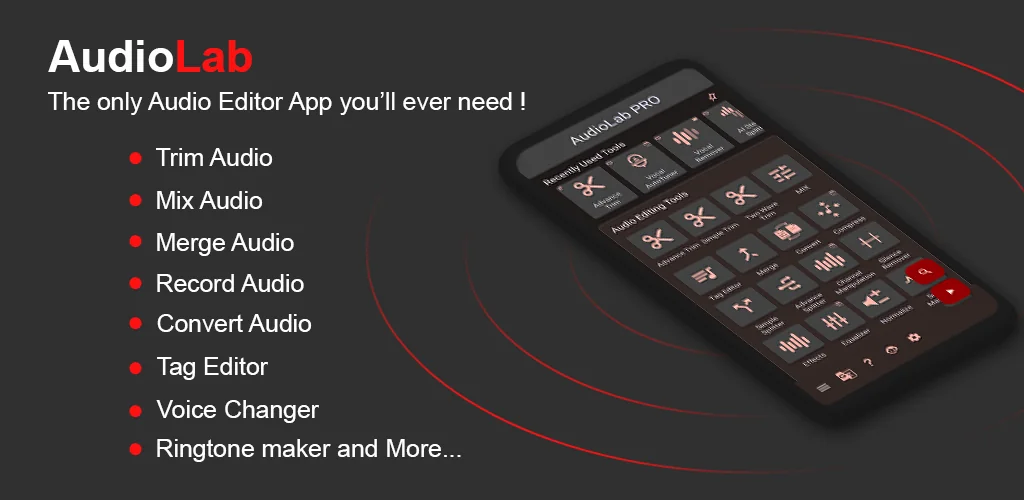
AudioLab Audio Cutter & Editor app cover art for Android
AudioLab Audio Cutter & Editor Icon

AudioLab Audio Cutter & Editor APK for Android

38M+
Free
Feb 23, 2026

Your pocket audio editor: record, mix, create masterpieces on the go.

Download AudioLab Audio Cutter & Editor APK 1.3.13 189MB

What is AudioLab Audio Cutter & Editor?

The most powerful audio processing tool for your smartphone or tablet, the AudioLab Audio Cutter & Editor app combines a variety of functions for editing, recording, and voicing tracks of any complexity and genre. Whether you’re a professional music editor or just starting out, be sure to try trimming tracks, changing voices, eliminating noise, improving sound, and even creating your own ringtone. All this is available right now in one app.

AUDIO EDITING CAPABILITIES

With this application, you can not only trim audio but also edit MP3s, create custom ringtones, or transform an ordinary track into an original sound project. Want to speed up audio for a dynamic effect or slow down a melody to create atmosphere? Managing sound is now easier than ever.

PROFESSIONAL FEATURES

Edit audio at the highest level, as the platform supports multi-track audio, sound layering, background additions, and exporting data to any device.

PROFESSIONAL MICROPHONE

Record sound in high quality with a single tap. The built-in voice recorder allows you to record voice, conversations, or any audio recordings with noise cancellation to get rid of unwanted sounds.

SOUND EDITOR

The application is optimized for fine-tuning tracks. Music trimming, podcast recording, playback speed, audio frequency adjustment, and many other tools will help you create a flawless audio file.

ANY TRACK MANIPULATION

You get everything you need to create ringtones and personalized melodies in just a few taps. Combine tracks, trim, and edit with ease. The app can become your best assistant for working with ringtones and compositions.

MIXER FUNCTION

A simple and intuitive mixer allows you to intuitively control volume and precisely overlay tracks onto sound layers. Mix multiple files to achieve a high-class result.

SOUND EFFECTS AND VOICE MODIFICATIONS

Give your voice an unusual and unique sound, transforming it into any tone you like. Apply unusual filters – from funny to robotic effects. Suitable for voicing videos and games, as well as for creating engaging podcasts or funny pranks.

PODCAST CREATION TOOLS

AudioLab Audio Cutter & Editor is indispensable for creating podcasts. Add background music, adjust volume, and apply audio effects for a flawless sound. Simply record, edit, and enjoy professional-quality results.

Also known as: AudioLab Audio Editor Recorder, AudioLab
Screenshot AudioLab Audio Cutter & Editor 1
Screenshot AudioLab Audio Cutter & Editor 2
Screenshot AudioLab Audio Cutter & Editor 3
Screenshot AudioLab Audio Cutter & Editor 4
Screenshot AudioLab Audio Cutter & Editor 5
Screenshot AudioLab Audio Cutter & Editor 6
Screenshot AudioLab Audio Cutter & Editor 7
Screenshot AudioLab Audio Cutter & Editor 8

Download AudioLab Audio Cutter & Editor APK for Android

What's New in Version 1.3.13

AudioLab now targets Android 15 (API 35)
New Features added:-
- Speed significant improvements (up to 30%)
- Search added in the main menu
- AI features Vocal remover, multi stem separation, noise, echo, reverb removal, key bpm finder
- Audio copy tools in the audio trim improved
- Audio Mix improved
- Mix added in AI stem separation
Improvement:-
- Lots of bug fixes and performance improvements
- Lots of UI improvements
- Landscape UI is optimised

Available Files

  • 1.3.13 (latest) 189MB Android 8.0+ arm64-v8aarmeabi-v7ax86x86_64 Download

System Requirements

OS Version
Android 8.0 (OREO) or higher
Architecture
Varies by file (Which one do I need?)
Disk Space
~250 MB free space required
RAM
2 GB
Internet
Not required
Google Services
Required   GMS dependent
Permissions (28)
  • Requires Google Play Services to launch:
    Note: This is an original file. Unlike modded versions with no verification, it validates via your store account. Details
  • Internet
  • Record Audio
  • Access Network State
  • Read External Storage
  • Write External Storage

APK File Details

Package ID com.hitrolab.audioeditor
Available on Google Play
Developer HitroLab - Mp3 Audio Editor and Ringtone Maker Dev
License Free
Monetization Contains Ads   In-App Purchases
Content Rating Everyone
Interface Language
English +42

English, Japanese, Italian, Czech, Thai, German, Ukrainian, Chinese, Russian, Hungarian, Portuguese, Polish, Spanish, Romanian, Arabic, Hindi, Turkish, Vietnamese, French, Bulgarian, Korean, + 22 localizations

APK Verification & Virus Scan Results

Scan In Queue Signature Verified Safe & Original

Antivirus scan in queue, will be scanned soon. This APK is free of malware and its signature matches the official developer release.

Show File Details (SHA-256, SHA-1, MD5)

SHA-1 Signature:

386f0fbf2fa6fb8d774a62f98ce4817c86648b56

SHA-256 Hash:

49b9e8ca3a67a8e8da700d20433fffdd36c564a477a98083b0e0db6c39335e90

MD5 Checksum:

d1691f1443b0ee7813f3cc784ec7e6ea

Frequently Asked Questions

Is AudioLab Audio Cutter & Editor safe to download?

AudioLab Audio Cutter & Editor has passed a basic integrity check. A full antivirus scan is pending. You can check the current scan status in the Security section above.

How to install XAPK file?

XAPK is a split APK package. Standard Android installer cannot open it directly. Use 'SAI' or 'XAPK Installer' — they handle XAPK files automatically. Download the installer, open the XAPK file with it, and follow the on-screen steps. Read more

What Android version does AudioLab Audio Cutter & Editor require?

AudioLab Audio Cutter & Editor requires Android 8.0 (API 26) or higher. Optimized for Android 15 (API 35).

Is AudioLab Audio Cutter & Editor free?

Yes, it is free to download and use, but it contains ads and offers in-app purchases.

Does AudioLab Audio Cutter & Editor require a license check?

Yes, this app performs a license check. You may need to have the Google Play Store installed and be logged in to verify the license.

How to update AudioLab Audio Cutter & Editor to the latest version?

Download the latest APK from this page and install it over your existing version — no need to uninstall first. Your data and settings will be preserved. We update the file as soon as a new version is released.

What processor architecture does AudioLab Audio Cutter & Editor support?

AudioLab Audio Cutter & Editor supports x86, x86_64, arm64-v8a, armeabi-v7a. If you are unsure about your device architecture, check the Device Info section on this page.

If you have found any issue or are having difficulty with this page, please .

User Reviews & Ratings

Global rating(Play Store): 4.66(321.2K)
Site Rating: 5(1)
Rate this app

5.00

12345

1

Share your experience with other users.