
Ever downloaded an APK only to see it crash with “This app won’t run without Google Play services”? You’ve encountered a GMS dependent app. This guide explains what it means and how to fix it.
📋 Quick Navigation
What Does “GMS Dependent” Mean?
GMS dependent app = An Android app that requires Google Mobile Services (GMS) to work properly.
Without GMS, these apps may:
- ❌ Crash immediately on launch
- ❌ Show “Google Play Services required” error
- ❌ Fail to send notifications
- ❌ Display blank maps or broken features
What Are Google Mobile Services?
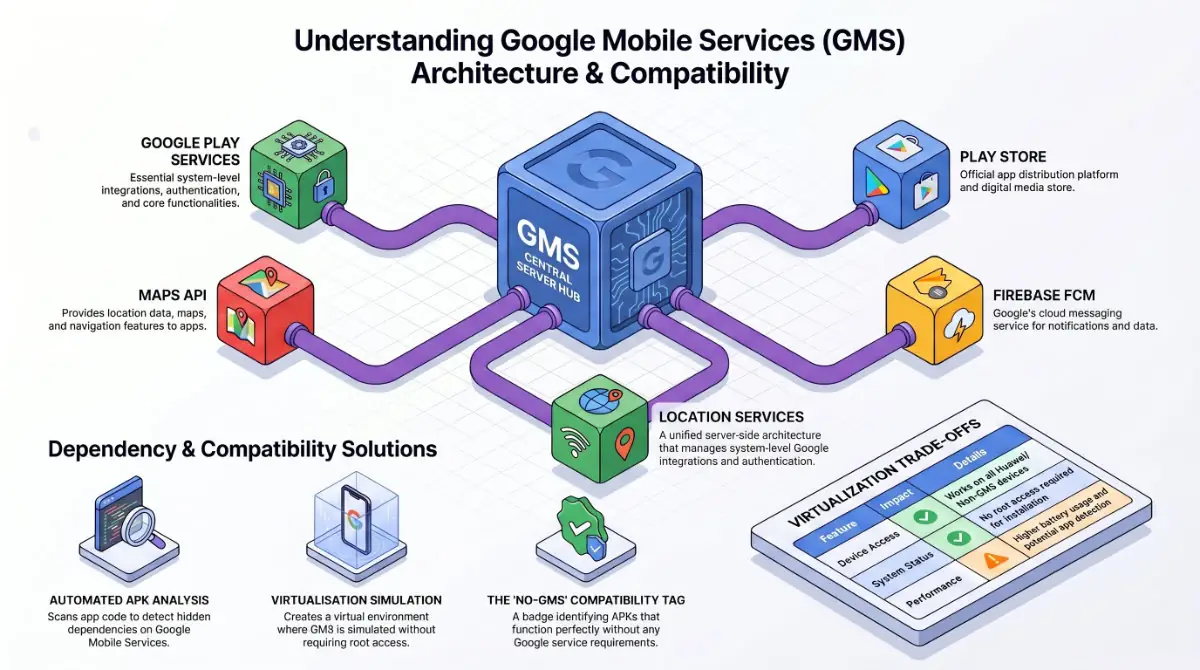
Google Mobile Services (GMS) is a package of proprietary Google apps and APIs that power many Android features. While Android itself is open-source (AOSP), GMS is not.
🔧 GMS Core Components:
- Google Play Services — The main engine
- Google Play Store — App marketplace
- Google Maps API — Location and navigation
- Firebase Cloud Messaging (FCM) — Push notifications
- Google Location Services — GPS and positioning

Why Do Apps Require GMS?
Developers use Google’s ready-made tools to build apps faster. An app becomes GMS dependent when it relies on these services:
📬 Push Notifications
Most apps use Firebase Cloud Messaging for real-time alerts (messages, updates, reminders).
🗺️ Maps & Location
Ride-sharing, delivery, and fitness apps need Google Maps API for accurate tracking.
🔐 Authentication
“Sign in with Google” buttons require GMS for secure login.
💳 In-App Purchases
Subscriptions and premium features use Google Play Billing.
☁️ Cloud Sync
Games and productivity apps use Google Drive API to save your progress.
Which Devices Don’t Have GMS?
Not all Android devices come with Google Services. Common examples:
| Device Type | Why No GMS? | Alternative |
|---|---|---|
| Huawei (2019+) & Older Honor | US trade restrictions | Huawei Mobile Services (HMS) |
| Amazon Fire Tablets | Uses Fire OS ecosystem | Amazon Appstore |
| Custom ROMs | Privacy-focused (LineageOS, GrapheneOS, /e/OS) | microG or manual GApps |
| Chinese Market Phones | Domestic regulations | Local app stores |
How to Check If Your Device Has GMS
✅ 3 Quick Methods:
5 Ways to Fix GMS Dependency Issues
🥇 Option 1: Virtual Environments (Best for Huawei)
How it works: Creates a virtual space where Google Play Services are simulated.
Pros: No root required, works on all Huawei devices
Cons: Uses extra battery, some apps may detect virtualization
🥈 Option 2: Install microG (Best for Custom ROMs)
What is it: Free, open-source alternative to Google Play Services.
How it works: Replaces Google libraries while protecting your privacy.
Pros: No data sent to Google, highly battery-efficient.
Cons: Requires technical setup (your ROM must support Signature Spoofing), not all apps work perfectly.
🥉 Option 3: Flash GApps (For Unlocked Devices)
Packages: OpenGApps, MindTheGapps, NikGApps
How it works: Installs official Google services at the system level via custom recovery.
Pros: 100% full GMS compatibility.
Cons: Requires an unlocked bootloader and a custom recovery (like TWRP). Root is not strictly required, but often used alongside.
💡 Option 4: Download “No-GMS” Versions
Many developers release alternative builds that don’t need Google.
Look for the No-GMS tag on Captain Droid to find compatible APKs.
🔄 Option 5: Use Alternative Apps
Switch to open-source alternatives that never needed GMS in the first place.
GMS vs Non-GMS Apps: Quick Comparison
| Feature | GMS Dependent App | Non-GMS App (AOSP/FOSS) |
|---|---|---|
| Push Notifications | ✅ Fast (Firebase) | ⚠️ Alternative push or polling |
| Location Services | ✅ Highly accurate (Google API) | ⚠️ Device GPS (may be slower) |
| Google Login | ✅ Supported | ❌ Not supported |
| Privacy | ⚠️ Shares data with Google | ✅ Often more private |
| Battery Usage | ✅ Optimized by Play Services | ⚠️ Varies by implementation |
How Captain Droid Identifies GMS Apps
Your safety is our priority. We use automated APK analysis to detect GMS dependency:
- Manifest Scanning: We analyze
AndroidManifest.xmlfor Google-specific libraries - Dependency Checks: We detect Firebase, Google Play Billing, and Maps API requirements
- Clear Labeling: Apps requiring GMS show a ⚠️ Requires GMS warning on the download page
Frequently Asked Questions
Can I install GMS dependent apps without Google Play Services?
Yes, you can install the APK, but the app may crash or have broken features (like missing maps or notifications) unless you use a workaround like microG or GBox.
Are GMS dependent apps safe to download?
Yes. “GMS dependent” simply refers to the app’s technical requirements, not its security. As long as you download from a trusted source like Captain Droid, it’s safe.
How do I fix the “App requires Google Play Services” error?
You can fix this by: installing Google Play Services manually, using an emulator like GBox, installing microG, or downloading a No-GMS alternative.
Do Huawei and Honor phones support GMS apps?
Huawei phones released before 2019 support GMS natively. Newer Huawei models (P40, Mate 50, P60 series) use HMS and require third-party tools like GBox.
Note: Honor separated from Huawei in 2020. Newer Honor devices (Honor 50 and above) do come with official Google Play Services.
What is a No-GMS APK?
A No-GMS APK is a version of an app built or modified to function entirely without Google Mobile Services. Perfect for Huawei users, Amazon Fire tablets, and Custom ROMs.


