Music player app cover art for Android
Music player Icon

Music player APK for Android

142M+
Free
Oct 10, 2025

Rediscover your music — a clean, powerful player made for real collections.

Download Music player APK 222.01 30MB

What is Music player?

Remember when your music collection was actually yours? In a world of streaming, it’s easy to forget the joy of having your own library of songs. Your Android phone is the perfect place for that collection, but are you using the right app to enjoy it? If your default player feels a bit boring, it might be time for an upgrade.

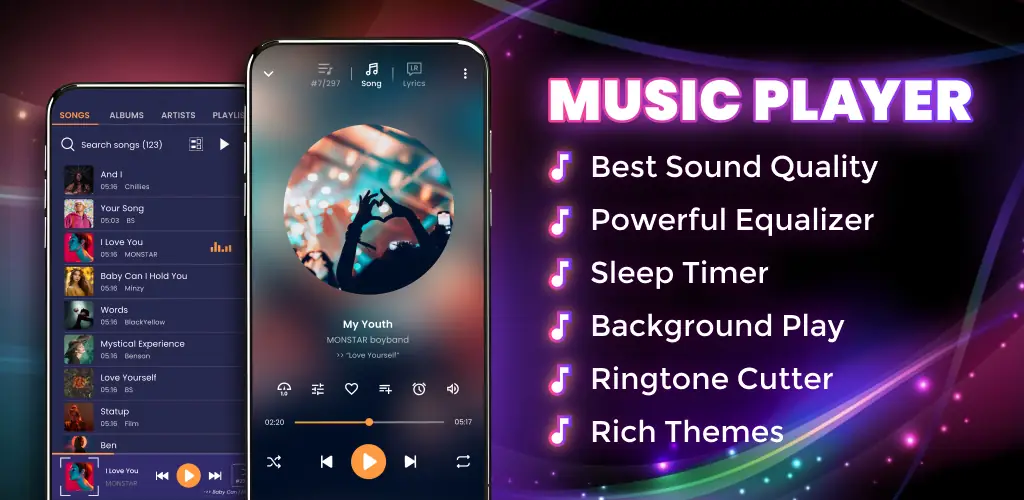
This Music player is designed to be the ultimate home for all the audio files on your device. Forget hunting for songs; the app automatically scans your phone’s storage—including hidden folders—and neatly organizes everything. You can easily browse your collection by song title, artist, or album. Finding that perfect track has never been simpler.

But where this player truly shines is in its sound and control. It delivers high-quality audio and features a built-in equalizer. Think of an equalizer as a sound mixer for your music, allowing you to boost the bass, sharpen the treble, or find the perfect balance for any genre.

It’s packed with smart features that make listening a breeze. Control your music from a mini-player on your lock screen or with the buttons on your headphones, so you never have to unlock your phone just to skip a track. You can also personalize the app with themes, edit song titles and artist info, and even use the handy ringtone maker to turn your favorite chorus into a custom ringtone.

This app isn’t just for MP3s; it handles a wide range of formats like FLAC and OGG, making it a versatile choice for any music lover. It’s a powerful, offline toolkit that puts you in command of your music.

Ready to rediscover your personal music collection? Download Music player and give your favorite songs the experience they deserve!

Screenshot Music player 1
Screenshot Music player 2
Screenshot Music player 3
Screenshot Music player 4
Screenshot Music player 5
Screenshot Music player 6
Screenshot Music player 7
Screenshot Music player 8

Download Music player APK for Android

What's New in Version 222.01

Bug fixes and stability improvements

Available Files

System Requirements

OS Version
Android 5.0 (Lollipop) or higher
Architecture
Varies by file (Which one do I need?)
Disk Space
~40 MB free space required
RAM
1 GB
Internet
Not required
Google Services
Required
Permissions (26)
  • Internet
  • Access Network State
  • Read External Storage
  • Write External Storage
  • Wake Lock

APK File Details

Package ID com.media.music.mp3.musicplayer
Available on Google Play
Developer recorder & smart apps
License Free
Monetization Contains Ads   In-App Purchases
Content Rating Everyone

APK Verification & Virus Scan Results

No Virus Signature Verified Safe & Original

Virus scan: Clean (0/64) View report. This APK is free of malware and its signature matches the official developer release.

Show File Details (SHA-256, SHA-1, MD5)

SHA-1 Signature:

ecd8475e7a79b8b3c20c57148bcb2df994b77ed5

SHA-256 Hash:

d73c5982a6f9e5bee8e3874a56b45b9821a353e1f8bffa85f91fd6f1caeb91be

MD5 Checksum:

96bf81f4d467ff1a6d02b3308918882b

Frequently Asked Questions

Is Music player safe to download?

Yes, Music player is safe to download. The APK is scanned on every update — no malware or viruses detected. You can verify the full scan report in the Security section above.

How to install XAPK file?

XAPK is a split APK package. Standard Android installer cannot open it directly. Use 'SAI' or 'XAPK Installer' — they handle XAPK files automatically. Download the installer, open the XAPK file with it, and follow the on-screen steps. Read more

What Android version does Music player require?

Music player requires Android 5.0 (API 21) or higher. Optimized for Android 14 (API 34).

Is Music player free?

Yes, it is free to download and use, but it contains ads and offers in-app purchases.

How to update Music player to the latest version?

Download the latest APK from this page and install it over your existing version — no need to uninstall first. Your data and settings will be preserved. We update the file as soon as a new version is released.

What processor architecture does Music player support?

Music player supports arm64-v8a. This build does not support x86/x86_64 processors, so it will not run on most PC emulators. If you are unsure about your device architecture, check the Device Info section on this page.

How to enable installation from unknown sources on Android?

Go to Settings → Security (or Settings → Apps → Special access on Android 8+) and enable "Install unknown apps" for your browser or file manager. On Android 8 and above this setting is per-app, not global. Read more

If you have found any issue or are having difficulty with this page, please .

User Reviews & Ratings

Global rating(Play Store): 4.71(2M)
Site Rating: 5(1)
Rate this app

5.00

12345

1

Share your experience with other users.