Default Music Player Icon

Default Music Player APK for Android

JAYAVELU V Original
168M+
Free
Oct 25, 2024

This is a simple music player

Download Default Music Player APK 7.0.64 14MB Old versions

What is Default Music Player?

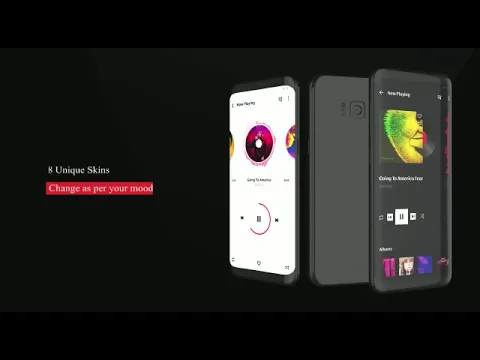
Default Music Player is a music player with which you can comfortably listen to any music. Music tracks can be recorded in any known audio file format. You can listen to music in the background.

Details.

  • The application is free. Does not contain ads.
  • The file manager integrated into the music player allows you to structure music tracks: 1) by albums, 2) by artist names, 3) by song titles.
  • The user can also create their own list of music tracks – a playlist – which can be set to random, sequential or circular playback order.

Note: The music player Default Music Player is based on open source code – for the user, this means that the program code of the application is available for viewing in order to detect virus or spyware scripts. Access to the application code also gives the user (indie developers) the ability to modify or borrow it for other projects.
Also known as: Music Player, Music
Video of Default Music Player
Screenshot Default Music Player 1
Screenshot Default Music Player 2
Screenshot Default Music Player 3

Download Default Music Player APK for Android

What's New in Version 7.0.64

Video Player Added:
We’ve upgraded your music player to a media player by introducing video playback support!

Highlights:
* Play video files directly from your Android device
* Supports popular formats: MP4, AVI, MKV, and more
* Intuitive controls: play/pause, seek, volume, and fullscreen
* Video playlist support
* Smooth switching between music and video playback

Improvements:
* Revamped UI to support both music and video navigation
* Optimized performance

Other versions

System Requirements

OS Version
Android 5.0 (Lollipop) or higher
Architecture
Varies by file (Which one do I need?)
Disk Space
~20 MB free space required
RAM
1 GB
Internet
Not required
Google Services
Required
Permissions (19)
  • Internet
  • Record Audio
  • Access Network State
  • Read External Storage
  • Write External Storage

APK File Details

Package ID com.musicplayer.music
Available on Google Play
Developer JAYAVELU V
License Free
Monetization Contains Ads  
Content Rating Everyone
Interface Language
English +16

English, Chinese, Hindi, Turkish, Spanish, German, Thai, Russian, Japanese, Korean, French, Portuguese, Vietnamese, Italian, Arabic, + 2 localizations

APK Verification & Virus Scan Results

No Virus Signature Verified Safe & Original

Virus scan: Clean (0/64) View report. This APK is free of malware and its signature matches the official developer release.

Show File Details (SHA-256, SHA-1, MD5)

SHA-1 Signature:

3abc3a14192230099516a1ed739089bfc40e07fd

SHA-256 Hash:

ceb9e31e7342f8286262ccbfd60ba8cb8b43e873f0960f9a861be8211c0da032

MD5 Checksum:

d1626ab7a9421271d6b88ebf7b9cc5e2

Frequently Asked Questions

Is Default Music Player safe to download?

Yes, Default Music Player is safe to download. The APK is scanned on every update — no malware or viruses detected. You can verify the full scan report in the Security section above.

How to install XAPK file?

XAPK is a split APK package. Standard Android installer cannot open it directly. Use 'SAI' or 'XAPK Installer' — they handle XAPK files automatically. Download the installer, open the XAPK file with it, and follow the on-screen steps. Read more

What Android version does Default Music Player require?

Default Music Player requires Android 5.0 (API 21) or higher. Optimized for Android 14 (API 34).

Is Default Music Player free?

Yes, it is free to use, but it is ad-supported.

How to update Default Music Player to the latest version?

Download the latest APK from this page and install it over your existing version — no need to uninstall first. Your data and settings will be preserved. We update the file as soon as a new version is released.

What processor architecture does Default Music Player support?

Default Music Player supports universal. If you are unsure about your device architecture, check the Device Info section on this page.

How to enable installation from unknown sources on Android?

Go to Settings → Security (or Settings → Apps → Special access on Android 8+) and enable "Install unknown apps" for your browser or file manager. On Android 8 and above this setting is per-app, not global. Read more

If you have found any issue or are having difficulty with this page, please .

User Reviews & Ratings

Global rating(Play Store): 4.41(697.5K)
Site Rating: 4.4(5)
Rate this app

4.40

12345

5

Share your experience with other users.