Volume Booster & Sound Enhancer Music Player Icon

Volume Booster & Sound Enhancer Music Player APK for Android

Volume booster and online music player

Download Volume Booster & Sound Enhancer Music Player APK 2.3.1 12MB

What is Volume Booster & Sound Enhancer Music Player?

Volume Booster & Sound Enhancer Music Player is an application with which you can increase the standard sound of your phone and peripherals connected to it, such as headphones and speakers. The latter can be connected to the phone wirelessly via Bluetooth.
The application does not require access to the root folders of the phone – root rights.
Thus, with this application, you can increase the sound volume of all applications installed on your phone: players, social networks, instant messengers, game applications and others.

This application also integrates a music player with which you can listen to music online. The player contains a library of music tracks in completely different genres. With this player, you can also listen to music offline by importing music files from the phone’s memory into the player.

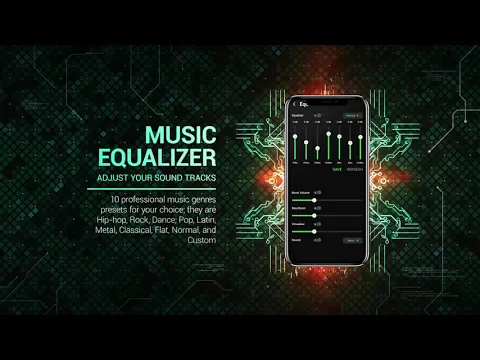
A professional equalizer will help you adjust the volume and the sound of sound effects (strengthen vocals and low or high frequencies), which, with the help of animation, visualizes the manipulation of the corresponding parameters.
All the settings and configurations you create, the application saves automatically.

By downloading Volume Booster & Sound Enhancer Music Player to your phone, you can listen to music at a comfortable volume range for yourself, and by amplifying the soundtrack, for example, pop-up notifications from social networks, you will never miss a single important message again.
Also known as: FishingPlanet, PES2012
Video of Volume Booster & Sound Enhancer Music Player
Screenshot Volume Booster & Sound Enhancer Music Player 1
Screenshot Volume Booster & Sound Enhancer Music Player 2
Screenshot Volume Booster & Sound Enhancer Music Player 3
Screenshot Volume Booster & Sound Enhancer Music Player 4
Screenshot Volume Booster & Sound Enhancer Music Player 5
Screenshot Volume Booster & Sound Enhancer Music Player 6
Screenshot Volume Booster & Sound Enhancer Music Player 7

Download Volume Booster & Sound Enhancer Music Player APK for Android

What's New in Version 2.3.1

No official changelog provided for Volume Booster & Sound Enhancer Music Player version 2.3.1. This update likely includes general stability improvements and bug fixes.

Available Files

  • 2.3.1 12MB Android 4.4+ arm64-v8a Download

System Requirements

OS Version
Android 4.4 (Kit Kat) or higher
Architecture
Varies by file (Which one do I need?)
Disk Space
~20 MB free space required
RAM
1 GB
Internet
Not required
Permissions (21)
  • Internet
  • Access Network State
  • Read External Storage
  • Write External Storage
  • Access Coarse Location

APK File Details

Package ID com.ivolumes.equalizer.bassbooster
Developer Ivolumes
License Free ( No Ads)
Interface Language
English +74

English, Japanese, German, Thai, Hindi, Vietnamese, Ukrainian, Polish, Korean, French, Turkish, Spanish, Italian, Portuguese, Russian, Bulgarian, Chinese, Romanian, Arabic, Czech, Hungarian, + 54 localizations

APK Verification & Virus Scan Results

Scan In Queue Signature Verified Removed from Play Store

Antivirus scan in queue, will be scanned soon. The APK file is digitally signed.

Show File Details (SHA-256, SHA-1, MD5)

SHA-1 Signature:

18D991DD284BAED8AD59F98A11109DB2772D0FB2

SHA-256 Hash:

799da57cc64557af8ca860d6064554932dbb8d66234c8b9fc58ba92404344392

MD5 Checksum:

93f4010fe8a01673b9c800c8b2fe3047

Frequently Asked Questions

Is Volume Booster & Sound Enhancer Music Player safe to download?

Volume Booster & Sound Enhancer Music Player has passed a basic integrity check. A full antivirus scan is pending. You can check the current scan status in the Security section above.

How to install Volume Booster & Sound Enhancer Music Player APK on Android?

Download the APK using the button above. Then open the file and tap Install. If prompted, enable "Install from unknown sources" in Settings → Security. The process takes under a minute. Read more

Why does installation fail on newer Android versions (14 - 16)?

Newer Android versions strictly block the installation of apps built for older Android versions (API < 23) for security reasons. Standard installation is not possible. Read our step-by-step guide on how to bypass this restriction using ADB or Shizuku.

What Android version does Volume Booster & Sound Enhancer Music Player require?

Volume Booster & Sound Enhancer Music Player requires Android 4.4 (API 19) or higher. Optimized for Android 10 (API 29).

What processor architecture does Volume Booster & Sound Enhancer Music Player support?

Volume Booster & Sound Enhancer Music Player supports arm64-v8a. This build does not support x86/x86_64 processors, so it will not run on most PC emulators. If you are unsure about your device architecture, check the Device Info section on this page.

How to enable installation from unknown sources on Android?

Go to Settings → Security (or Settings → Apps → Special access on Android 8+) and enable "Install unknown apps" for your browser or file manager. On Android 8 and above this setting is per-app, not global. Read more

If you have found any issue or are having difficulty with this page, please .

User Reviews & Ratings

Rate this app

0.00

12345

not yet rated

Share your experience with other users.