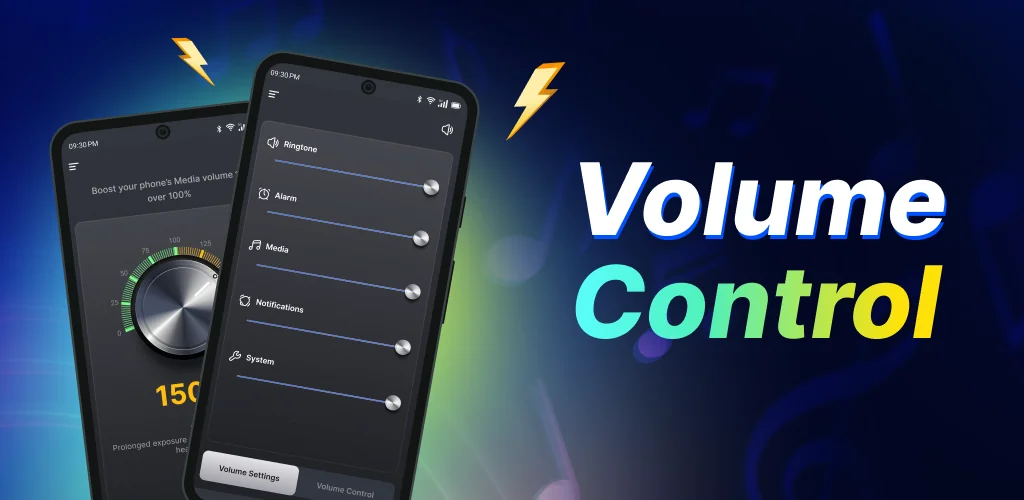
Volume Control Sound Launcher app cover art for Android
Volume Control Sound Launcher Icon

Volume Control Sound Launcher APK for Android

Also known as: Volume Control Launcher
278K+
Free
Jul 8, 2026

Integrated launcher for quick volume adjustments across all sound types.

Download Volume Control Sound Launcher APK 1.9.1 50MB

What is Volume Control Sound Launcher?

Volume Control Sound Launcher APK offers a streamlined approach to managing your phone's audio. This launcher app puts all essential volume settings within easy reach, ensuring every sound from calls to music feels just right. It integrates comprehensive sound controls directly into your device's home screen experience.

What is Volume Control Sound Launcher?

Volume Control Sound Launcher functions as a full-fledged launcher that prioritizes audio management. Instead of navigating through multiple menus, you gain one-swipe access to adjust various sound levels. This includes specific controls for music, video playback, incoming calls, alarms, and notification alerts. The app aims to simplify daily audio interactions, providing "smart controls" designed to optimize sound for maximum volume, everyday comfort, and clearer listening experiences.

Key Features:

  • One-Swipe Volume Access: Adjust all device volume levels quickly with a single gesture from your home screen. This makes on-the-fly changes super convenient.
  • Home Screen Widget: Display essential information like time and weather directly on your home screen, integrated with the launcher's interface.
  • Custom Wallpapers: Personalize your device's look with a selection of themed wallpapers for both your home and lock screens.
  • Multi-Touchpoint Search: Easily locate installed applications or conduct web searches (powered by Yahoo) from several access points within the launcher.
  • Smart Volume Controls: Utilize optimized settings for boosting overall volume, ensuring comfortable daily listening, and enhancing audio clarity across different media types.

Integrated Sound Management

Beyond simple volume sliders, Volume Control Sound Launcher reconfigures your device's interaction with sound. By acting as a launcher, it embeds these controls into your primary interface, making them instantly available without needing to open separate applications. This integration means you can quickly fine-tune audio during a video, boost call volume, or quiet notifications with minimal effort. It’s a practical tool for anyone who finds their phone's default volume management a bit clunky.

Volume Control Sound Launcher vs similar apps

Unlike dedicated volume panel customizers such as Volume Styles, Volume Control Sound Launcher integrates sound management directly into a full launcher experience. This means you gain quick audio controls alongside home screen customization and search functions. For users primarily seeking to re-skin their volume slider, an app like Volume Styles might suffice. However, if you prefer a unified interface that prioritizes quick audio access within a broader utility framework, Volume Control Sound Launcher offers a distinct advantage over both simple volume apps and general launchers like Nova Launcher, which don't centralize audio control in the same way.

This app is ideal for users who value convenience and clarity in their daily phone use, whether listening to music, taking an important call, or relying on an alarm. Users should note that installing Volume Control Sound Launcher as a launcher will alter the home screen layout. While all existing apps remain accessible, their placement might shift, requiring a brief adjustment period.

Screenshot Volume Control Sound Launcher 1
Screenshot Volume Control Sound Launcher 2
Screenshot Volume Control Sound Launcher 3
Screenshot Volume Control Sound Launcher 4
Screenshot Volume Control Sound Launcher 5

Volume Control Sound Launcher APK Download

What's New in Version 1.9.1

Hello World

System Requirements

OS Version
Android 10 (Q) or higher
Architecture
Varies by file (Which one do I need?)
Disk Space
~70 MB free space required
RAM
1 GB
Internet
Not required
Google Services
Required   GMS dependent

APK File Details

Package ID com.soundcontroller.loudspeaker.volume.manager.android
Available on Google Play
Developer AtomApplications
License Free
Monetization Contains Ads  
Content Rating PEGI 3
Interface Language
English +16

English, Arabic, German, Spanish, French, Hindi, Italian, Japanese, Korean, Portuguese, Russian, Thai, Turkish, Vietnamese, Chinese, + 2 localizations

Required Permissions (52)
  • Requires Google Play Services to launch:
    Note: This is an original file. Unlike modded versions with no verification, it validates via your store account. Details
  • Internet
  • Access Network State
  • Access Fine Location
  • Vibrate
  • Wake Lock

APK Verification & Virus Scan Results

No Virus Signature Verified Safe & Original

Virus scan: Clean (0/64) View report. This APK is free of malware and its signature matches the official developer release.

Show File Details (SHA-256, SHA-1, MD5)

SHA-1 Signature:

6c74cbb640a53fde382a491c7fb5ad74a72cca01

SHA-256 Hash:

aaa6600e2b9e9629fb1c707fd42df3dff6909eaabd346e38af8fef13ed382171

MD5 Checksum:

8ccefb7cee1147d170362c347bd38f24

Frequently Asked Questions

Is Volume Control Sound Launcher safe to download?

Yes, Volume Control Sound Launcher is safe to download. The APK is scanned on every update — no malware or viruses detected. You can verify the full scan report in the Security section above.

How to install XAPK file?

XAPK is a split APK package. Standard Android installer cannot open it directly. Use 'SAI' or 'XAPK Installer' — they handle XAPK files automatically. Download the installer, open the XAPK file with it, and follow the on-screen steps. Read more

What Android version does Volume Control Sound Launcher require?

Volume Control Sound Launcher requires Android 10 (API 29) or higher. Optimized for Android 15 (API 35).

Is Volume Control Sound Launcher free?

Yes, it is free to use, but it is ad-supported.

Does Volume Control Sound Launcher require a license check?

Yes, this app performs a license check. You may need to have the Google Play Store installed and be logged in to verify the license.

How to update Volume Control Sound Launcher to the latest version?

Download the latest APK from this page and install it over your existing version — no need to uninstall first. Your data and settings will be preserved. We update the file as soon as a new version is released.

Does Volume Control Sound Launcher require Root access?

No root is required for basic use. Volume Control Sound Launcher works on standard Android for CPU info, RAM, battery, sensors, and network stats. Root unlocks a small set of advanced system parameters that Android restricts by default.

If you have found any issue or are having difficulty with this page, please .

User Reviews & Ratings

Site Rating: 5(1)
Rate this app

5.00

12345

1

Share your experience with other users.

Download Volume Control Sound Launcher APK - Latest version

Get the official APK file for your Android device. Fast, safe, and free. Download APK