Building Mods for Minecraft app cover art for Android
Building Mods for Minecraft Icon

Building Mods for Minecraft APK for Android

71M+
Free
Nov 26, 2025

Collection of buildings and decorative elements for Minecraft

Download Building Mods for Minecraft APK 18.6 70MB Old versions

What is Building Mods for Minecraft?

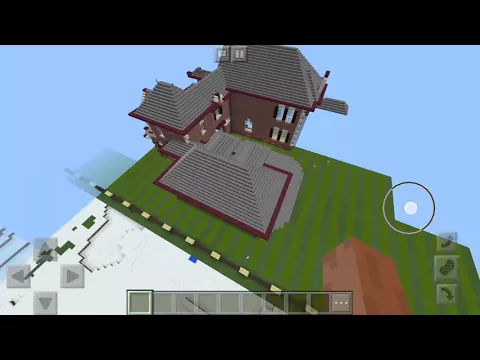
Buildings for Minecraft is a useful addition for the mobile version of Minecraft , which allows you to fill cubic universe with various buildings. From now on, there is no need to build a dwelling for the main character for a long time and painstakingly block by block – gamers have tens of thousands of infrastructure facilities that are quickly placed at a selected point in the world using the 3D mode and a special mini-map.

Modern mansions, high-tech houses, skyscrapers, schools, hospitals, prisons, luxurious castles, pixel art, statues, ships, vehicles, redstone schemes – the variety of content is amazing and inspiring, bringing new colors and possibilities into the gameplay. To quickly find the content of a given category, the application implements an intuitive search – enter the name of the object and read the list.

Features:

  • thousands of buildings from several categories for the cubic universe;
  • preview of buildings from different angles;
  • quick installation of content in the selected territory;
  • for any mobile versions of the original game;
  • support for working in offline mode;
  • create your own buildings;
  • works without launchers.

Installing the selected building or decorative element on the map takes place literally with one touch – select the object and the world, and then use the navigation arrows to install the building in the planned zone. The Buildings for Minecraft application will be a great addition to the famous “sandbox”, saving the user from routine and wasting precious time.
Also known as: Buildings for Minecraft PE
Video of Building Mods for Minecraft
Screenshot Building Mods for Minecraft 1
Screenshot Building Mods for Minecraft 2
Screenshot Building Mods for Minecraft 3
Screenshot Building Mods for Minecraft 4
Screenshot Building Mods for Minecraft 5
Screenshot Building Mods for Minecraft 6
Screenshot Building Mods for Minecraft 7
Screenshot Building Mods for Minecraft 8

Download Building Mods for Minecraft APK for Android

What's New in Version 18.6

No official changelog provided for Building Mods for Minecraft version 18.6. This update likely includes general stability improvements and bug fixes.

Other versions

  • 18.6 (latest) 70MB Android 6.0+ arm64-v8aarmeabi-v7a Download
  • 18.5 83MB Android 6.0+ arm64-v8a Download
  • 17.0 73MB Android 5.0+ armeabi-v7a Download
  • 15.8 80MB Android 5.0+ arm64-v8aarmeabi-v7ax86x86_64 Download

System Requirements

OS Version
Android 6.0 (Marshmallow) or higher
Architecture
Varies by file (Which one do I need?)
Disk Space
~90 MB free space required
RAM
1 GB
Internet
Not required
Google Services
Required
Permissions (21)
  • Internet
  • Access Network State
  • Read External Storage
  • Write External Storage
  • Read Phone State

APK File Details

Package ID com.electricfoal.buildingsformcpe
Available on Google Play
Developer Addons for Minecraft
License Free
Monetization Contains Ads  
Content Rating Teen (Language)
Interface Language
English +12

English, Thai, Turkish, Arabic, Russian, Ukrainian, Spanish, German, Portuguese, French, Chinese, + 2 localizations

APK Verification & Virus Scan Results

No Virus Signature Verified Safe & Original

Virus scan: Clean (0/39) View report. This APK is free of malware and its signature matches the official developer release.

Show File Details (SHA-256, SHA-1, MD5)

SHA-1 Signature:

e7a697ebab6ef6930cf9ed18a6b5f4b92c8387fb

SHA-256 Hash:

4c59db67618064d7d50b86e71de8ffd17d1e943ce3967c406a2640686b25f226

MD5 Checksum:

23a8df27f0763aa579f14ecb93491b25

Frequently Asked Questions

Is Building Mods for Minecraft safe to download?

Yes, Building Mods for Minecraft is safe to download. The APK is scanned on every update — no malware or viruses detected. You can verify the full scan report in the Security section above.

How to install XAPK file?

XAPK is a split APK package. Standard Android installer cannot open it directly. Use 'SAI' or 'XAPK Installer' — they handle XAPK files automatically. Download the installer, open the XAPK file with it, and follow the on-screen steps. Read more

What Android version does Building Mods for Minecraft require?

Building Mods for Minecraft requires Android 6.0 (API 23) or higher.

Is Building Mods for Minecraft free?

Yes, it is free to use, but it is ad-supported.

How to update Building Mods for Minecraft to the latest version?

Download the latest APK from this page and install it over your existing version — no need to uninstall first. Your data and settings will be preserved. We update the file as soon as a new version is released.

What processor architecture does Building Mods for Minecraft support?

Building Mods for Minecraft supports arm64-v8a, armeabi-v7a. This build does not support x86/x86_64 processors, so it will not run on most PC emulators. If you are unsure about your device architecture, check the Device Info section on this page.

How to enable installation from unknown sources on Android?

Go to Settings → Security (or Settings → Apps → Special access on Android 8+) and enable "Install unknown apps" for your browser or file manager. On Android 8 and above this setting is per-app, not global. Read more

If you have found any issue or are having difficulty with this page, please .

User Reviews & Ratings

Global rating(Play Store): 4.24(507.5K)
Site Rating: 4.24(11)
Rate this app

3.18

12345

11

Share your experience with other users.

breno:
oi
hani:
Hhhhhhhh