
Games app cover art for Android
Games Icon

Games APK for Android

HeyTap Original
1B+
Free
Apr 1, 2026

Your ultimate command center for optimized mobile gaming

Download Games APK 10.29.2 90MB

What is Games?

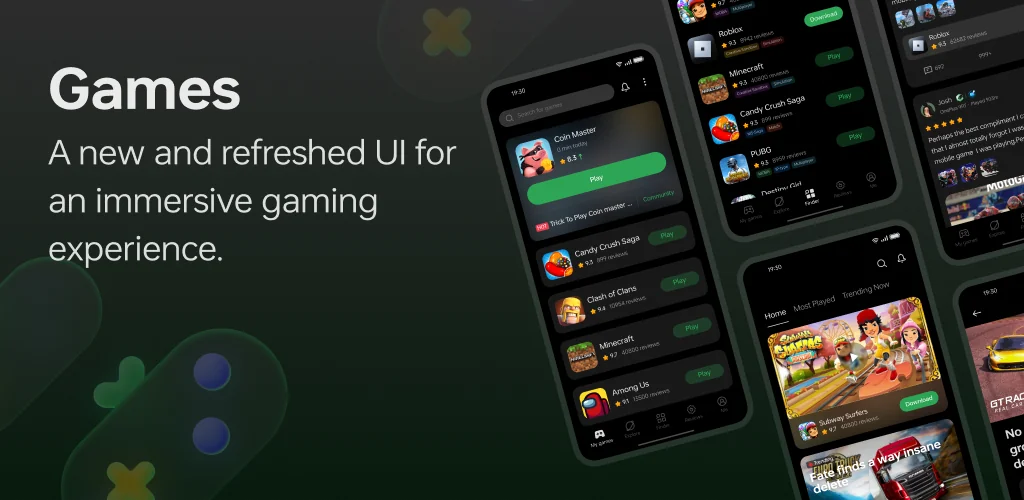
Games isn’t just another folder on your home screen. It’s a smart hub designed to elevate your playtime. When you launch a game from the app, it automatically kicks into Gaming Mode. This nifty feature optimizes your phone’s resources, clearing background clutter to dedicate more power to your game. The result? Less lag and a more immersive, distraction-free session. No more annoying notifications popping up at a critical moment!

But it’s more than just a performance booster. Games also aims to connect you with other players. It’s a space where you can discover new titles, see what’s trending, and share your own thoughts and reviews within the community. It’s all about making your gaming life easier and more connected.

Here are the key features:

  • One-Touch Game Boost: Optimizes your device’s performance for gaming with a single tap.
  • Centralized Game Library: Keeps all your installed games neatly organized in one place for easy access.
  • Automatic Gaming Mode: Launches automatically to block notifications and maximize resources for an uninterrupted experience.
  • Community Hub: Engage with fellow gamers, read reviews, and share your opinions.

So, why not give your gaming a proper home? Download Games and see how a dedicated space can transform your mobile gaming sessions from just a pastime into a true experience.
Also known as: Game Assistant
Video of Games
Screenshot Games 1
Screenshot Games 2
Screenshot Games 3
Screenshot Games 4
Screenshot Games 5
Screenshot Games 6

Download Games APK for Android

What's New in Version 10.29.2

Optimized the interactive visual details of some functions and fixed some known issues.

Available Files

System Requirements

OS Version
Android 16 (Baklava) or higher
Architecture
Varies by file (Which one do I need?)
Disk Space
~150 MB free space required
RAM
1 GB
Internet
Not required
Permissions (67)
  • Internet
  • Record Audio
  • Access Network State
  • Read External Storage
  • Write External Storage

APK File Details

Package ID com.oplus.games
Available on Google Play
Developer HeyTap
License Free ( No Ads)
Content Rating Everyone
Interface Language
English +79

English, Japanese, German, Thai, Hindi, Vietnamese, Polish, Korean, Romanian, Arabic, French, Turkish, Czech, Spanish, Italian, Hungarian, Russian, Ukrainian, Bulgarian, Chinese, Portuguese, + 59 localizations

APK Verification & Virus Scan Results

No Virus Signature Verified Safe & Original

Virus scan: Clean (0/65) View report. This APK is free of malware and its signature matches the official developer release.

Show File Details (SHA-256, SHA-1, MD5)

SHA-1 Signature:

f2c22d4c312373eb290ec442c53e99ba3af5a849

SHA-256 Hash:

040362eb1b5d886d797d3df17c2b1dfc3e5e07be08aad3f93713c70d86edeeb2

MD5 Checksum:

8cf514d394fc992bdafbff36dfec4c62

Frequently Asked Questions

Is Games safe to download?

Yes, Games is safe to download. The APK is scanned on every update — no malware or viruses detected. You can verify the full scan report in the Security section above.

How to install Games APK on Android?

Download the APK using the button above. Then open the file and tap Install. If prompted, enable "Install from unknown sources" in Settings → Security. The process takes under a minute. Read more

What Android version does Games require?

Games requires Android 16 (API 36) or higher. Optimized for Android 15 (API 35).

Is Games free?

Yes, this app is completely free to download and use.

How to update Games to the latest version?

Download the latest APK from this page and install it over your existing version — no need to uninstall first. Your data and settings will be preserved. We update the file as soon as a new version is released.

What processor architecture does Games support?

Games supports arm64-v8a. This build does not support x86/x86_64 processors, so it will not run on most PC emulators. If you are unsure about your device architecture, check the Device Info section on this page.

How to enable installation from unknown sources on Android?

Go to Settings → Security (or Settings → Apps → Special access on Android 8+) and enable "Install unknown apps" for your browser or file manager. On Android 8 and above this setting is per-app, not global. Read more

If you have found any issue or are having difficulty with this page, please .

User Reviews & Ratings

Global rating(Play Store): 3.3(65.9K)
Site Rating: 4(1)
Rate this app

4.00

12345

1

Share your experience with other users.