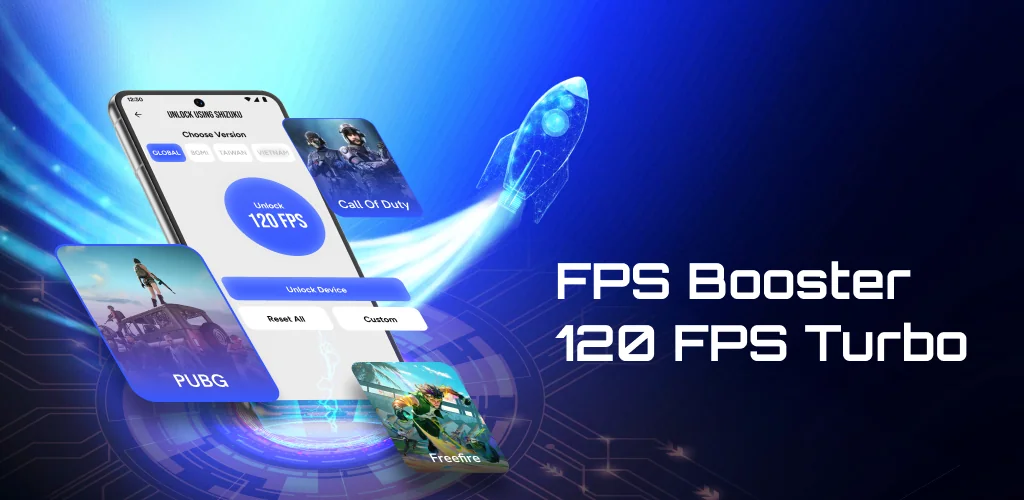

FPS Booster - 120 FPS Turbo app cover art for Android
FPS Booster - 120 FPS Turbo Icon

FPS Booster - 120 FPS Turbo APK for Android

13M+
Free
Aug 19, 2026

Unlocks higher frame rates through custom save file configs matched to your game version

Download FPS Booster - 120 FPS Turbo APK 1.0.6 40MB

What is FPS Booster?

FPS Booster - 120 FPS Turbo is a game booster aimed at squeezing extra frame rate out of Android devices that struggle with drops during long sessions. It targets a specific frustration: games that stutter or feel sluggish even when your phone should handle them fine, and it goes after that problem through configuration rather than raw hardware tricks.

The app works by having you pick your game version first, since settings differ by region and build. From there it exposes FPS controls that go up to 120 FPS on supported devices, letting you push past a game’s default cap if your hardware can keep up. For players who want more control, there is a custom configuration path: you can upload your own Active.sav file and apply it directly, which changes fps-related parameters without digging through a game’s native settings menu. Setup includes troubleshooting steps for the common snags that show up when a config file doesn’t load right or a device isn’t recognized, walking you through fixes instead of leaving you stuck on a blank screen.

Key Features:

  • Unlock higher frame rates up to 120 FPS on devices that support it
  • Switch between game versions so settings match your region and setup
  • Apply a custom Active.sav file to fine-tune fps-related parameters yourself
  • Follow built-in troubleshooting steps when setup doesn’t go smoothly
  • Manage every fps tool from one simple interface without jumping between menus
  • Reduce frame drops by optimizing how the device handles game performance

How to set up custom FPS configs

Uploading your own Active.sav file is the part that separates this app from a basic toggle switch. Instead of picking a preset, you drop in a file you’ve configured yourself and the app applies those specific fps-related values to your chosen game version. That gives more precise control over frame rate behavior, but it also means the burden of getting the file right sits with you. If the config is off or mismatched with your device, the app’s troubleshooting steps are there to walk through fixes rather than reset things automatically. This setup suits players who already know roughly what settings they want and prefer manual control over a one-tap boost.

Alternatives to FPS Booster - 120 FPS Turbo

GFX Tool takes a narrower path, focusing on graphical settings like resolution and anti-aliasing, mostly for battle royale titles where visual tuning matters more than raw fps ceilings. Game Booster 4x Faster goes broader, clearing background RAM and limiting other processes on top of frame rate tweaks. FPS Booster - 120 FPS Turbo sits closer to GFX Tool in spirit but centers everything on fps and version-specific configuration rather than general device cleanup.

This app is built for mobile gamers chasing smoother frame rates who are willing to handle version selection and file uploads themselves. Its results depend entirely on what your device’s hardware can physically support, and getting the most out of the custom configuration option means managing the Active.sav file by hand rather than relying on an automatic fix.

FPS Booster - 120 FPS Turbo screenshot 1
FPS Booster - 120 FPS Turbo screenshot 2
FPS Booster - 120 FPS Turbo screenshot 3
FPS Booster - 120 FPS Turbo screenshot 4
FPS Booster - 120 FPS Turbo screenshot 5

Download FPS Booster - 120 FPS Turbo APK for Android

What's New in Version 1.0.6

No official changelog provided for FPS Booster - 120 FPS Turbo version 1.0.6. This update likely includes general stability improvements and bug fixes.

Download Link:

System Requirements

OS Version
Android 10 (Q) or higher
Architecture
Varies by file (Which one do I need?)
Disk Space
~50 MB free space required
RAM
1 GB
Internet
Not required
Google Services
Required   GMS dependent
Permissions (20)
  • Requires Google Play Services to launch:
    Note: This is an original file. Unlike modded versions with no verification, it validates via your store account. Details
  • Internet
  • Access Network State
  • Read External Storage
  • Write External Storage
  • Vibrate

APK File Details

Package ID com.egpl.boostgame.resolutionbooster.fpsgame
Available on Google Play
Developer ESIN GROUP PTE. LTD
License Free
Monetization Contains Ads  
Content Rating Everyone
Interface Language
English +75

English, Arabic, Bulgarian, Czech, German, Spanish, French, Hindi, Hungarian, Indonesian, Italian, Japanese, Korean, Polish, Portuguese, Romanian, Russian, Thai, Turkish, Ukrainian, Vietnamese, Chinese, + 54 localizations

APK Verification & Virus Scan Results

No Virus Signature Verified Safe & unmodified

Virus scan: Verified safe (0/59) View report. This APK is free of malware and its signature matches the official developer release.

Show File Details (SHA-256, SHA-1, MD5)

SHA-1 Signature:

1421dc949e4a02777de378d33cb8c4245424f481

SHA-256 Hash:

a509c2d5d1c3fabf5c60a49981da1df0580736234868c3fe9d443b70d23d355b

MD5 Checksum:

f0b22d152c73ce8692531f5e3712bbcc

Frequently Asked Questions

Is FPS Booster safe to download?

Yes, FPS Booster is safe to download. The APK is scanned on every update — no malware or viruses detected. You can verify the full scan report in the Security section above.

How to install XAPK file?

XAPK is a split APK package. Standard Android installer cannot open it directly. Use 'SAI' or 'XAPK Installer' — they handle XAPK files automatically. Download the installer, open the XAPK file with it, and follow the on-screen steps. Read more

What Android version does FPS Booster require?

FPS Booster requires Android 10 (API 29) or higher. Optimized for Android 16 (API 36).

Is FPS Booster free?

Yes, it is free to use, but it is ad-supported.

Does FPS Booster require a license check?

Yes, this app performs a license check. You may need to have the Google Play Store installed and be logged in to verify the license.

How to update FPS Booster to the latest version?

Download the latest APK from this page and install it over your existing version — no need to uninstall first. Your data and settings will be preserved. We update the file as soon as a new version is released.

Does FPS Booster require Root access?

No root is required for basic use. FPS Booster works on standard Android for CPU info, RAM, battery, sensors, and network stats. Root unlocks a small set of advanced system parameters that Android restricts by default.

Found a problem on this page?

User Reviews & Ratings

Global rating (Play Store): 4.41(70.1K)
Site Rating: 5(1)
Rate this app

5.00

12345

1

Share your experience with other users.